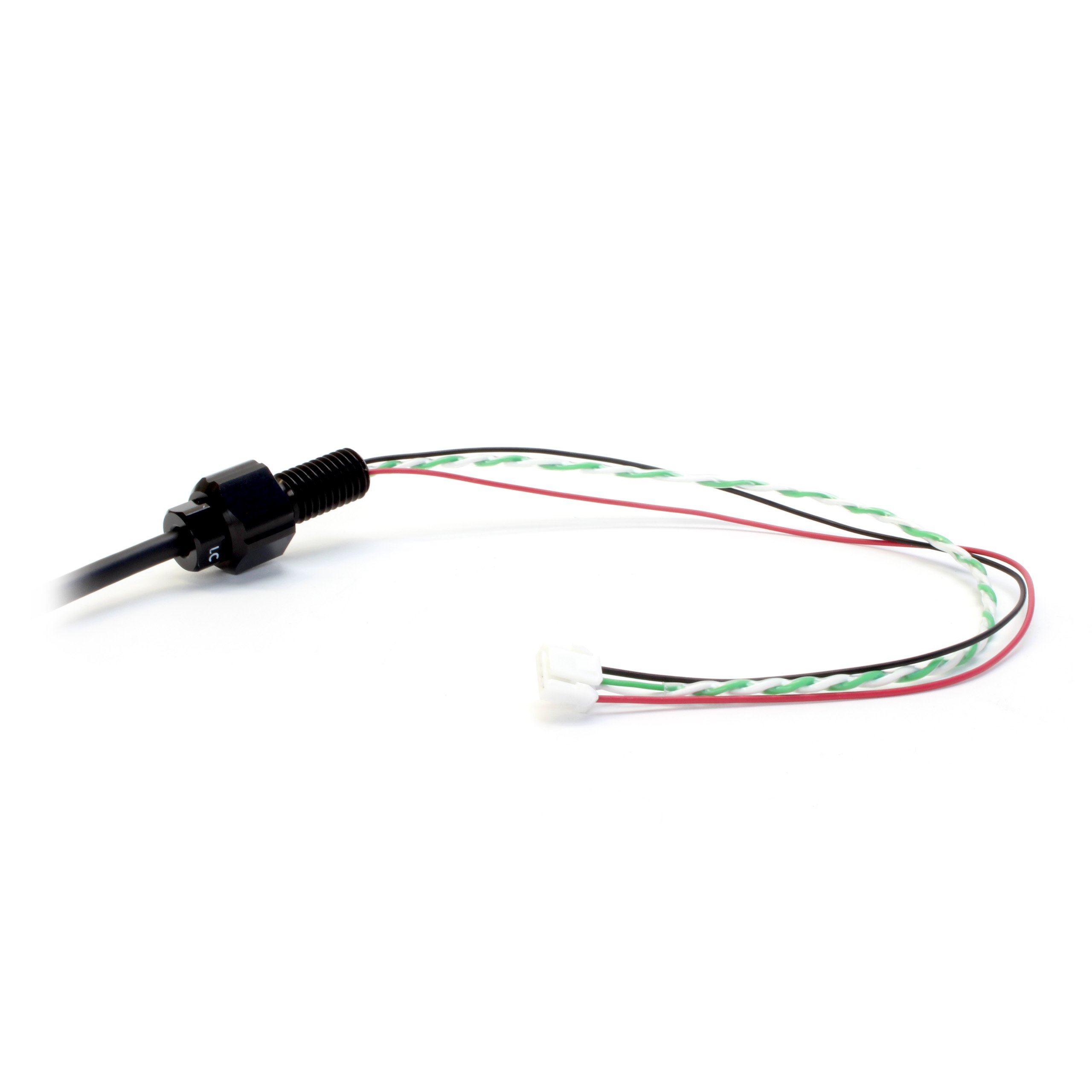
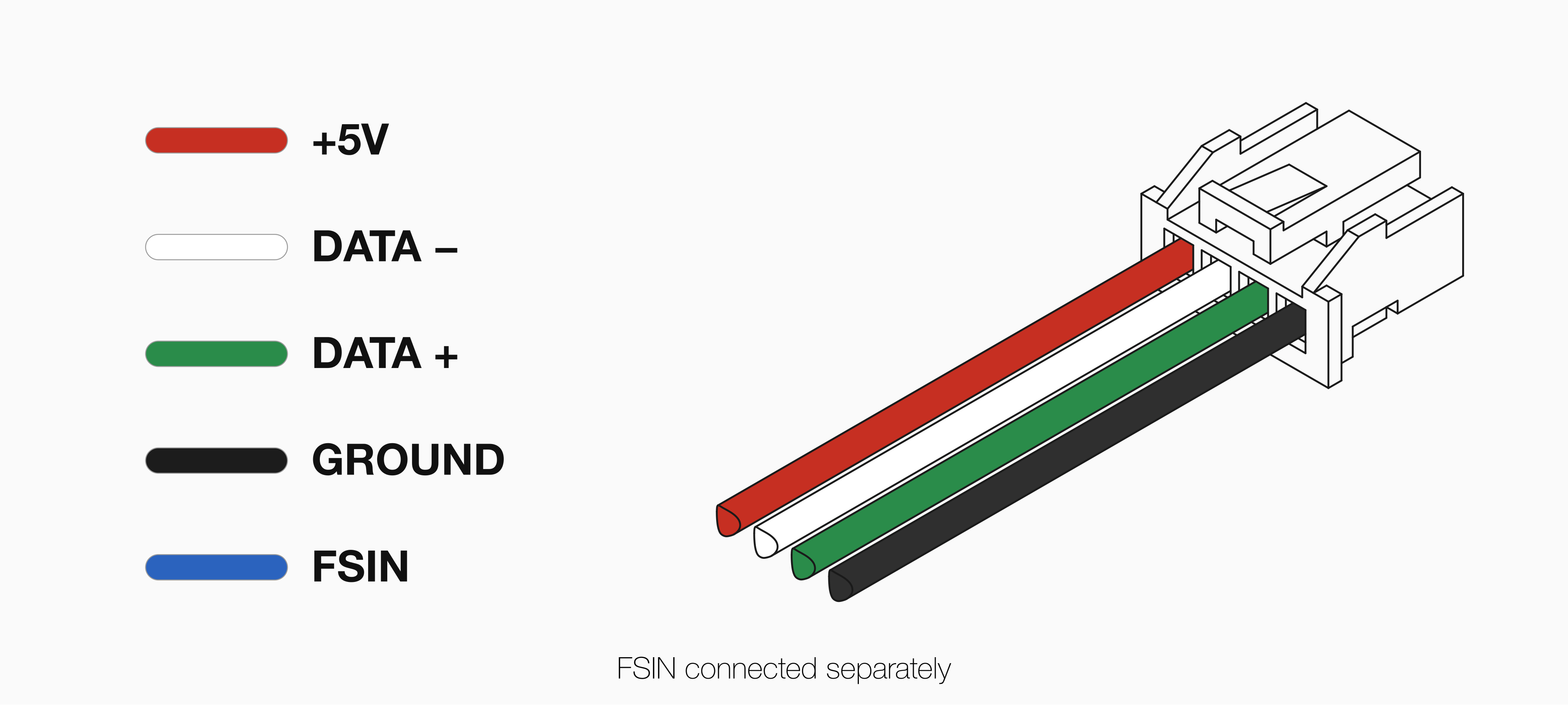
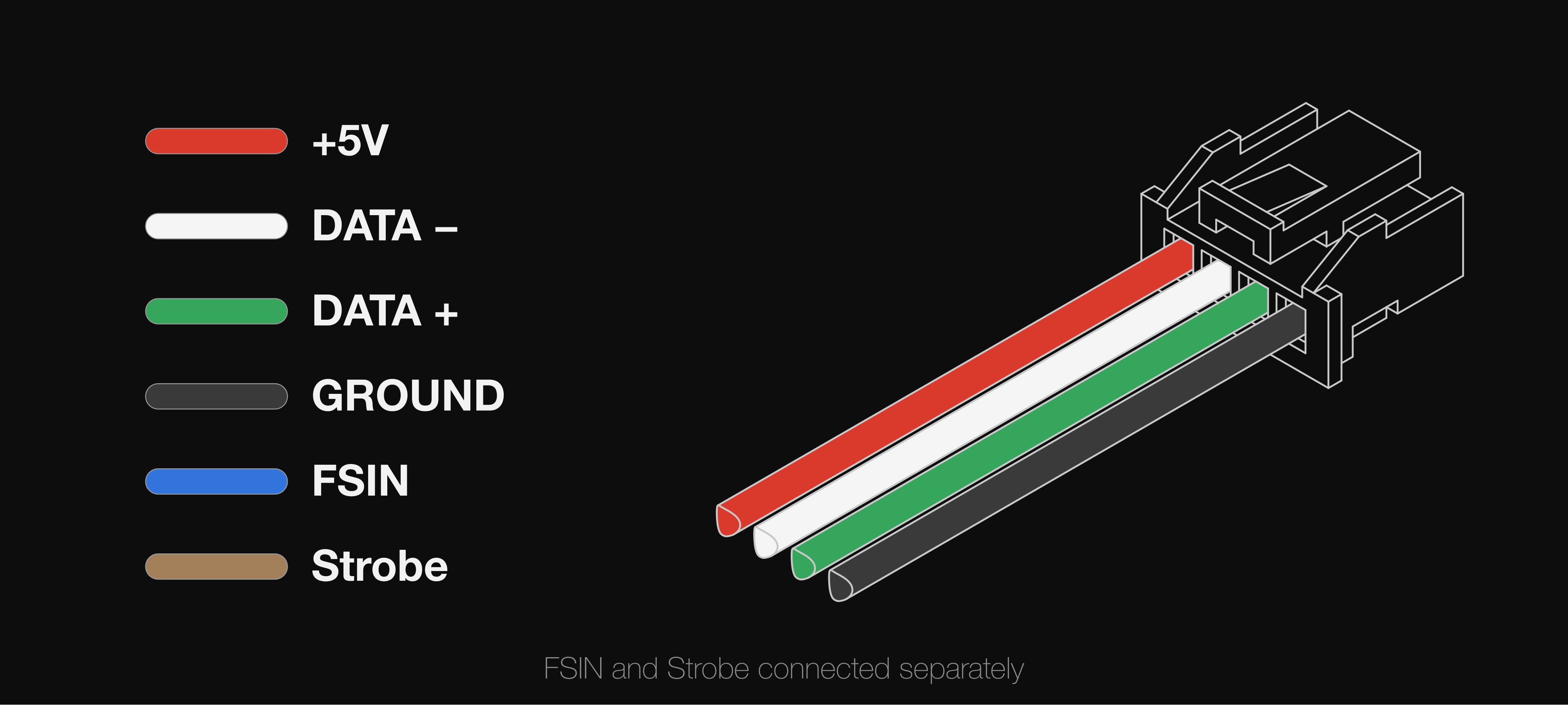
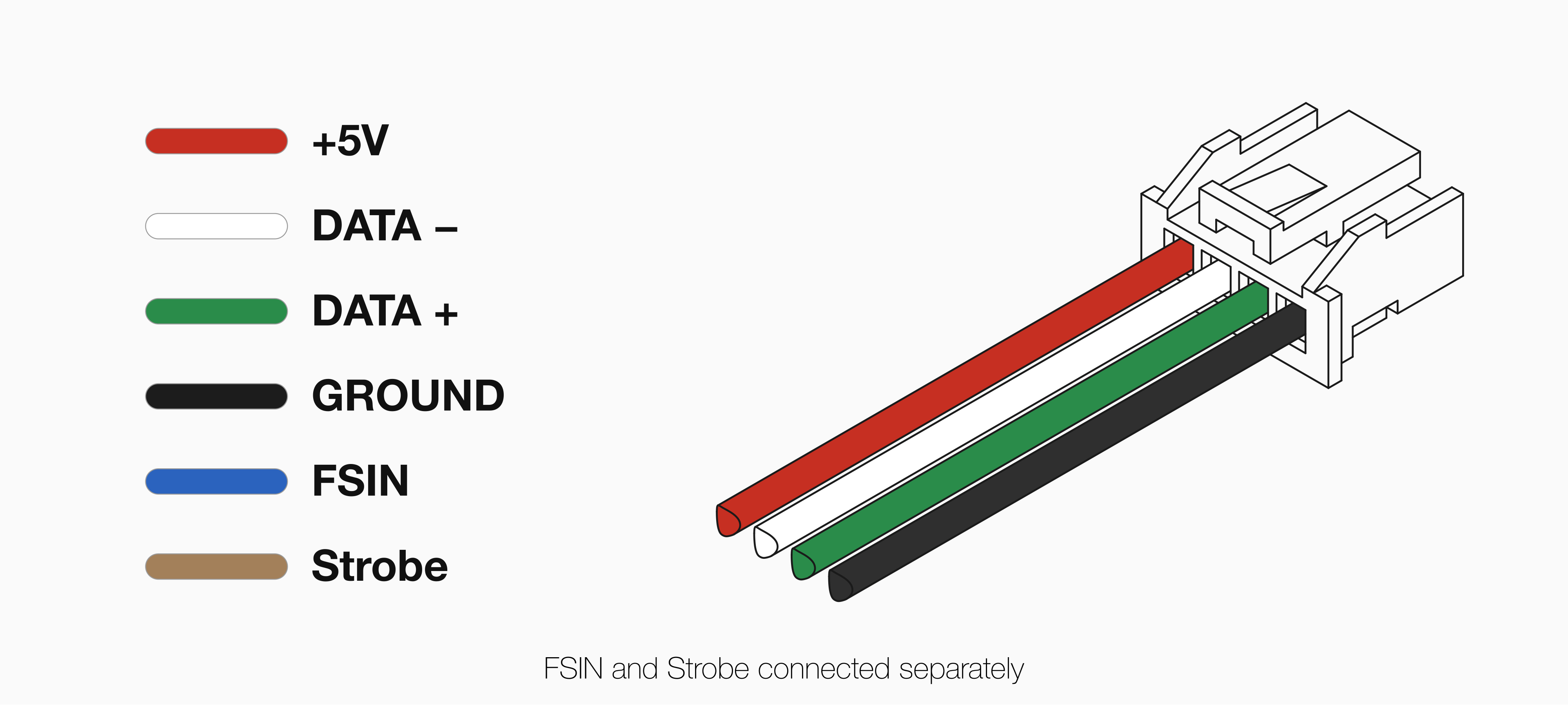
For Epoxy or WetLink models, follow the cable pinout guide located on the specification page for your stellarHD model.Below is an example of passing the exposed wiring through an M10 WetLink bulkhead to be installed onto your vehicle end cap.
Vehicle-side WetLink Bulkhead
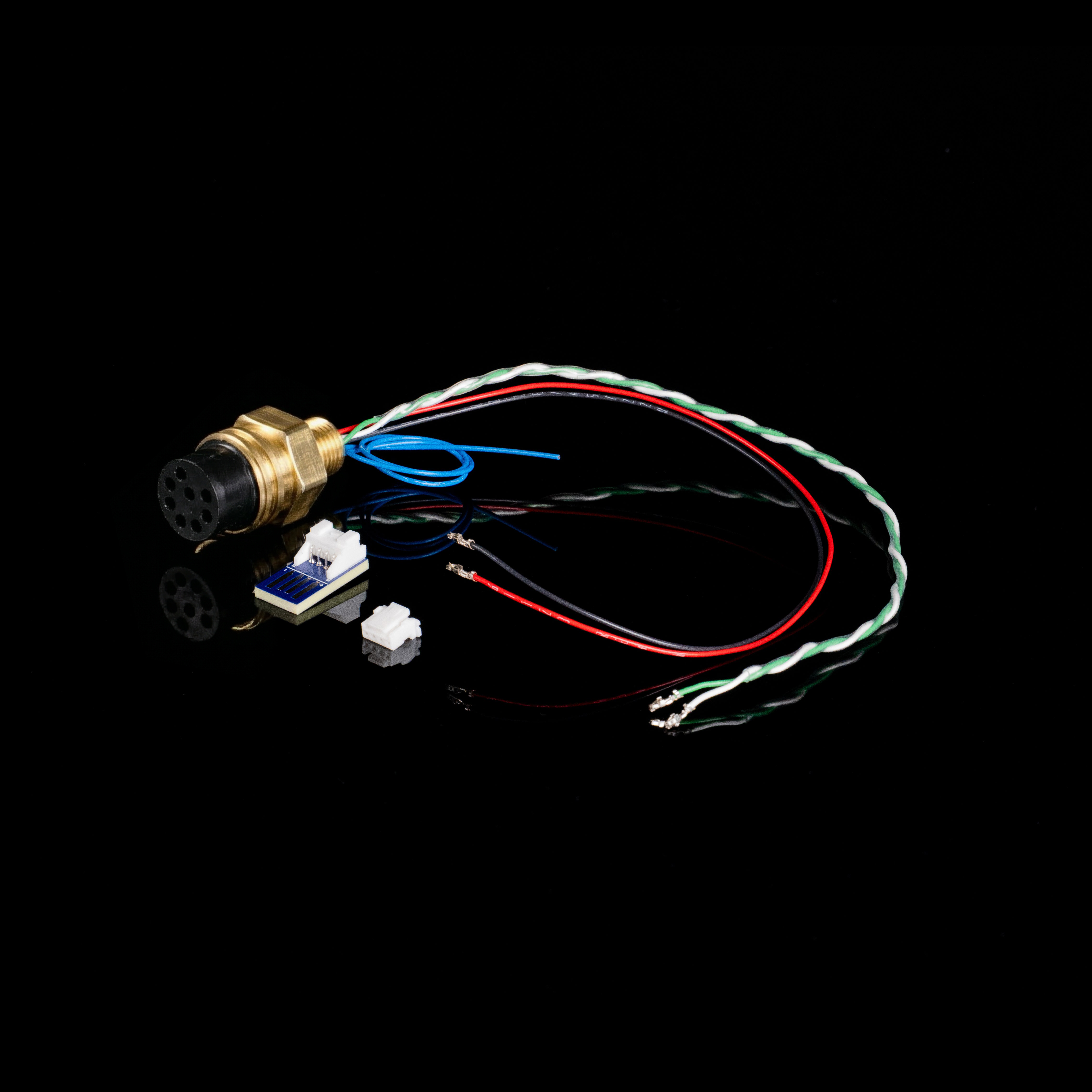
For Cobalt, follow the pinout guide located on the specification page for your stellarHD model.Below is an example of a pre-made cobalt bulkhead.
Cobalt to JST Connector
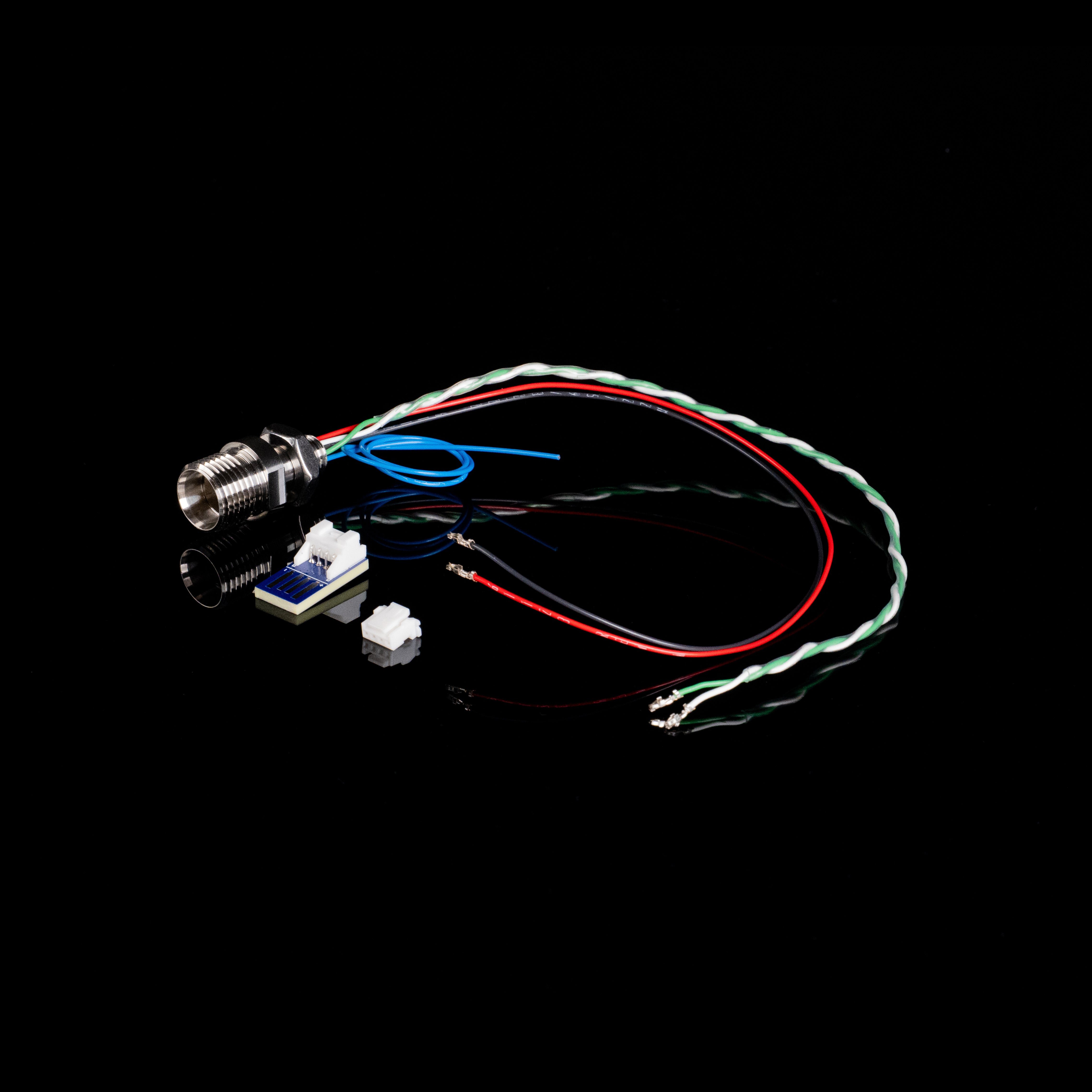
For SubConn, follow the pinout guide located on the specification page for your stellarHD model.Below is an example of a pre-made SubConn MCBH8M bulkhead.
Connect the USB cable to a computer to confirm the camera is working and in the correct orientation.You can test the camera using our tool below.
Online Camera Testing Utility
Convenient tool to test your USB camera feeds.
If the camera is showing up on your computer, you are done! You can now move onto using more advanced features of the stellarHD.If you are having issues, please check our troubleshooting below.
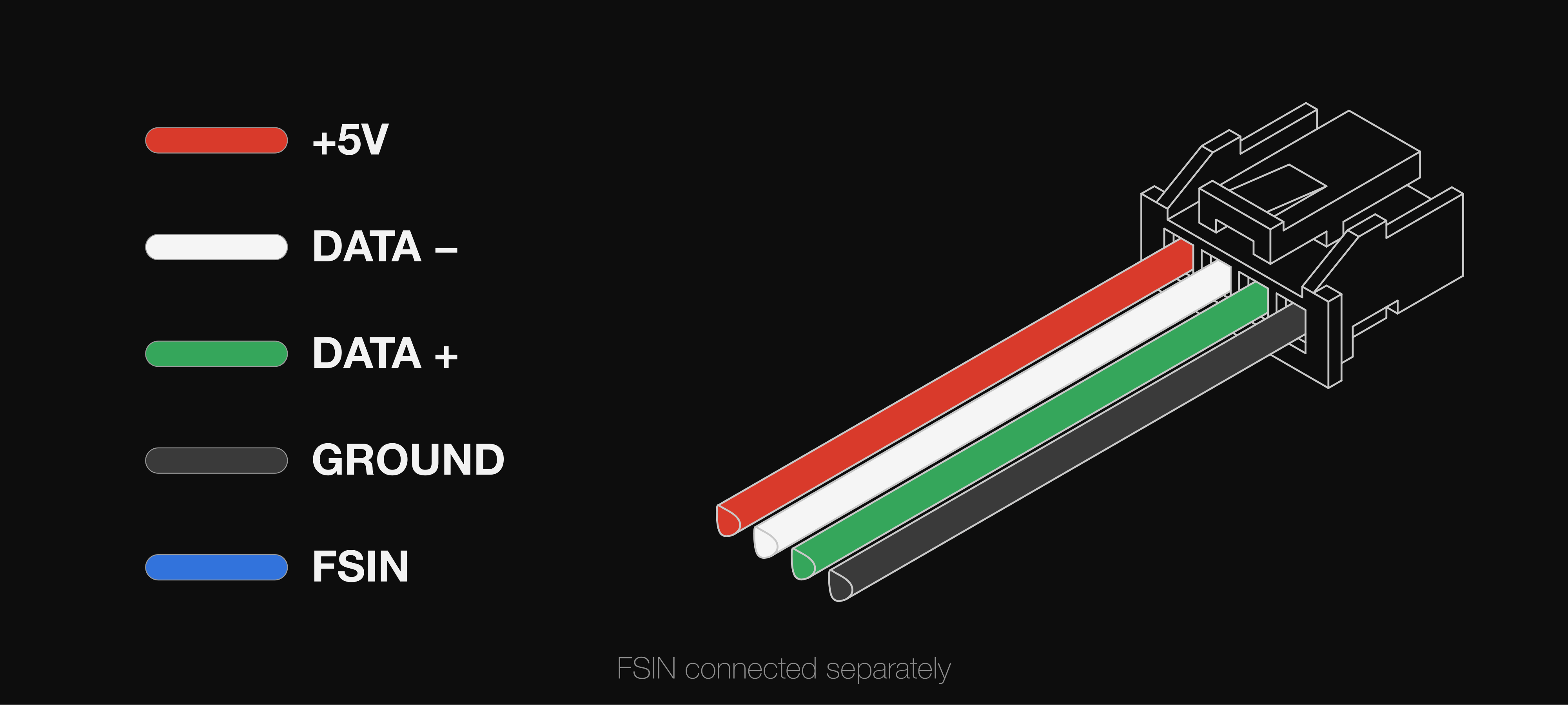
Ensure that the wire colors match their respective functions when connected to the JST connector. Even a single crossed wire will prevent the camera from being recognized.
Twist the Data Wires (Required)
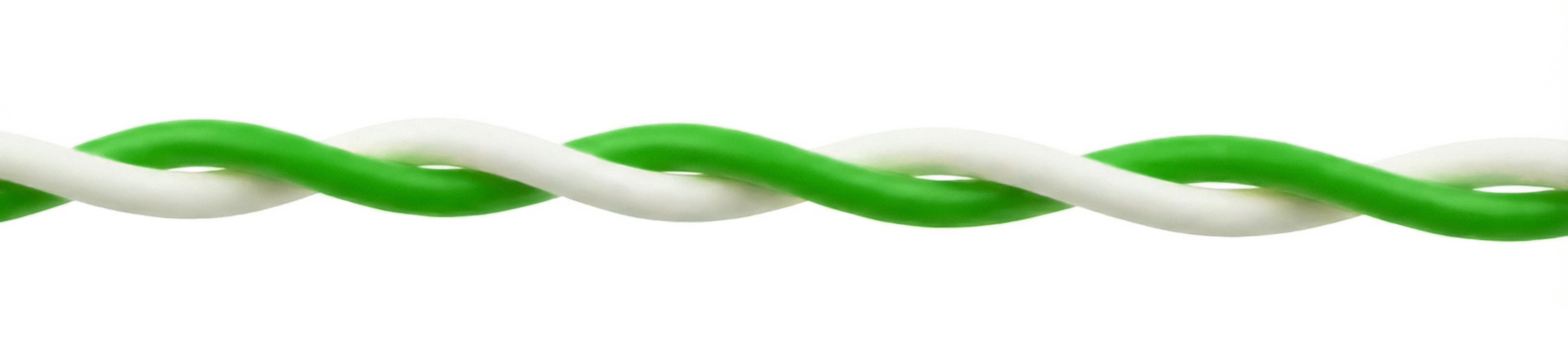
Twist the White (D-) and Yellow/Green (D+) wires together along their length, as shown in Preparing the JST Cable Connection. The camera uses a USB 2.0 High-Speed connection, which needs a twisted data pair to reject interference. Without it, the signal may be too weak for your computer to recognize the camera.
Check the Connections and Power
Make sure the wires are seated securely in the JST connector.Make sure the JST is pushed all the way into the USB adapter, and the adapter is securely plugged into your USB port.The camera can draw 200–320mA at 5V, depending on the model. Try plugging the adapter directly into your computer, rather than a low-power USB hub, to ensure it is getting sufficient current.
Check That Your Computer Detects the Camera
Check if your computer’s operating system is detecting the camera at a hardware level, even if it’s not showing an image yet. Since it connects via USB, we are looking for a USB device connection.
Windows
macOS
Linux
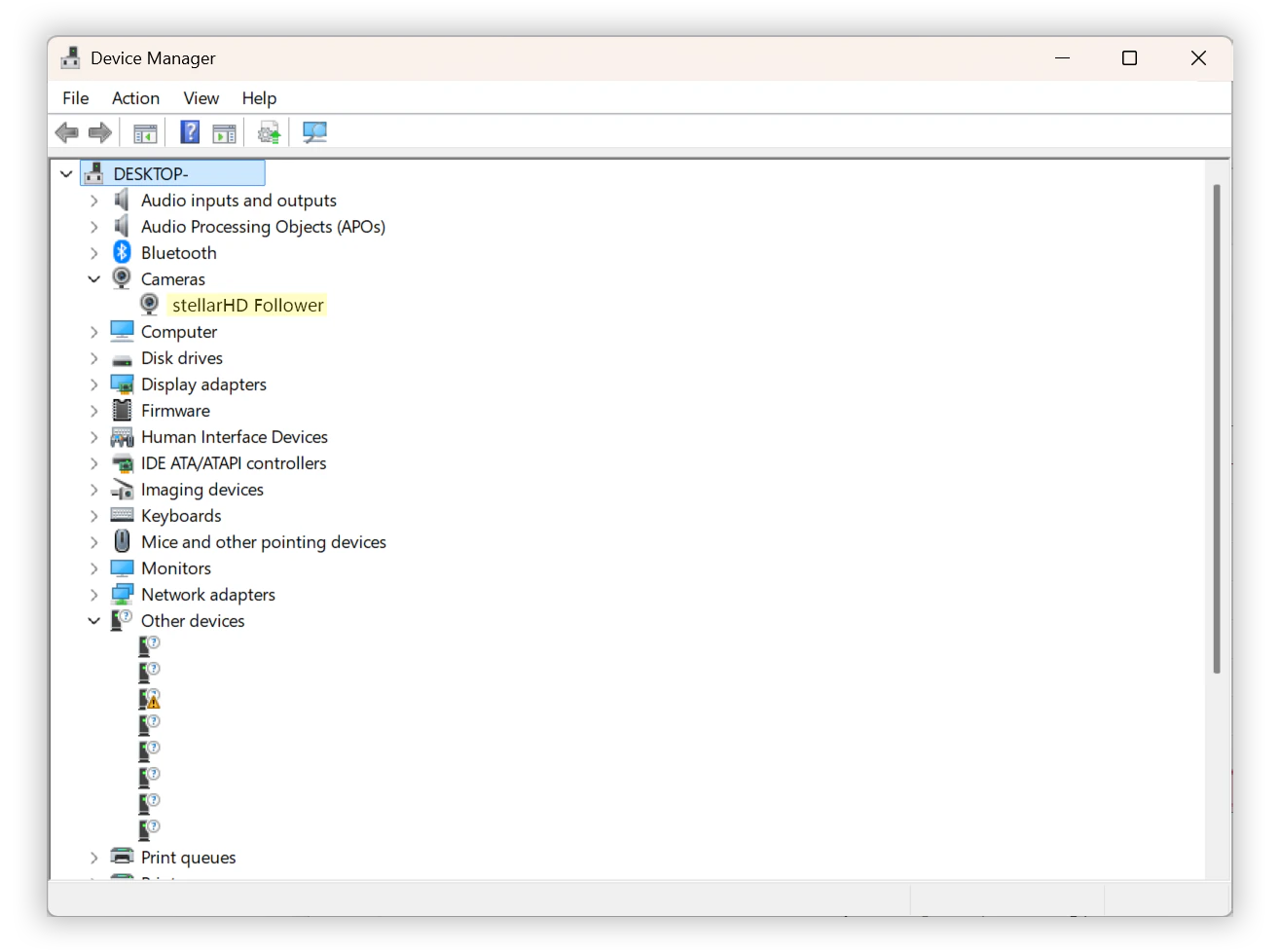
Right-click the Start button (or press Win + X) and select Device Manager.
Expand the following categories to look for the camera, stellarHD:
Cameras
Imaging devices
Sound, video and game controllers
If the wiring is slightly off or the data lines aren’t twisted properly, Windows might detect something but not know what it is. Expand Universal Serial Bus controllers and look for anything labeled Unknown USB Device (Device Descriptor Request Failed).
Keep the Device Manager open and unplug/replug the USB adapter. The list will refresh; watch to see if any new devices appear or disappear.
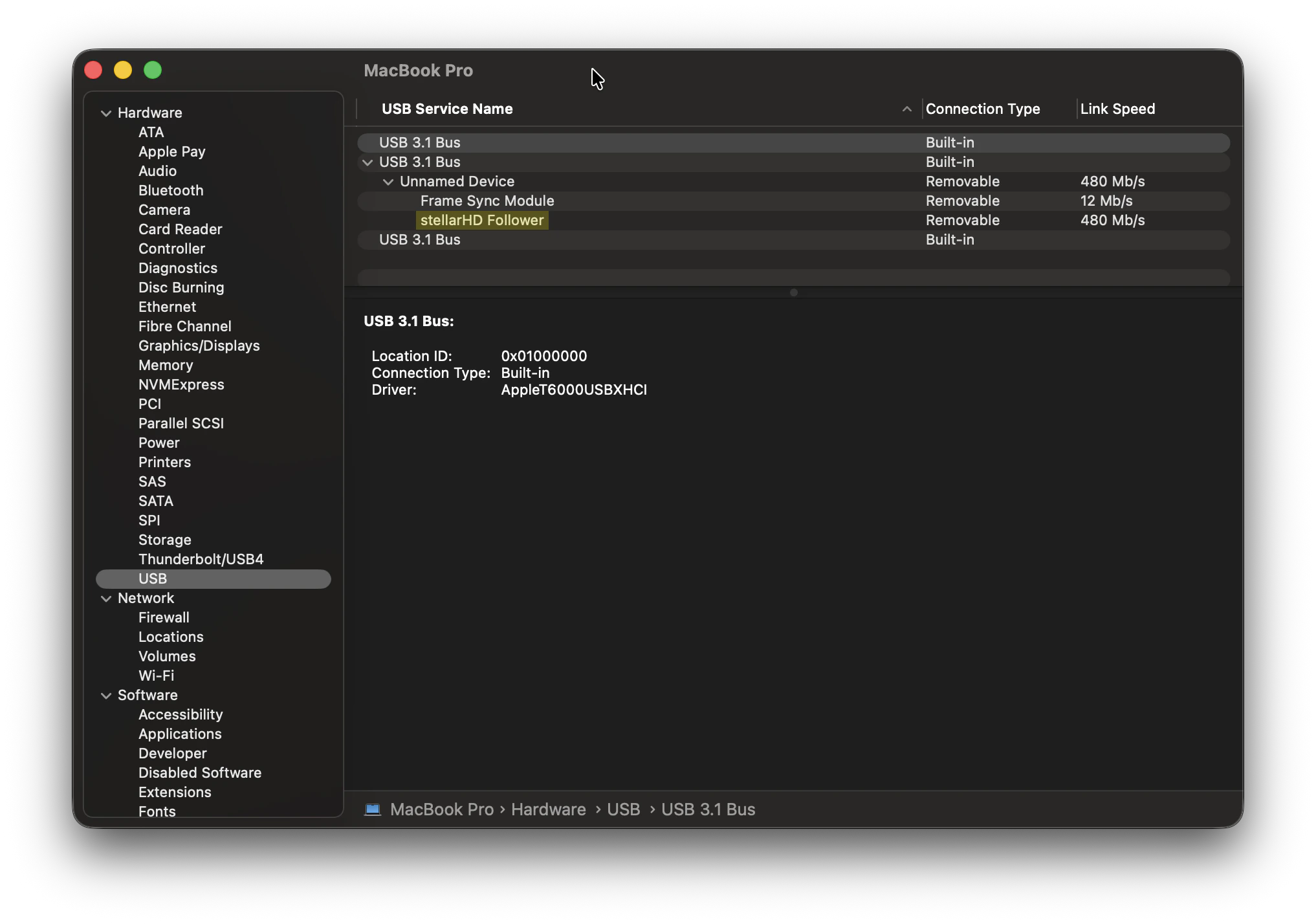
Hold down the Option key on your keyboard, then click the Apple logo () in the top left corner of your screen.
Select System Information (this is usually “About This Mac” if you don’t hold the Option key).
Unplugging and replugging the camera while on this screen (and pressing Cmd + R to refresh) will help you spot if the system is registering a hardware connection.
In the left-hand sidebar under the “Hardware” section, click on USB.
Check the USB Device Tree on the right. Look for the stellarHD camera or an unrecognized USB device.
Open your terminal.
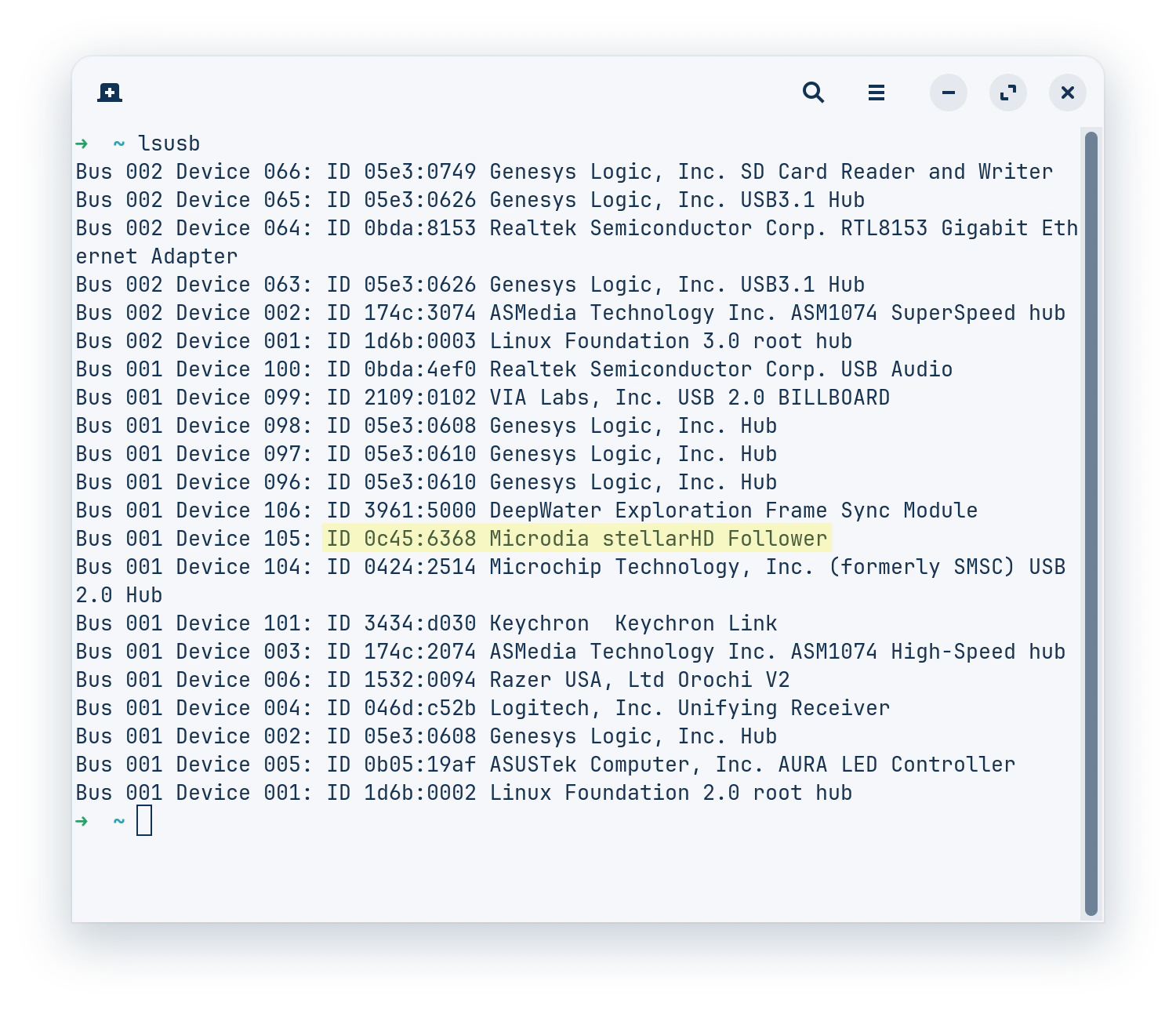
Type lsusb and press Enter. This lists all connected USB buses and the devices attached to them. Look for a device name that mentions the camera or an unnamed device that appears when plugged in.
You can also use this one-line command to detect a valid stellarHD camera:
To see if Linux recognizes it specifically as a video device (since it is V4L2 compatible), run:
ls -l /dev/video*
For real-time connection logs, run the following command. When you plug the camera in, you should see a flurry of text appear, indicating whether the USB connection was successful or if there were enumeration errors (like device descriptor read/64, error).
sudo dmesg -w | grep -iE "usb|uvcvideo"
type lsusb, press enter, and look for your camera
"Failed to Initialize the Device" Error (Linux)
If the camera disconnects shortly after being plugged in, check the Linux kernel log (sudo dmesg -w) for errors like these:
uvcvideo: UVC non compliance - GET_DEF(PROBE) not supported. Enabling workaround.uvcvideo: Failed to query (129) UVC probe control : -71 (exp. 26).uvcvideo: Failed to initialize the device (-5).usb 1-1.3: USB disconnect, device number 7
This error can have more than one cause. Check each one below.
A damaged or incorrectly wired cable can corrupt the USB signal. Make sure that the wiring is correct and that the data wires are twisted:
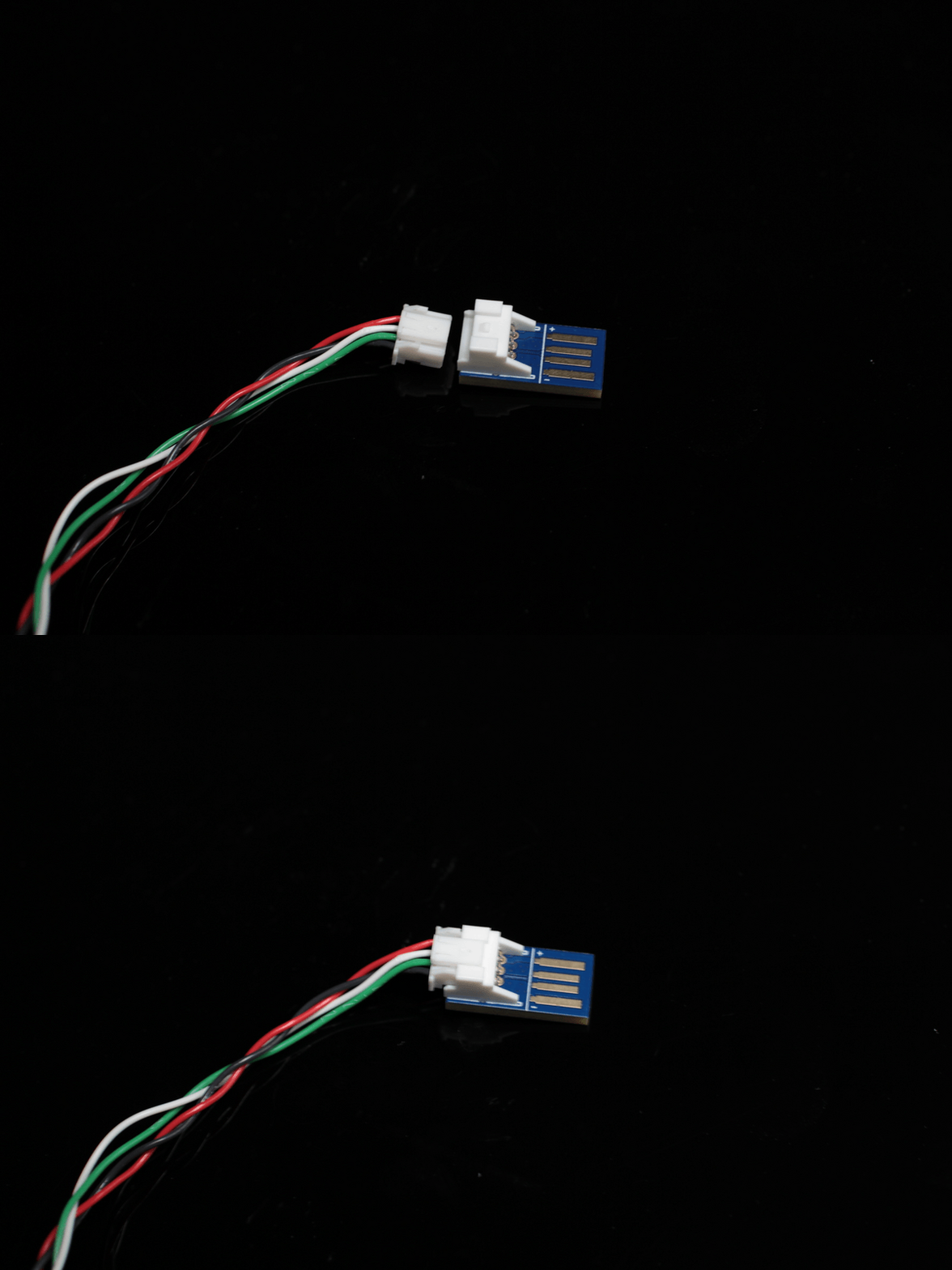
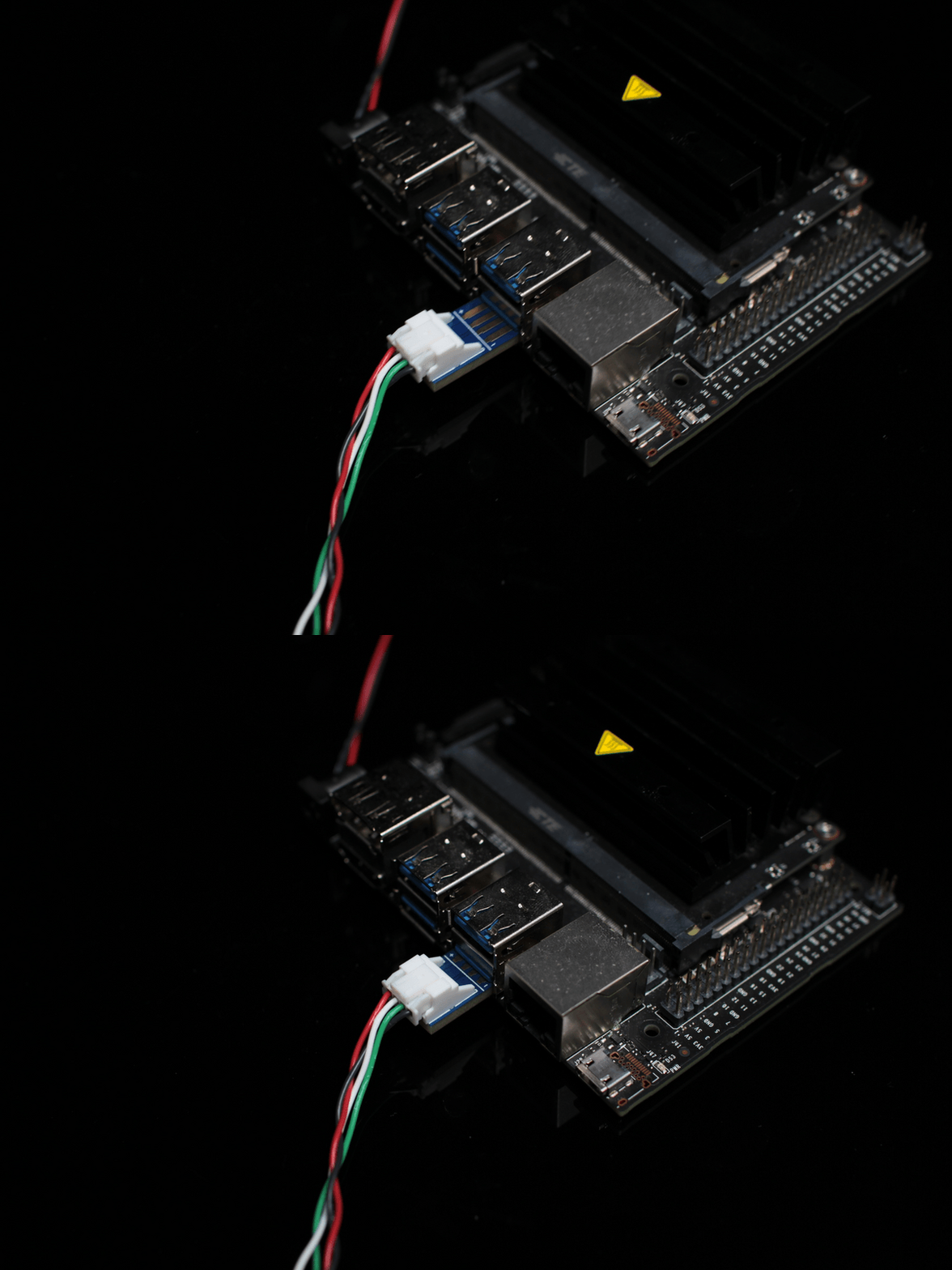
stellarHD Cable Connection
Prepare the JST cable connection for stellarHD series cameras.
{"docsConfig":{"theme":"sequoia","$schema":"https://mintlify.com/docs.json","name":"DWE.ai","colors":{"primary":"#46bae7","light":"#6fc9ec","dark":"#105f7e"},"logo":{"light":"https://mintcdn.com/deepwaterexplorationinc/OjrzvzQnCFbrTTxb/logo/light.svg?fit=max\u0026auto=format\u0026n=OjrzvzQnCFbrTTxb\u0026q=85\u0026s=6b18c2a0ebaebc55d84ac69bbdcee1c0","dark":"https://mintcdn.com/deepwaterexplorationinc/OjrzvzQnCFbrTTxb/logo/dark.svg?fit=max\u0026auto=format\u0026n=OjrzvzQnCFbrTTxb\u0026q=85\u0026s=68b8b16941c75f0b343607f4b64ce07a"},"favicon":"https://mintcdn.com/deepwaterexplorationinc/OjrzvzQnCFbrTTxb/favicon.svg?fit=max\u0026auto=format\u0026n=OjrzvzQnCFbrTTxb\u0026q=85\u0026s=dc91a660832ad0f4f9f9a4573e0b3cb9","api":{"playground":{"display":"none"}},"appearance":{"default":"light"},"navbar":{"links":[{"href":"https://dwe.ai/contact","label":"Support"}],"primary":{"type":"button","label":"Visit Store","href":"https://dwe.ai/collections/all"}},"footer":{"socials":{"github":"https://github.com/deepwaterexploration","linkedin":"https://www.linkedin.com/company/dweai","youtube":"https://www.youtube.com/@dweai","instagram":"https://www.instagram.com/deepwaterexploration"}},"icons":{"library":"fontawesome"},"styling":{"latex":false},"navigation":{"languages":[{"language":"en","default":true,"href":"home"},{"language":"ja","href":"ja/home"},{"language":"fr","href":"fr/home"},{"language":"ko","href":"ko/home"},{"language":"no","href":"no/home"},{"language":"es","href":"es/home"},{"language":"pt","href":"pt/home"},{"language":"de","href":"de/home"}]}},"deployment":{"deploymentMetadataValue":{"subdomain":"deepwaterexplorationinc","hasAudioNarration":false,"actualSubdomain":"deepwaterexplorationinc","customDomains":["docs.dwe.ai"],"gitSource":{"type":"github","owner":"deepwaterexploration","repo":"docs","deployBranch":"main","contentDirectory":"","isPrivate":false,"mountPath":"","label":""},"chroma":{"liveDeploymentHistoryId":"6ae29110b12be330c1cee5f9","collectionId":"8e6d5d74-514b-431c-80eb-1fd96646d231","schemaVersion":"v3","latestBuiltDeploymentHistoryId":"6ae29110b12be330c1cee5f9"},"feedback":{"thumbs":true,"issues":false},"entitlements":{"AI_CHAT":{"status":"ENABLED"}},"buildId":"6ae29110b12be330c1cee5f9","clientVersion":"0.0.4044","searchFilterCounts":[{"language":"de","tag":"Discovery","count":52},{"language":"en","tag":"Discovery","count":52},{"language":"es","tag":"Discovery","count":52},{"language":"fr","tag":"Discovery","count":52},{"language":"ja","tag":"Discovery","count":52},{"language":"ko","tag":"Discovery","count":52},{"language":"no","tag":"Discovery","count":52},{"language":"pt","tag":"Discovery","count":52},{"language":"de","tag":"dweOS","count":44},{"language":"en","tag":"dweOS","count":44},{"language":"es","tag":"dweOS","count":44},{"language":"fr","tag":"dweOS","count":44},{"language":"ja","tag":"dweOS","count":44},{"language":"ko","tag":"dweOS","count":44},{"language":"no","tag":"dweOS","count":44},{"language":"pt","tag":"dweOS","count":44},{"language":"de","tag":"Hardware","count":37},{"language":"en","tag":"Hardware","count":37},{"language":"es","tag":"Hardware","count":37},{"language":"fr","tag":"Matériel","count":37},{"language":"ja","tag":"ハードウェア","count":37},{"language":"ko","tag":"하드웨어","count":37},{"language":"no","tag":"Maskinvare","count":37},{"language":"pt","tag":"Hardware","count":37},{"language":"default","tag":"dweOS","count":35},{"language":"default","tag":"dweOS API Reference","count":35},{"language":"de","tag":"Übersicht","count":17},{"language":"de","tag":"Anleitungen","count":17},{"language":"de","tag":"Spezifikationen","count":17},{"language":"en","tag":"Overview","count":17},{"language":"en","tag":"Guides","count":17},{"language":"en","tag":"Specifications","count":17},{"language":"es","tag":"Descripción general","count":17},{"language":"es","tag":"Guías","count":17},{"language":"es","tag":"Especificaciones","count":17},{"language":"fr","tag":"Guides","count":17},{"language":"fr","tag":"Spécifications","count":17},{"language":"ja","tag":"概要","count":17},{"language":"ja","tag":"ガイド","count":17},{"language":"ja","tag":"仕様","count":17},{"language":"ko","tag":"개요","count":17},{"language":"ko","tag":"가이드","count":17},{"language":"ko","tag":"사양","count":17},{"language":"no","tag":"Oversikt","count":17},{"language":"no","tag":"Veiledninger","count":17},{"language":"no","tag":"Spesifikasjoner","count":17},{"language":"pt","tag":"Visão geral","count":17},{"language":"pt","tag":"Guias","count":17},{"language":"pt","tag":"Especificações","count":17},{"language":"de","tag":"explore3D-System","count":16},{"language":"en","tag":"explore3D System","count":16},{"language":"es","tag":"Sistema explore3D","count":16},{"language":"fr","tag":"Système explore3D","count":16},{"language":"ja","tag":"explore3D システム","count":16},{"language":"ko","tag":"explore3D 시스템","count":16},{"language":"no","tag":"explore3D-system","count":16},{"language":"pt","tag":"Sistema explore3D","count":16},{"language":"de","tag":"Stream-Viewer-Seite","count":15},{"language":"en","tag":"Stream Viewer Page","count":15},{"language":"es","tag":"Página del visor de flujos","count":15},{"language":"fr","tag":"Page de visualisation des flux","count":15},{"language":"ja","tag":"ストリームビューアページ","count":15},{"language":"ko","tag":"스트림 뷰어 페이지","count":15},{"language":"no","tag":"Strømvisningsside","count":15},{"language":"pt","tag":"Página do visualizador de fluxo","count":15},{"language":"fr","tag":"Aperçu","count":14},{"language":"de","tag":"exploreHD-Serie","count":11},{"language":"de","tag":"stellarHD-Serie","count":11},{"language":"en","tag":"exploreHD Series","count":11},{"language":"en","tag":"stellarHD Series","count":11},{"language":"es","tag":"Serie exploreHD","count":11},{"language":"es","tag":"Serie stellarHD","count":11},{"language":"fr","tag":"Série exploreHD","count":11},{"language":"fr","tag":"Série stellarHD","count":11},{"language":"ja","tag":"exploreHD シリーズ","count":11},{"language":"ja","tag":"stellarHD シリーズ","count":11},{"language":"ko","tag":"exploreHD 시리즈","count":11},{"language":"ko","tag":"stellarHD 시리즈","count":11},{"language":"no","tag":"exploreHD-serien","count":11},{"language":"no","tag":"stellarHD-serien","count":11},{"language":"pt","tag":"Série exploreHD","count":11},{"language":"pt","tag":"Série stellarHD","count":11},{"language":"default","tag":"cameras","count":10},{"language":"default","tag":"recordings","count":10},{"language":"default","tag":"network","count":4},{"language":"default","tag":"preferences","count":3},{"language":"default","tag":"pwm","count":3},{"language":"default","tag":"system","count":3},{"language":"default","tag":"features","count":1},{"language":"default","tag":"logs","count":1}]},"assistantConfig":{"enableStarterQuestions":true,"enableContextualStarterQuestions":true,"deflection":{"enabled":true,"email":"support@dwe.ai","showHelpButton":true}},"basePath":"","hasChatPermissions":true,"hasWebMcpPermissions":false,"toggles":[],"privacy":{"consentBanner":{"enabled":true}},"googleFontsInlined":false},"customCss":[{"filePath":"style-ask-assistant-button.css","content":"@keyframes assistant-entry-spin{to{--assistant-entry-angle:360deg}}@keyframes assistant-entry-fade{0%,60%,to{opacity:0}15%,45%{opacity:1}}@property --assistant-entry-angle{syntax:\"\u003cangle>\";initial-value:0deg;inherits:false}#assistant-entry{position:relative}#assistant-entry.dwe-animate-trigger::before{content:\"\";position:absolute;inset:-2px;border-radius:inherit;padding:2px;background:conic-gradient(from var(--assistant-entry-angle),transparent 0deg,#46bae7 80deg,#6fc9ec 150deg,#46bae7 220deg,transparent 300deg);-webkit-mask:linear-gradient(#000 0 0) content-box,linear-gradient(#000 0 0);-webkit-mask-composite:xor;mask-composite:exclude;animation:assistant-entry-spin 4s linear infinite,assistant-entry-fade 7s ease-in-out infinite;pointer-events:none}@media (prefers-reduced-motion:reduce){#assistant-entry.dwe-animate-trigger::before{animation:none}}"},{"filePath":"style-chat-assistant-textarea.css","content":":has(>div>#chat-assistant-textarea){position:relative}:has(>div>#chat-assistant-textarea).dwe-animate-trigger::before{content:\"\";position:absolute;inset:-1px;border-radius:inherit;padding:2px;background:conic-gradient(from var(--assistant-entry-angle),transparent 0deg,#46bae7 80deg,#6fc9ec 150deg,#46bae7 220deg,transparent 300deg);-webkit-mask:linear-gradient(#000 0 0) content-box,linear-gradient(#000 0 0);-webkit-mask-composite:xor;mask-composite:exclude;animation:assistant-entry-spin 4s linear infinite,assistant-entry-fade 7s ease-in-out -3.5s infinite;pointer-events:none}@media (prefers-reduced-motion:reduce){:has(>div>#chat-assistant-textarea).dwe-animate-trigger::before{animation:none}}"},{"filePath":"style-product-button.css","content":"@keyframes selector-entry-spin{to{--selector-entry-angle:360deg}}@keyframes selector-entry-fade{0%,41.18%,to{opacity:0}32.35%,8.82%{opacity:1}}@property --selector-entry-angle{syntax:\"\u003cangle>\";initial-value:0deg;inherits:false}[data-component-part=products-selector-trigger]{position:relative;overflow:visible!important}[data-component-part=products-selector-trigger].dwe-animate-trigger::before{content:\"\";position:absolute;inset:-2px;border-radius:.75rem;padding:2px;background:conic-gradient(from var(--selector-entry-angle),transparent 0deg,#46bae7 80deg,#6fc9ec 150deg,#46bae7 220deg,transparent 300deg);-webkit-mask:linear-gradient(#000 0 0) content-box,linear-gradient(#000 0 0);-webkit-mask-composite:xor;mask-composite:exclude;animation:selector-entry-spin 4s linear infinite,selector-entry-fade 17s ease-in-out infinite;pointer-events:none;z-index:1}"},{"filePath":"style-kbd.css","content":"kbd{margin-inline:.2em}"}],"page":{"pagePath":"stellarHD/guides/stellarHD-quickstart","slug":"/stellarHD/guides/stellarHD-quickstart","pageMetadata":{"title":"stellarHD Quick Start Guide","icon":"rocket","description":"This guide will help you connect your stellarHD to your computer and receive an image!","href":"/stellarHD/guides/stellarHD-quickstart"},"description":{"compiledSource":"\"use strict\";\nconst {jsx: _jsx} = arguments[0];\nconst {useMDXComponents: _provideComponents} = arguments[0];\nfunction _createMdxContent(props) {\n const _components = {\n p: \"p\",\n ..._provideComponents(),\n ...props.components\n };\n return _jsx(_components.p, {\n children: \"This guide will help you connect your stellarHD to your computer and receive an image!\"\n });\n}\nfunction MDXContent(props = {}) {\n const {wrapper: MDXLayout} = {\n ..._provideComponents(),\n ...props.components\n };\n return MDXLayout ? _jsx(MDXLayout, {\n ...props,\n children: _jsx(_createMdxContent, {\n ...props\n })\n }) : _createMdxContent(props);\n}\nreturn {\n default: MDXContent\n};\n","frontmatter":{},"scope":{}},"pageType":"default","mdx":{"mdxSource":{"compiledSource":"\"use strict\";const{Fragment:_Fragment,jsx:_jsx,jsxs:_jsxs}=arguments[0];const{useMDXComponents:_provideComponents}=arguments[0];function _createMdxContent(props){const _components={a:`a`,code:`code`,em:`em`,li:`li`,ol:`ol`,p:`p`,pre:`pre`,span:`span`,strong:`strong`,tbody:`tbody`,td:`td`,th:`th`,thead:`thead`,tr:`tr`,ul:`ul`,..._provideComponents(),...props.components},{Accordion,AccordionGroup,Card,CodeBlock,Columns,Frame,Heading,OptimizedImage,Step,Steps,Tab,Table,Tabs,Tip,Warning}=_components;if(!Accordion)_missingMdxReference(`Accordion`,true);if(!AccordionGroup)_missingMdxReference(`AccordionGroup`,true);if(!Card)_missingMdxReference(`Card`,true);if(!CodeBlock)_missingMdxReference(`CodeBlock`,true);if(!Columns)_missingMdxReference(`Columns`,true);if(!Frame)_missingMdxReference(`Frame`,true);if(!Heading)_missingMdxReference(`Heading`,true);if(!OptimizedImage)_missingMdxReference(`OptimizedImage`,true);if(!Step)_missingMdxReference(`Step`,true);if(!Steps)_missingMdxReference(`Steps`,true);if(!Tab)_missingMdxReference(`Tab`,true);if(!Table)_missingMdxReference(`Table`,true);if(!Tabs)_missingMdxReference(`Tabs`,true);if(!Tip)_missingMdxReference(`Tip`,true);if(!Warning)_missingMdxReference(`Warning`,true);return _jsxs(_Fragment,{children:[_jsx(Heading,{level:`2`,id:`connect-your-camera-to-a-bulkhead`,children:`Connect Your Camera to a Bulkhead`}),`\n`,_jsxs(Tabs,{children:[_jsxs(Tab,{title:`WetLink`,id:`wetlink`,children:[_jsx(_components.p,{children:`For Epoxy or WetLink models, follow the cable pinout guide located on the specification page for your stellarHD model.`}),_jsx(_components.p,{children:`Below is an example of passing the exposed wiring through an M10 WetLink bulkhead to be installed onto your vehicle end cap.`}),_jsx(Frame,{caption:`Vehicle-side WetLink Bulkhead`,children:_jsx(OptimizedImage,{src:`https://mintcdn.com/deepwaterexplorationinc/NrWVR9Qe6FWmBE6d/stellarHD/guides/images/quickstart/WetLink-ROV-side-Bulkhead.jpg?fit=max\u0026auto=format\u0026n=NrWVR9Qe6FWmBE6d\u0026q=85\u0026s=ca42f913d8962ec6d7d7826ecbcf3ea0`,style:{width:`400px`,aspectRatio:`16 / 11`,objectFit:`cover`,objectPosition:`30% 30%`},className:`mint-rounded-lg`,\"data-og-width\":`2560`,width:`2560`,\"data-og-height\":`2560`,height:`2560`,\"data-path\":`stellarHD/guides/images/quickstart/WetLink-ROV-side-Bulkhead.jpg`,\"data-optimize\":`true`,\"data-opv\":`3`,srcset:`https://mintcdn.com/deepwaterexplorationinc/NrWVR9Qe6FWmBE6d/stellarHD/guides/images/quickstart/WetLink-ROV-side-Bulkhead.jpg?w=280\u0026fit=max\u0026auto=format\u0026n=NrWVR9Qe6FWmBE6d\u0026q=85\u0026s=8d960877f703235cd9f5c541cbae1258 280w, https://mintcdn.com/deepwaterexplorationinc/NrWVR9Qe6FWmBE6d/stellarHD/guides/images/quickstart/WetLink-ROV-side-Bulkhead.jpg?w=560\u0026fit=max\u0026auto=format\u0026n=NrWVR9Qe6FWmBE6d\u0026q=85\u0026s=dc46ffef0fec1cb6ad3a3f0551e5ff17 560w, https://mintcdn.com/deepwaterexplorationinc/NrWVR9Qe6FWmBE6d/stellarHD/guides/images/quickstart/WetLink-ROV-side-Bulkhead.jpg?w=840\u0026fit=max\u0026auto=format\u0026n=NrWVR9Qe6FWmBE6d\u0026q=85\u0026s=470444c42c8e8b51c4286fc909f6e277 840w, https://mintcdn.com/deepwaterexplorationinc/NrWVR9Qe6FWmBE6d/stellarHD/guides/images/quickstart/WetLink-ROV-side-Bulkhead.jpg?w=1100\u0026fit=max\u0026auto=format\u0026n=NrWVR9Qe6FWmBE6d\u0026q=85\u0026s=b2c32bad0d7ebef4195a67b768c8f0e8 1100w, https://mintcdn.com/deepwaterexplorationinc/NrWVR9Qe6FWmBE6d/stellarHD/guides/images/quickstart/WetLink-ROV-side-Bulkhead.jpg?w=1650\u0026fit=max\u0026auto=format\u0026n=NrWVR9Qe6FWmBE6d\u0026q=85\u0026s=0ca98818b72db861a8c52ed724fc5b11 1650w, https://mintcdn.com/deepwaterexplorationinc/NrWVR9Qe6FWmBE6d/stellarHD/guides/images/quickstart/WetLink-ROV-side-Bulkhead.jpg?w=2500\u0026fit=max\u0026auto=format\u0026n=NrWVR9Qe6FWmBE6d\u0026q=85\u0026s=1db476a58565642bba57bcab99f1c0f7 2500w`})})]}),_jsxs(Tab,{title:`Cobalt`,id:`cobalt`,children:[_jsx(_components.p,{children:`For Cobalt, follow the pinout guide located on the specification page for your stellarHD model.`}),_jsxs(_components.p,{children:[`Below is an example of a `,_jsx(_components.a,{href:`https://dwe.ai/collections/our-parts-and-accessories/products/cobalt-to-jst-connector`,children:`pre-made cobalt bulkhead`}),`.`]}),_jsx(Frame,{caption:`Cobalt to JST Connector`,children:_jsx(OptimizedImage,{src:`https://mintcdn.com/deepwaterexplorationinc/NrWVR9Qe6FWmBE6d/stellarHD/guides/images/quickstart/DWE-Cobalt-to-JST-Connector.jpg?fit=max\u0026auto=format\u0026n=NrWVR9Qe6FWmBE6d\u0026q=85\u0026s=b0e0eb1dcc14fd5460b93d6efd4c37b1`,style:{width:`400px`,aspectRatio:`16 / 11`,objectFit:`cover`,objectPosition:`30% 30%`},className:`mint-rounded-lg`,\"data-og-width\":`4556`,width:`4556`,\"data-og-height\":`4556`,height:`4556`,\"data-path\":`stellarHD/guides/images/quickstart/DWE-Cobalt-to-JST-Connector.jpg`,\"data-optimize\":`true`,\"data-opv\":`3`,srcset:`https://mintcdn.com/deepwaterexplorationinc/NrWVR9Qe6FWmBE6d/stellarHD/guides/images/quickstart/DWE-Cobalt-to-JST-Connector.jpg?w=280\u0026fit=max\u0026auto=format\u0026n=NrWVR9Qe6FWmBE6d\u0026q=85\u0026s=9ad446ede5b2f88ec1fabed7390f5b46 280w, https://mintcdn.com/deepwaterexplorationinc/NrWVR9Qe6FWmBE6d/stellarHD/guides/images/quickstart/DWE-Cobalt-to-JST-Connector.jpg?w=560\u0026fit=max\u0026auto=format\u0026n=NrWVR9Qe6FWmBE6d\u0026q=85\u0026s=9248dcab6a4cac59ccda44139222741d 560w, https://mintcdn.com/deepwaterexplorationinc/NrWVR9Qe6FWmBE6d/stellarHD/guides/images/quickstart/DWE-Cobalt-to-JST-Connector.jpg?w=840\u0026fit=max\u0026auto=format\u0026n=NrWVR9Qe6FWmBE6d\u0026q=85\u0026s=ffaf8f0ad90274a38848c05c632e9f1b 840w, https://mintcdn.com/deepwaterexplorationinc/NrWVR9Qe6FWmBE6d/stellarHD/guides/images/quickstart/DWE-Cobalt-to-JST-Connector.jpg?w=1100\u0026fit=max\u0026auto=format\u0026n=NrWVR9Qe6FWmBE6d\u0026q=85\u0026s=2ca14912cd54f144534262854d2f2c5f 1100w, https://mintcdn.com/deepwaterexplorationinc/NrWVR9Qe6FWmBE6d/stellarHD/guides/images/quickstart/DWE-Cobalt-to-JST-Connector.jpg?w=1650\u0026fit=max\u0026auto=format\u0026n=NrWVR9Qe6FWmBE6d\u0026q=85\u0026s=239a40115bd8630971f9b0334f45b729 1650w, https://mintcdn.com/deepwaterexplorationinc/NrWVR9Qe6FWmBE6d/stellarHD/guides/images/quickstart/DWE-Cobalt-to-JST-Connector.jpg?w=2500\u0026fit=max\u0026auto=format\u0026n=NrWVR9Qe6FWmBE6d\u0026q=85\u0026s=fd706f3ab19b76cb4334aaddc86988d2 2500w`})})]}),_jsxs(Tab,{title:`SubConn`,id:`subconn`,children:[_jsx(_components.p,{children:`For SubConn, follow the pinout guide located on the specification page for your stellarHD model.`}),_jsxs(_components.p,{children:[`Below is an example of a `,_jsx(_components.a,{href:`https://dwe.ai/collections/our-parts-and-accessories`,children:`pre-made SubConn MCBH8M bulkhead`}),`.`]}),_jsx(Frame,{caption:`SubConn to JST Connector`,children:_jsx(OptimizedImage,{src:`https://mintcdn.com/deepwaterexplorationinc/NrWVR9Qe6FWmBE6d/stellarHD/guides/images/quickstart/DWE-SubConn-to-JST-Connector.png?fit=max\u0026auto=format\u0026n=NrWVR9Qe6FWmBE6d\u0026q=85\u0026s=f750163c07956217a920ed6f9a2d919e`,style:{width:`400px`,aspectRatio:`16 / 11`,objectFit:`cover`,objectPosition:`30% 30%`},className:`mint-rounded-lg`,\"data-og-width\":`4556`,width:`4556`,\"data-og-height\":`4556`,height:`4556`,\"data-path\":`stellarHD/guides/images/quickstart/DWE-SubConn-to-JST-Connector.png`,\"data-optimize\":`true`,\"data-opv\":`3`,srcset:`https://mintcdn.com/deepwaterexplorationinc/NrWVR9Qe6FWmBE6d/stellarHD/guides/images/quickstart/DWE-SubConn-to-JST-Connector.png?w=280\u0026fit=max\u0026auto=format\u0026n=NrWVR9Qe6FWmBE6d\u0026q=85\u0026s=d019444f9618400ce5f90a2252db0163 280w, https://mintcdn.com/deepwaterexplorationinc/NrWVR9Qe6FWmBE6d/stellarHD/guides/images/quickstart/DWE-SubConn-to-JST-Connector.png?w=560\u0026fit=max\u0026auto=format\u0026n=NrWVR9Qe6FWmBE6d\u0026q=85\u0026s=f1e1238b586ea17dca4133673bfee7ba 560w, https://mintcdn.com/deepwaterexplorationinc/NrWVR9Qe6FWmBE6d/stellarHD/guides/images/quickstart/DWE-SubConn-to-JST-Connector.png?w=840\u0026fit=max\u0026auto=format\u0026n=NrWVR9Qe6FWmBE6d\u0026q=85\u0026s=cb2e324b7f9add401075c2d5b23343e0 840w, https://mintcdn.com/deepwaterexplorationinc/NrWVR9Qe6FWmBE6d/stellarHD/guides/images/quickstart/DWE-SubConn-to-JST-Connector.png?w=1100\u0026fit=max\u0026auto=format\u0026n=NrWVR9Qe6FWmBE6d\u0026q=85\u0026s=dd48274021906ad20e2b534a2dee6793 1100w, https://mintcdn.com/deepwaterexplorationinc/NrWVR9Qe6FWmBE6d/stellarHD/guides/images/quickstart/DWE-SubConn-to-JST-Connector.png?w=1650\u0026fit=max\u0026auto=format\u0026n=NrWVR9Qe6FWmBE6d\u0026q=85\u0026s=9073240fc4d551dfcfb5d90cca1e1947 1650w, https://mintcdn.com/deepwaterexplorationinc/NrWVR9Qe6FWmBE6d/stellarHD/guides/images/quickstart/DWE-SubConn-to-JST-Connector.png?w=2500\u0026fit=max\u0026auto=format\u0026n=NrWVR9Qe6FWmBE6d\u0026q=85\u0026s=c08e4ba0a1e23ff0d96ec9bf9246e8b3 2500w`})})]})]}),`\n`,_jsx(Heading,{level:`2`,id:`preparing-the-jst-cable-connection`,children:`Preparing the JST Cable Connection`}),`\n`,_jsxs(Steps,{children:[_jsxs(Step,{title:`Review the wire functions before connecting`,children:[_jsxs(Tabs,{children:[_jsxs(Tab,{title:`stellarHD`,id:`stellarhd`,children:[_jsxs(Frame,{children:[_jsx(OptimizedImage,{className:`mint-hidden dark:mint-block`,src:`https://mintcdn.com/deepwaterexplorationinc/1eIeDk35tTY0X3ue/snippets/cable-pinout-options/images/JST/stellarHD-JST-dark.png?fit=max\u0026auto=format\u0026n=1eIeDk35tTY0X3ue\u0026q=85\u0026s=f4b21710ba9f9cd83d5188040a83c86b`,\"data-og-width\":`4000`,width:`4000`,\"data-og-height\":`1799`,height:`1799`,\"data-path\":`snippets/cable-pinout-options/images/JST/stellarHD-JST-dark.png`,\"data-optimize\":`true`,\"data-opv\":`3`,srcset:`https://mintcdn.com/deepwaterexplorationinc/1eIeDk35tTY0X3ue/snippets/cable-pinout-options/images/JST/stellarHD-JST-dark.png?w=280\u0026fit=max\u0026auto=format\u0026n=1eIeDk35tTY0X3ue\u0026q=85\u0026s=21d475bb64e0ced4512f06154961b897 280w, https://mintcdn.com/deepwaterexplorationinc/1eIeDk35tTY0X3ue/snippets/cable-pinout-options/images/JST/stellarHD-JST-dark.png?w=560\u0026fit=max\u0026auto=format\u0026n=1eIeDk35tTY0X3ue\u0026q=85\u0026s=fad300f74411646a41f31a79de255e3a 560w, https://mintcdn.com/deepwaterexplorationinc/1eIeDk35tTY0X3ue/snippets/cable-pinout-options/images/JST/stellarHD-JST-dark.png?w=840\u0026fit=max\u0026auto=format\u0026n=1eIeDk35tTY0X3ue\u0026q=85\u0026s=42ca05655fdcd952aa5ba853a1dc2084 840w, https://mintcdn.com/deepwaterexplorationinc/1eIeDk35tTY0X3ue/snippets/cable-pinout-options/images/JST/stellarHD-JST-dark.png?w=1100\u0026fit=max\u0026auto=format\u0026n=1eIeDk35tTY0X3ue\u0026q=85\u0026s=087fa3448934c8654627aff7c61e1a93 1100w, https://mintcdn.com/deepwaterexplorationinc/1eIeDk35tTY0X3ue/snippets/cable-pinout-options/images/JST/stellarHD-JST-dark.png?w=1650\u0026fit=max\u0026auto=format\u0026n=1eIeDk35tTY0X3ue\u0026q=85\u0026s=0111de659b0d0af51ac74261f33300d5 1650w, https://mintcdn.com/deepwaterexplorationinc/1eIeDk35tTY0X3ue/snippets/cable-pinout-options/images/JST/stellarHD-JST-dark.png?w=2500\u0026fit=max\u0026auto=format\u0026n=1eIeDk35tTY0X3ue\u0026q=85\u0026s=6365ec2f314dd6a0251ca567470cc532 2500w`}),_jsx(OptimizedImage,{className:`mint-block dark:mint-hidden`,src:`https://mintcdn.com/deepwaterexplorationinc/1eIeDk35tTY0X3ue/snippets/cable-pinout-options/images/JST/stellarHD-JST-light.png?fit=max\u0026auto=format\u0026n=1eIeDk35tTY0X3ue\u0026q=85\u0026s=c10fb41b283bc8f1f779d95d19ac325a`,\"data-og-width\":`4000`,width:`4000`,\"data-og-height\":`1799`,height:`1799`,\"data-path\":`snippets/cable-pinout-options/images/JST/stellarHD-JST-light.png`,\"data-optimize\":`true`,\"data-opv\":`3`,srcset:`https://mintcdn.com/deepwaterexplorationinc/1eIeDk35tTY0X3ue/snippets/cable-pinout-options/images/JST/stellarHD-JST-light.png?w=280\u0026fit=max\u0026auto=format\u0026n=1eIeDk35tTY0X3ue\u0026q=85\u0026s=6601a70c6c8ad1997a3af9dd04088b08 280w, https://mintcdn.com/deepwaterexplorationinc/1eIeDk35tTY0X3ue/snippets/cable-pinout-options/images/JST/stellarHD-JST-light.png?w=560\u0026fit=max\u0026auto=format\u0026n=1eIeDk35tTY0X3ue\u0026q=85\u0026s=0c75e379d032a9ff8ac9b348633ef49f 560w, https://mintcdn.com/deepwaterexplorationinc/1eIeDk35tTY0X3ue/snippets/cable-pinout-options/images/JST/stellarHD-JST-light.png?w=840\u0026fit=max\u0026auto=format\u0026n=1eIeDk35tTY0X3ue\u0026q=85\u0026s=bd2cbcaf4737c3b5e30461fbbafd93c7 840w, https://mintcdn.com/deepwaterexplorationinc/1eIeDk35tTY0X3ue/snippets/cable-pinout-options/images/JST/stellarHD-JST-light.png?w=1100\u0026fit=max\u0026auto=format\u0026n=1eIeDk35tTY0X3ue\u0026q=85\u0026s=406aad8c51f700612260c1c30b4ed5a6 1100w, https://mintcdn.com/deepwaterexplorationinc/1eIeDk35tTY0X3ue/snippets/cable-pinout-options/images/JST/stellarHD-JST-light.png?w=1650\u0026fit=max\u0026auto=format\u0026n=1eIeDk35tTY0X3ue\u0026q=85\u0026s=80a97a36cd391103d7b4a1e24b02ece3 1650w, https://mintcdn.com/deepwaterexplorationinc/1eIeDk35tTY0X3ue/snippets/cable-pinout-options/images/JST/stellarHD-JST-light.png?w=2500\u0026fit=max\u0026auto=format\u0026n=1eIeDk35tTY0X3ue\u0026q=85\u0026s=641f175d22156d5acf6877bf3d998530 2500w`})]}),_jsxs(Table,{children:[_jsx(_components.thead,{children:_jsxs(_components.tr,{children:[_jsx(_components.th,{children:`PAP-04V-S Pin`}),_jsx(_components.th,{children:`Color`}),_jsx(_components.th,{children:`Function`}),_jsx(_components.th,{children:`Wire Gauge (AWG)`})]})}),_jsxs(_components.tbody,{children:[_jsxs(_components.tr,{children:[_jsx(_components.td,{\"data-numeric\":`true`,children:`1`}),_jsx(_components.td,{children:`Red`}),_jsx(_components.td,{\"data-numeric\":`true`,children:`5V`}),_jsx(_components.td,{\"data-numeric\":`true`,children:`24`})]}),_jsxs(_components.tr,{children:[_jsx(_components.td,{\"data-numeric\":`true`,children:`2`}),_jsx(_components.td,{children:`White`}),_jsx(_components.td,{children:`D- (Data Negative)`}),_jsx(_components.td,{\"data-numeric\":`true`,children:`28`})]}),_jsxs(_components.tr,{children:[_jsx(_components.td,{\"data-numeric\":`true`,children:`3`}),_jsx(_components.td,{children:`Green`}),_jsx(_components.td,{children:`D+ (Data Positive)`}),_jsx(_components.td,{\"data-numeric\":`true`,children:`28`})]}),_jsxs(_components.tr,{children:[_jsx(_components.td,{\"data-numeric\":`true`,children:`4`}),_jsx(_components.td,{children:`Black`}),_jsx(_components.td,{children:`Ground`}),_jsx(_components.td,{\"data-numeric\":`true`,children:`24`})]}),_jsxs(_components.tr,{children:[_jsx(_components.td,{children:`—`}),_jsx(_components.td,{children:`Blue`}),_jsx(_components.td,{children:`FSIN (Frame-Sync)`}),_jsx(_components.td,{\"data-numeric\":`true`,children:`28`})]})]})]})]}),_jsxs(Tab,{title:`stellarHD Elite`,id:`stellarhd-elite`,children:[_jsxs(Frame,{children:[_jsx(OptimizedImage,{className:`mint-hidden dark:mint-block`,src:`https://mintcdn.com/deepwaterexplorationinc/1eIeDk35tTY0X3ue/snippets/cable-pinout-options/images/JST/stellarHD-elite-JST-dark.png?fit=max\u0026auto=format\u0026n=1eIeDk35tTY0X3ue\u0026q=85\u0026s=a0d7bdfed60e83f2eeb941a28cdf29c4`,\"data-og-width\":`4000`,width:`4000`,\"data-og-height\":`1799`,height:`1799`,\"data-path\":`snippets/cable-pinout-options/images/JST/stellarHD-elite-JST-dark.png`,\"data-optimize\":`true`,\"data-opv\":`3`,srcset:`https://mintcdn.com/deepwaterexplorationinc/1eIeDk35tTY0X3ue/snippets/cable-pinout-options/images/JST/stellarHD-elite-JST-dark.png?w=280\u0026fit=max\u0026auto=format\u0026n=1eIeDk35tTY0X3ue\u0026q=85\u0026s=f3030aaf730a832246bb42aeb95683cc 280w, https://mintcdn.com/deepwaterexplorationinc/1eIeDk35tTY0X3ue/snippets/cable-pinout-options/images/JST/stellarHD-elite-JST-dark.png?w=560\u0026fit=max\u0026auto=format\u0026n=1eIeDk35tTY0X3ue\u0026q=85\u0026s=fb2542cd088862b20ece65d119413c30 560w, https://mintcdn.com/deepwaterexplorationinc/1eIeDk35tTY0X3ue/snippets/cable-pinout-options/images/JST/stellarHD-elite-JST-dark.png?w=840\u0026fit=max\u0026auto=format\u0026n=1eIeDk35tTY0X3ue\u0026q=85\u0026s=8ec22b27d8fdf4aaa71bf0722e608d6a 840w, https://mintcdn.com/deepwaterexplorationinc/1eIeDk35tTY0X3ue/snippets/cable-pinout-options/images/JST/stellarHD-elite-JST-dark.png?w=1100\u0026fit=max\u0026auto=format\u0026n=1eIeDk35tTY0X3ue\u0026q=85\u0026s=bea943292d5ebd024f5f0c741d9edb13 1100w, https://mintcdn.com/deepwaterexplorationinc/1eIeDk35tTY0X3ue/snippets/cable-pinout-options/images/JST/stellarHD-elite-JST-dark.png?w=1650\u0026fit=max\u0026auto=format\u0026n=1eIeDk35tTY0X3ue\u0026q=85\u0026s=1755ad22fb3ab7706c05b109f36613ca 1650w, https://mintcdn.com/deepwaterexplorationinc/1eIeDk35tTY0X3ue/snippets/cable-pinout-options/images/JST/stellarHD-elite-JST-dark.png?w=2500\u0026fit=max\u0026auto=format\u0026n=1eIeDk35tTY0X3ue\u0026q=85\u0026s=556131e88f2e5d321028f2952118da82 2500w`}),_jsx(OptimizedImage,{className:`mint-block dark:mint-hidden`,src:`https://mintcdn.com/deepwaterexplorationinc/1eIeDk35tTY0X3ue/snippets/cable-pinout-options/images/JST/stellarHD-elite-JST-light.png?fit=max\u0026auto=format\u0026n=1eIeDk35tTY0X3ue\u0026q=85\u0026s=20ff42a9af0321c535eb69b947db4213`,\"data-og-width\":`4000`,width:`4000`,\"data-og-height\":`1799`,height:`1799`,\"data-path\":`snippets/cable-pinout-options/images/JST/stellarHD-elite-JST-light.png`,\"data-optimize\":`true`,\"data-opv\":`3`,srcset:`https://mintcdn.com/deepwaterexplorationinc/1eIeDk35tTY0X3ue/snippets/cable-pinout-options/images/JST/stellarHD-elite-JST-light.png?w=280\u0026fit=max\u0026auto=format\u0026n=1eIeDk35tTY0X3ue\u0026q=85\u0026s=fa50cc8bc6022fe62ec4b7d36375adeb 280w, https://mintcdn.com/deepwaterexplorationinc/1eIeDk35tTY0X3ue/snippets/cable-pinout-options/images/JST/stellarHD-elite-JST-light.png?w=560\u0026fit=max\u0026auto=format\u0026n=1eIeDk35tTY0X3ue\u0026q=85\u0026s=13dcc8a112fedb000d6f11d21a306e95 560w, https://mintcdn.com/deepwaterexplorationinc/1eIeDk35tTY0X3ue/snippets/cable-pinout-options/images/JST/stellarHD-elite-JST-light.png?w=840\u0026fit=max\u0026auto=format\u0026n=1eIeDk35tTY0X3ue\u0026q=85\u0026s=460ed8c4afc80e4010bbd42b58b1a504 840w, https://mintcdn.com/deepwaterexplorationinc/1eIeDk35tTY0X3ue/snippets/cable-pinout-options/images/JST/stellarHD-elite-JST-light.png?w=1100\u0026fit=max\u0026auto=format\u0026n=1eIeDk35tTY0X3ue\u0026q=85\u0026s=f3bffabaaa58d593a4d95da75e4d9dbb 1100w, https://mintcdn.com/deepwaterexplorationinc/1eIeDk35tTY0X3ue/snippets/cable-pinout-options/images/JST/stellarHD-elite-JST-light.png?w=1650\u0026fit=max\u0026auto=format\u0026n=1eIeDk35tTY0X3ue\u0026q=85\u0026s=4c28ca0a5dbc839d173d24481ac2011e 1650w, https://mintcdn.com/deepwaterexplorationinc/1eIeDk35tTY0X3ue/snippets/cable-pinout-options/images/JST/stellarHD-elite-JST-light.png?w=2500\u0026fit=max\u0026auto=format\u0026n=1eIeDk35tTY0X3ue\u0026q=85\u0026s=7f7c19088c6aab13cb141b1b8f04ee87 2500w`})]}),_jsxs(Table,{children:[_jsx(_components.thead,{children:_jsxs(_components.tr,{children:[_jsx(_components.th,{children:`PAP-04V-S Pin`}),_jsx(_components.th,{children:`Color`}),_jsx(_components.th,{children:`Function`}),_jsx(_components.th,{children:`Wire Gauge (AWG)`})]})}),_jsxs(_components.tbody,{children:[_jsxs(_components.tr,{children:[_jsx(_components.td,{\"data-numeric\":`true`,children:`1`}),_jsx(_components.td,{children:`Red`}),_jsx(_components.td,{\"data-numeric\":`true`,children:`5V`}),_jsx(_components.td,{\"data-numeric\":`true`,children:`24`})]}),_jsxs(_components.tr,{children:[_jsx(_components.td,{\"data-numeric\":`true`,children:`2`}),_jsx(_components.td,{children:`White`}),_jsx(_components.td,{children:`D- (Data Negative)`}),_jsx(_components.td,{\"data-numeric\":`true`,children:`28`})]}),_jsxs(_components.tr,{children:[_jsx(_components.td,{\"data-numeric\":`true`,children:`3`}),_jsx(_components.td,{children:`Green`}),_jsx(_components.td,{children:`D+ (Data Positive)`}),_jsx(_components.td,{\"data-numeric\":`true`,children:`28`})]}),_jsxs(_components.tr,{children:[_jsx(_components.td,{\"data-numeric\":`true`,children:`4`}),_jsx(_components.td,{children:`Black`}),_jsx(_components.td,{children:`Ground`}),_jsx(_components.td,{\"data-numeric\":`true`,children:`24`})]}),_jsxs(_components.tr,{children:[_jsx(_components.td,{children:`—`}),_jsx(_components.td,{children:`Blue`}),_jsx(_components.td,{children:`FSIN (Frame-Sync)`}),_jsx(_components.td,{\"data-numeric\":`true`,children:`28`})]}),_jsxs(_components.tr,{children:[_jsx(_components.td,{children:`—`}),_jsx(_components.td,{children:`Brown/Yellow`}),_jsx(_components.td,{children:`Strobe`}),_jsx(_components.td,{\"data-numeric\":`true`,children:`28`})]})]})]})]})]}),_jsx(Warning,{children:_jsxs(_components.p,{children:[`Ensure you `,_jsx(_components.strong,{children:`do not mix up the +5V Power and Ground`}),`. Doing so can permanently damage your device and void warranty.`]})})]}),_jsx(Step,{title:`Ensure the following two wires are twisted/intertwined. Twisted pairs ensures the data signal is strong.`,children:_jsx(Frame,{children:_jsx(OptimizedImage,{width:`500px`,src:`https://mintcdn.com/deepwaterexplorationinc/NrWVR9Qe6FWmBE6d/stellarHD/guides/images/quickstart/twisted_pair.jpg?fit=max\u0026auto=format\u0026n=NrWVR9Qe6FWmBE6d\u0026q=85\u0026s=b1cdcaa767d4b8b1246f8b935ef1f19c`,\"data-og-width\":`6336`,\"data-og-height\":`1408`,\"data-path\":`stellarHD/guides/images/quickstart/twisted_pair.jpg`,\"data-optimize\":`true`,\"data-opv\":`3`,srcset:`https://mintcdn.com/deepwaterexplorationinc/NrWVR9Qe6FWmBE6d/stellarHD/guides/images/quickstart/twisted_pair.jpg?w=280\u0026fit=max\u0026auto=format\u0026n=NrWVR9Qe6FWmBE6d\u0026q=85\u0026s=e7a659807b749ffa4ff9bc351bcab267 280w, https://mintcdn.com/deepwaterexplorationinc/NrWVR9Qe6FWmBE6d/stellarHD/guides/images/quickstart/twisted_pair.jpg?w=560\u0026fit=max\u0026auto=format\u0026n=NrWVR9Qe6FWmBE6d\u0026q=85\u0026s=65c280419387a4d9df51e60d4e1e4002 560w, https://mintcdn.com/deepwaterexplorationinc/NrWVR9Qe6FWmBE6d/stellarHD/guides/images/quickstart/twisted_pair.jpg?w=840\u0026fit=max\u0026auto=format\u0026n=NrWVR9Qe6FWmBE6d\u0026q=85\u0026s=c90ee225f1b39bf18b0f36f5923aeb12 840w, https://mintcdn.com/deepwaterexplorationinc/NrWVR9Qe6FWmBE6d/stellarHD/guides/images/quickstart/twisted_pair.jpg?w=1100\u0026fit=max\u0026auto=format\u0026n=NrWVR9Qe6FWmBE6d\u0026q=85\u0026s=cc877f447d766f8a36b727f69c5a76b3 1100w, https://mintcdn.com/deepwaterexplorationinc/NrWVR9Qe6FWmBE6d/stellarHD/guides/images/quickstart/twisted_pair.jpg?w=1650\u0026fit=max\u0026auto=format\u0026n=NrWVR9Qe6FWmBE6d\u0026q=85\u0026s=6276d936a4d8a13613593387825d809c 1650w, https://mintcdn.com/deepwaterexplorationinc/NrWVR9Qe6FWmBE6d/stellarHD/guides/images/quickstart/twisted_pair.jpg?w=2500\u0026fit=max\u0026auto=format\u0026n=NrWVR9Qe6FWmBE6d\u0026q=85\u0026s=c3cb7550efeb853f64bca1f597cd262f 2500w`})})}),_jsx(Step,{title:`Connect the wires to the JST Connector`,children:_jsx(Frame,{children:_jsx(`video`,{controls:false,autoPlay:true,loop:true,muted:true,height:`300px`,className:`mint-w-full mint-aspect-video`,src:`https://cdn.shopify.com/videos/c/o/v/eb935c9753d444baabe6f96ffd66a03d.webm`,playsInline:`true`})})}),_jsx(Step,{title:`Connect the JST to the Adapter`,children:_jsx(Frame,{children:_jsx(OptimizedImage,{height:`300px`,src:`https://mintcdn.com/deepwaterexplorationinc/NrWVR9Qe6FWmBE6d/stellarHD/guides/images/quickstart/jst-to-adapter.gif?s=d170ad47b7260d07c2d2ba1abeca0ea1`,\"data-og-width\":`1200`,\"data-og-height\":`800`,\"data-path\":`stellarHD/guides/images/quickstart/jst-to-adapter.gif`,\"data-optimize\":`true`,\"data-opv\":`3`})})}),_jsx(Step,{title:`Connect the Adapter to the USB Port on your computer`,children:_jsx(Frame,{children:_jsx(OptimizedImage,{height:`300px`,src:`https://mintcdn.com/deepwaterexplorationinc/NrWVR9Qe6FWmBE6d/stellarHD/guides/images/quickstart/adapter-to-usb-port.gif?s=3c158b178e24e072642b6891947ccdae`,\"data-og-width\":`1200`,\"data-og-height\":`800`,\"data-path\":`stellarHD/guides/images/quickstart/adapter-to-usb-port.gif`,\"data-optimize\":`true`,\"data-opv\":`3`})})})]}),`\n`,_jsx(Heading,{level:`2`,id:`test-your-camera-online`,children:`Test Your Camera Online`}),`\n`,_jsx(_components.p,{children:`Connect the USB cable to a computer to confirm the camera is working and in the correct orientation.`}),`\n`,_jsx(_components.p,{children:`You can test the camera using our tool below.`}),`\n`,_jsx(Card,{title:`Online Camera Testing Utility`,icon:`video`,href:`https://dwe.ai/testcam`,children:_jsx(_components.p,{children:`Convenient tool to test your USB camera feeds.`})}),`\n`,_jsx(_components.p,{children:`If the camera is showing up on your computer, you are done! You can now move onto using more advanced features of the stellarHD.`}),`\n`,_jsxs(_components.p,{children:[`If you are having issues, please check our `,_jsx(_components.a,{href:`#troubleshooting`,children:`troubleshooting`}),` below.`]}),`\n`,_jsx(Heading,{level:`2`,id:`advanced-features`,children:`Advanced Features`}),`\n`,_jsxs(Columns,{cols:2,children:[_jsx(Card,{title:`Frame-Synchronization Guide`,icon:`gear`,href:`/stellarHD/guides/syncing-multiple-cameras`,children:_jsx(_components.p,{children:`Click here for a guide on how to synchronize multiple stellarHD cameras that feature a frame-sync cable.`})}),_jsx(Card,{title:`OpenCV`,icon:`https://github.com/opencv/opencv/wiki/logo/OpenCV_logo_no_text.png`,href:`/stellarHD/guides/syncing-multiple-cameras`,children:_jsx(_components.p,{children:`Click here to see our resources for using the stellarHD with OpenCV.`})})]}),`\n`,_jsx(Heading,{level:`2`,id:`troubleshooting`,children:`Troubleshooting`}),`\n`,_jsxs(AccordionGroup,{children:[_jsx(Accordion,{title:`Check the Wiring`,id:`check-the-wiring`,children:_jsxs(_components.p,{children:[_jsx(_components.a,{href:`/stellarHD/guides/stellarHD-quickstart#preparing-the-jst-cable-connection`,children:`Ensure that the wire colors match`}),` their respective functions when connected to the JST connector. Even a single crossed wire will prevent the camera from being recognized.`]})}),_jsx(Accordion,{title:`Twist the Data Wires (Required)`,id:`twist-the-data-wires-required`,children:_jsxs(_components.p,{children:[`Twist the `,_jsx(_components.strong,{children:`White (D-)`}),` and `,_jsx(_components.strong,{children:`Yellow/Green (D+)`}),` wires together along their length, as shown in `,_jsx(_components.a,{href:`/stellarHD/guides/stellarHD-quickstart#preparing-the-jst-cable-connection`,children:`Preparing the JST Cable Connection`}),`. The camera uses a USB 2.0 High-Speed connection, which needs a twisted data pair to reject interference. Without it, the signal may be too weak for your computer to recognize the camera.`]})}),_jsxs(Accordion,{title:`Check the Connections and Power`,id:`check-the-connections-and-power`,children:[_jsx(_components.p,{children:`Make sure the wires are seated securely in the JST connector.`}),_jsx(_components.p,{children:`Make sure the JST is pushed all the way into the USB adapter, and the adapter is securely plugged into your USB port.`}),_jsx(_components.p,{children:`The camera can draw 200–320mA at 5V, depending on the model. Try plugging the adapter directly into your computer, rather than a low-power USB hub, to ensure it is getting sufficient current.`})]}),_jsxs(Accordion,{title:`Check That Your Computer Detects the Camera`,id:`check-that-your-computer-detects-the-camera`,children:[_jsx(_components.p,{children:`Check if your computer’s operating system is detecting the camera at a hardware level, even if it’s not showing an image yet. Since it connects via USB, we are looking for a USB device connection.`}),_jsxs(Tabs,{children:[_jsxs(Tab,{title:`Windows`,id:`windows`,children:[_jsxs(_components.ol,{children:[`\n`,_jsxs(_components.li,{children:[`Right-click the `,_jsx(_components.strong,{children:`Start button`}),` (or press `,_jsx(_components.code,{children:`Win`}),` + `,_jsx(_components.code,{children:`X`}),`) and select `,_jsx(_components.strong,{children:`Device Manager`}),`.`]}),`\n`,_jsxs(_components.li,{children:[`Expand the following categories to look for the camera, `,_jsx(_components.code,{children:`stellarHD`}),`:`,`\n`,_jsxs(_components.ul,{children:[`\n`,_jsx(_components.li,{children:_jsx(_components.strong,{children:`Cameras`})}),`\n`,_jsx(_components.li,{children:_jsx(_components.strong,{children:`Imaging devices`})}),`\n`,_jsx(_components.li,{children:_jsx(_components.strong,{children:`Sound, video and game controllers`})}),`\n`]}),`\n`]}),`\n`,_jsxs(_components.li,{children:[`If the wiring is slightly off or the data lines aren’t twisted properly, Windows might detect `,_jsx(_components.em,{children:`something`}),` but not know what it is. Expand `,_jsx(_components.strong,{children:`Universal Serial Bus controllers`}),` and look for anything labeled `,_jsx(_components.strong,{children:`Unknown USB Device (Device Descriptor Request Failed)`}),`.`]}),`\n`]}),_jsx(Tip,{children:_jsx(_components.p,{children:`Keep the Device Manager open and unplug/replug the USB adapter. The list will refresh; watch to see if any new devices appear or disappear.`})}),_jsx(Frame,{children:_jsx(OptimizedImage,{height:`300px`,src:`https://mintcdn.com/deepwaterexplorationinc/NrWVR9Qe6FWmBE6d/stellarHD/guides/images/quickstart/windows-11-troubleshooting.png?fit=max\u0026auto=format\u0026n=NrWVR9Qe6FWmBE6d\u0026q=85\u0026s=ebae4cf303d4b478d71fcb6d8881f4d2`,\"data-og-width\":`1315`,\"data-og-height\":`978`,\"data-path\":`stellarHD/guides/images/quickstart/windows-11-troubleshooting.png`,\"data-optimize\":`true`,\"data-opv\":`3`,srcset:`https://mintcdn.com/deepwaterexplorationinc/NrWVR9Qe6FWmBE6d/stellarHD/guides/images/quickstart/windows-11-troubleshooting.png?w=280\u0026fit=max\u0026auto=format\u0026n=NrWVR9Qe6FWmBE6d\u0026q=85\u0026s=750f06de052d5df1a16478ba8e35f8dd 280w, https://mintcdn.com/deepwaterexplorationinc/NrWVR9Qe6FWmBE6d/stellarHD/guides/images/quickstart/windows-11-troubleshooting.png?w=560\u0026fit=max\u0026auto=format\u0026n=NrWVR9Qe6FWmBE6d\u0026q=85\u0026s=965267eb7dfefda4ef6405814f7e7289 560w, https://mintcdn.com/deepwaterexplorationinc/NrWVR9Qe6FWmBE6d/stellarHD/guides/images/quickstart/windows-11-troubleshooting.png?w=840\u0026fit=max\u0026auto=format\u0026n=NrWVR9Qe6FWmBE6d\u0026q=85\u0026s=0e381ad135b136d5bfa466b89e0acad7 840w, https://mintcdn.com/deepwaterexplorationinc/NrWVR9Qe6FWmBE6d/stellarHD/guides/images/quickstart/windows-11-troubleshooting.png?w=1100\u0026fit=max\u0026auto=format\u0026n=NrWVR9Qe6FWmBE6d\u0026q=85\u0026s=3824c97eaf80a7b03d9b3ba786fe7e94 1100w, https://mintcdn.com/deepwaterexplorationinc/NrWVR9Qe6FWmBE6d/stellarHD/guides/images/quickstart/windows-11-troubleshooting.png?w=1650\u0026fit=max\u0026auto=format\u0026n=NrWVR9Qe6FWmBE6d\u0026q=85\u0026s=5bc3dd2869970e385856dca923b6c81a 1650w, https://mintcdn.com/deepwaterexplorationinc/NrWVR9Qe6FWmBE6d/stellarHD/guides/images/quickstart/windows-11-troubleshooting.png?w=2500\u0026fit=max\u0026auto=format\u0026n=NrWVR9Qe6FWmBE6d\u0026q=85\u0026s=96a99d05aac9a8e57b7e997fce4d272c 2500w`})})]}),_jsxs(Tab,{title:`macOS`,id:`macos`,children:[_jsxs(_components.ol,{children:[`\n`,_jsxs(_components.li,{children:[`Hold down the `,_jsx(_components.strong,{children:`Option`}),` key on your keyboard, then click the `,_jsx(_components.strong,{children:`Apple logo`}),` () in the top left corner of your screen.`]}),`\n`,_jsxs(_components.li,{children:[`Select `,_jsx(_components.strong,{children:`System Information`}),` (this is usually “About This Mac” if you don’t hold the Option key).`,`\n`,_jsx(Tip,{children:_jsxs(_components.p,{children:[`Unplugging and replugging the camera while on this screen (and pressing `,_jsx(_components.code,{children:`Cmd`}),` + `,_jsx(_components.code,{children:`R`}),` to refresh) will help you spot if the system is registering a hardware connection.`]})}),`\n`]}),`\n`,_jsxs(_components.li,{children:[`In the left-hand sidebar under the “Hardware” section, click on `,_jsx(_components.strong,{children:`USB`}),`.`]}),`\n`,_jsxs(_components.li,{children:[`Check the `,_jsx(_components.strong,{children:`USB Device Tree`}),` on the right. Look for the stellarHD camera or an unrecognized USB device.`]}),`\n`]}),_jsx(Frame,{children:_jsx(OptimizedImage,{height:`300px`,src:`https://mintcdn.com/deepwaterexplorationinc/NrWVR9Qe6FWmBE6d/stellarHD/guides/images/quickstart/macOS-troubleshooting-stellar.png?fit=max\u0026auto=format\u0026n=NrWVR9Qe6FWmBE6d\u0026q=85\u0026s=d1f32482f0119e4d6a567e0f9c3932f9`,\"data-og-width\":`2034`,\"data-og-height\":`1428`,\"data-path\":`stellarHD/guides/images/quickstart/macOS-troubleshooting-stellar.png`,\"data-optimize\":`true`,\"data-opv\":`3`,srcset:`https://mintcdn.com/deepwaterexplorationinc/NrWVR9Qe6FWmBE6d/stellarHD/guides/images/quickstart/macOS-troubleshooting-stellar.png?w=280\u0026fit=max\u0026auto=format\u0026n=NrWVR9Qe6FWmBE6d\u0026q=85\u0026s=4491a10ce3f9d9785c860fbadb18f9e1 280w, https://mintcdn.com/deepwaterexplorationinc/NrWVR9Qe6FWmBE6d/stellarHD/guides/images/quickstart/macOS-troubleshooting-stellar.png?w=560\u0026fit=max\u0026auto=format\u0026n=NrWVR9Qe6FWmBE6d\u0026q=85\u0026s=690d8d735cb8f395f8d4ad86cd5715b5 560w, https://mintcdn.com/deepwaterexplorationinc/NrWVR9Qe6FWmBE6d/stellarHD/guides/images/quickstart/macOS-troubleshooting-stellar.png?w=840\u0026fit=max\u0026auto=format\u0026n=NrWVR9Qe6FWmBE6d\u0026q=85\u0026s=d9771bc05ec9a2ca680f7db6064d7e4d 840w, https://mintcdn.com/deepwaterexplorationinc/NrWVR9Qe6FWmBE6d/stellarHD/guides/images/quickstart/macOS-troubleshooting-stellar.png?w=1100\u0026fit=max\u0026auto=format\u0026n=NrWVR9Qe6FWmBE6d\u0026q=85\u0026s=1d52f5df241bead743d7aeccf0dd2e90 1100w, https://mintcdn.com/deepwaterexplorationinc/NrWVR9Qe6FWmBE6d/stellarHD/guides/images/quickstart/macOS-troubleshooting-stellar.png?w=1650\u0026fit=max\u0026auto=format\u0026n=NrWVR9Qe6FWmBE6d\u0026q=85\u0026s=67dbe43034a9a58580f12cbdb22e5f8b 1650w, https://mintcdn.com/deepwaterexplorationinc/NrWVR9Qe6FWmBE6d/stellarHD/guides/images/quickstart/macOS-troubleshooting-stellar.png?w=2500\u0026fit=max\u0026auto=format\u0026n=NrWVR9Qe6FWmBE6d\u0026q=85\u0026s=c3ed385951ecba7cb7c40f3dfd8b1962 2500w`})})]}),_jsxs(Tab,{title:`Linux`,id:`linux`,children:[_jsxs(_components.ol,{children:[`\n`,_jsx(_components.li,{children:`Open your terminal.`}),`\n`,_jsxs(_components.li,{children:[`Type `,_jsx(_components.code,{children:`lsusb`}),` and press `,_jsx(_components.code,{children:`Enter`}),`. This lists all connected USB buses and the devices attached to them. Look for a device name that mentions the camera or an unnamed device that appears when plugged in.`,`\n`,_jsxs(_components.ul,{children:[`\n`,_jsx(_components.li,{children:`You can also use this one-line command to detect a valid stellarHD camera:`}),`\n`]}),`\n`,_jsx(CodeBlock,{numberOfLines:`2`,language:`text`,children:_jsx(_components.pre,{className:`shiki shiki-themes github-light-default dark-plus`,style:{backgroundColor:`#ffffff`,\"--shiki-dark-bg\":`#0B0C0E`,color:`#1f2328`,\"--shiki-dark\":`#D4D4D4`},language:`text`,children:_jsxs(_components.code,{language:`text`,numberOfLines:`2`,children:[_jsx(_components.span,{className:`line`,children:_jsx(_components.span,{children:`lsusb | grep -qiE \"stellarhd|microdia|0c45\" \u0026\u0026 echo \"stellarHD connected!\"`})}),`\n`,_jsx(_components.span,{className:`line`,children:_jsx(_components.span,{})})]})})}),`\n`]}),`\n`,_jsxs(_components.li,{children:[`To see if Linux recognizes it specifically as a video device (since it is V4L2 compatible), run:`,`\n`,_jsx(CodeBlock,{filename:``,numberOfLines:`1`,language:`shellscript`,children:_jsx(_components.pre,{className:`shiki shiki-themes github-light-default dark-plus`,style:{backgroundColor:`#ffffff`,\"--shiki-dark-bg\":`#0B0C0E`,color:`#1f2328`,\"--shiki-dark\":`#D4D4D4`},language:`shellscript`,children:_jsxs(_components.code,{language:`shellscript`,numberOfLines:`1`,children:[_jsxs(_components.span,{className:`line`,children:[_jsx(_components.span,{style:{color:`#953800`,\"--shiki-dark\":`#DCDCAA`},children:`ls`}),_jsx(_components.span,{style:{color:`#0550AE`,\"--shiki-dark\":`#569CD6`},children:` -l`}),_jsx(_components.span,{style:{color:`#0A3069`,\"--shiki-dark\":`#CE9178`},children:` /dev/video`}),_jsx(_components.span,{style:{color:`#0550AE`,\"--shiki-dark\":`#569CD6`},children:`*`})]}),`\n`]})})}),`\n`]}),`\n`,_jsxs(_components.li,{children:[`For real-time connection logs, run the following command. When you plug the camera in, you should see a flurry of text appear, indicating whether the USB connection was successful or if there were enumeration errors (like `,_jsx(_components.code,{children:`device descriptor read/64, error`}),`).`,`\n`,_jsx(CodeBlock,{filename:``,numberOfLines:`1`,language:`shellscript`,children:_jsx(_components.pre,{className:`shiki shiki-themes github-light-default dark-plus`,style:{backgroundColor:`#ffffff`,\"--shiki-dark-bg\":`#0B0C0E`,color:`#1f2328`,\"--shiki-dark\":`#D4D4D4`},language:`shellscript`,children:_jsxs(_components.code,{language:`shellscript`,numberOfLines:`1`,children:[_jsxs(_components.span,{className:`line`,children:[_jsx(_components.span,{style:{color:`#953800`,\"--shiki-dark\":`#DCDCAA`},children:`sudo`}),_jsx(_components.span,{style:{color:`#0A3069`,\"--shiki-dark\":`#CE9178`},children:` dmesg`}),_jsx(_components.span,{style:{color:`#0550AE`,\"--shiki-dark\":`#569CD6`},children:` -w`}),_jsx(_components.span,{style:{color:`#CF222E`,\"--shiki-dark\":`#D4D4D4`},children:` |`}),_jsx(_components.span,{style:{color:`#953800`,\"--shiki-dark\":`#DCDCAA`},children:` grep`}),_jsx(_components.span,{style:{color:`#0550AE`,\"--shiki-dark\":`#569CD6`},children:` -iE`}),_jsx(_components.span,{style:{color:`#0A3069`,\"--shiki-dark\":`#CE9178`},children:` \"usb|uvcvideo\"`})]}),`\n`]})})}),`\n`]}),`\n`]}),_jsx(Frame,{caption:\"type `lsusb`, press enter, and look for your camera\",children:_jsx(OptimizedImage,{height:`300px`,src:`https://mintcdn.com/deepwaterexplorationinc/NrWVR9Qe6FWmBE6d/stellarHD/guides/images/quickstart/linux-troubleshooting.png?fit=max\u0026auto=format\u0026n=NrWVR9Qe6FWmBE6d\u0026q=85\u0026s=8edcb05aa9c5b7f9718a4982f65ecb9c`,\"data-og-width\":`1500`,\"data-og-height\":`1288`,\"data-path\":`stellarHD/guides/images/quickstart/linux-troubleshooting.png`,\"data-optimize\":`true`,\"data-opv\":`3`,srcset:`https://mintcdn.com/deepwaterexplorationinc/NrWVR9Qe6FWmBE6d/stellarHD/guides/images/quickstart/linux-troubleshooting.png?w=280\u0026fit=max\u0026auto=format\u0026n=NrWVR9Qe6FWmBE6d\u0026q=85\u0026s=36e6b593d7e3f9be5e10b9422bcc26f2 280w, https://mintcdn.com/deepwaterexplorationinc/NrWVR9Qe6FWmBE6d/stellarHD/guides/images/quickstart/linux-troubleshooting.png?w=560\u0026fit=max\u0026auto=format\u0026n=NrWVR9Qe6FWmBE6d\u0026q=85\u0026s=5d1c97996b71f27ec6d7323b9d88b4d2 560w, https://mintcdn.com/deepwaterexplorationinc/NrWVR9Qe6FWmBE6d/stellarHD/guides/images/quickstart/linux-troubleshooting.png?w=840\u0026fit=max\u0026auto=format\u0026n=NrWVR9Qe6FWmBE6d\u0026q=85\u0026s=9ecc0ee2a9ad3f55266267ca3a090737 840w, https://mintcdn.com/deepwaterexplorationinc/NrWVR9Qe6FWmBE6d/stellarHD/guides/images/quickstart/linux-troubleshooting.png?w=1100\u0026fit=max\u0026auto=format\u0026n=NrWVR9Qe6FWmBE6d\u0026q=85\u0026s=d935786ce36ef3d9628de949d48c4c06 1100w, https://mintcdn.com/deepwaterexplorationinc/NrWVR9Qe6FWmBE6d/stellarHD/guides/images/quickstart/linux-troubleshooting.png?w=1650\u0026fit=max\u0026auto=format\u0026n=NrWVR9Qe6FWmBE6d\u0026q=85\u0026s=207e4ed78f423a668f7f6eb9169fe085 1650w, https://mintcdn.com/deepwaterexplorationinc/NrWVR9Qe6FWmBE6d/stellarHD/guides/images/quickstart/linux-troubleshooting.png?w=2500\u0026fit=max\u0026auto=format\u0026n=NrWVR9Qe6FWmBE6d\u0026q=85\u0026s=757fe5c7ac5b43cf8fb59d64453c02da 2500w`})})]})]})]}),_jsxs(Accordion,{title:`\"Failed to Initialize the Device\" Error (Linux)`,id:`failed-to-initialize-the-device-error-linux`,children:[_jsxs(_components.p,{children:[`If the camera disconnects shortly after being plugged in, check the Linux kernel log (`,_jsx(_components.code,{children:`sudo dmesg -w`}),`) for errors like these:`]}),_jsx(CodeBlock,{filename:``,numberOfLines:`5`,language:`text`,children:_jsx(_components.pre,{className:`shiki shiki-themes github-light-default dark-plus`,style:{backgroundColor:`#ffffff`,\"--shiki-dark-bg\":`#0B0C0E`,color:`#1f2328`,\"--shiki-dark\":`#D4D4D4`},language:`text`,children:_jsxs(_components.code,{language:`text`,numberOfLines:`5`,children:[_jsx(_components.span,{className:`line`,children:_jsx(_components.span,{children:`uvcvideo: UVC non compliance - GET_DEF(PROBE) not supported. Enabling workaround.`})}),`\n`,_jsx(_components.span,{className:`line`,children:_jsx(_components.span,{children:`uvcvideo: Failed to query (129) UVC probe control : -71 (exp. 26).`})}),`\n`,_jsx(_components.span,{className:`line`,children:_jsx(_components.span,{children:`uvcvideo: Failed to initialize the device (-5).`})}),`\n`,_jsx(_components.span,{className:`line`,children:_jsx(_components.span,{children:`usb 1-1.3: USB disconnect, device number 7`})}),`\n`,_jsx(_components.span,{className:`line`,children:_jsx(_components.span,{})})]})})}),_jsx(_components.p,{children:`This error can have more than one cause. Check each one below.`}),_jsx(Heading,{level:`4`,id:`bad-firmware`,children:`Bad Firmware`}),_jsx(_components.p,{children:`Corrupt or outdated firmware can stop the camera from initializing. Update the camera firmware with the DWE Firmware Loader:`}),_jsx(Card,{title:`stellarHD Firmware Update`,icon:`arrows-rotate`,href:`/stellarHD/guides/stellarHD-firmware`,horizontal:true,children:_jsx(_components.p,{children:`Update the firmware on stellarHD series cameras.`})}),_jsx(Heading,{level:`4`,id:`bad-cable`,children:`Bad Cable`}),_jsx(_components.p,{children:`A damaged or incorrectly wired cable can corrupt the USB signal. Make sure that the wiring is correct and that the data wires are twisted:`}),_jsx(Card,{title:`stellarHD Cable Connection`,icon:`plug`,href:`/stellarHD/guides/stellarHD-quickstart#preparing-the-jst-cable-connection`,horizontal:true,children:_jsx(_components.p,{children:`Prepare the JST cable connection for stellarHD series cameras.`})})]})]})]})}function MDXContent(props={}){const{wrapper:MDXLayout}={..._provideComponents(),...props.components};return MDXLayout?_jsx(MDXLayout,{...props,children:_jsx(_createMdxContent,{...props})}):_createMdxContent(props)}return{default:MDXContent};function _missingMdxReference(id,component){throw new Error(`Expected `+(component?`component`:`object`)+\" `\"+id+\"` to be defined: you likely forgot to import, pass, or provide it.\")}","frontmatter":{},"scope":{"config":{},"pageMetadata":{"title":"stellarHD Quick Start Guide","icon":"rocket","description":"This guide will help you connect your stellarHD to your computer and receive an image!","href":"/stellarHD/guides/stellarHD-quickstart"}}},"mdxSourceWithNoJs":null},"mdxExtracts":{"tableOfContents":[{"title":"Connect Your Camera to a Bulkhead","slug":"connect-your-camera-to-a-bulkhead","depth":2,"children":[]},{"title":"Preparing the JST Cable Connection","slug":"preparing-the-jst-cable-connection","depth":2,"children":[]},{"title":"Test Your Camera Online","slug":"test-your-camera-online","depth":2,"children":[]},{"title":"Advanced Features","slug":"advanced-features","depth":2,"children":[]},{"title":"Troubleshooting","slug":"troubleshooting","depth":2,"children":[]}],"codeExamples":{}},"jsLinks":["/_mintlify/custom/deepwaterexplorationinc/ea3a84a4f07d1c99/script.js"],"dynamicCss":".mint-block {\n display: block\n}\n.mint-hidden {\n display: none\n}\n.mint-aspect-video {\n aspect-ratio: 16 / 9\n}\n.mint-w-full {\n width: 100%\n}\n.mint-rounded-lg {\n border-radius: 0.5rem\n}\n.dark\\:mint-block:is(.dark *) {\n display: block\n}\n.dark\\:mint-hidden:is(.dark *) {\n display: none\n}","subdomain":"deepwaterexplorationinc","siteName":"DWE.ai","title":"stellarHD Quick Start Guide - DWE.ai","contextualStarterQuestions":[{"_id":"6ae1a38d6a5518b471303cc5","deploymentId":"661876d9d353dcfde295402c","questionText":"How do I connect the WetLink cable?","status":"active","generatedBy":"contextual","path":"stellarHD/guides/stellarHD-quickstart","createdAt":"2026-10-28T07:26:05.884Z","updatedAt":"2026-10-28T07:26:05.884Z","__v":0},{"_id":"6ae1a38d6a5518b471303cc7","deploymentId":"661876d9d353dcfde295402c","questionText":"How do I install the bulkhead?","status":"active","generatedBy":"contextual","path":"stellarHD/guides/stellarHD-quickstart","createdAt":"2026-10-28T07:26:05.884Z","updatedAt":"2026-10-28T07:26:05.884Z","__v":0},{"_id":"6ae1a38d6a5518b471303cc6","deploymentId":"661876d9d353dcfde295402c","questionText":"What's the cable pinout for my model?","status":"active","generatedBy":"contextual","path":"stellarHD/guides/stellarHD-quickstart","createdAt":"2026-10-28T07:26:05.884Z","updatedAt":"2026-10-28T07:26:05.884Z","__v":0}],"navMaps":{"firstHrefInVersion":{},"firstHrefInLanguage":{"en":{"href":"/stellarHD/guides/stellarHD-quickstart","matchLevel":0},"ja":{"href":"/ja/stellarHD/guides/stellarHD-quickstart","matchLevel":1},"fr":{"href":"/fr/stellarHD/guides/stellarHD-quickstart","matchLevel":1},"ko":{"href":"/ko/stellarHD/guides/stellarHD-quickstart","matchLevel":1},"no":{"href":"/no/stellarHD/guides/stellarHD-quickstart","matchLevel":1},"es":{"href":"/es/stellarHD/guides/stellarHD-quickstart","matchLevel":1},"pt":{"href":"/pt/stellarHD/guides/stellarHD-quickstart","matchLevel":1},"de":{"href":"/de/stellarHD/guides/stellarHD-quickstart","matchLevel":1}}},"lastModified":"2026-10-28T07:25:37.986Z","originalFileLocation":"stellarHD/guides/stellarHD-quickstart.mdx","locale":"en"},"headHtml":"\u003cscript data-mint-head>(function(){var d=document.documentElement,p=null;if(!p){try{p=localStorage.getItem(\"isDarkMode\")}catch(e){}if(p==='true')p='dark';else if(p==='false')p='light';if(p!=='light'\u0026\u0026p!=='dark'\u0026\u0026p!=='system')p=\"light\"}var r=p==='system'?(matchMedia(\"(prefers-color-scheme: dark)\").matches?'dark':'light'):p;d.classList.remove(r==='dark'?'light':'dark');d.classList.add(r);d.setAttribute(\"data-theme-preference\",p)})();\u003c/script>\u003cmeta data-mint-head name=\"description\" content=\"This guide will help you connect your stellarHD to your computer and receive an image!\">\u003cmeta data-mint-head name=\"application-name\" content=\"DWE.ai\">\u003cmeta data-mint-head name=\"generator\" content=\"Mintlify\">\u003clink data-mint-head rel=\"icon\" type=\"image/png\" sizes=\"192x192\" href=\"/mintlify-assets/_mintlify/favicons/deepwaterexplorationinc/lyyyTWNrWBZJ6jxX/_generated/favicon/android-chrome-192x192.png\" media=\"(prefers-color-scheme: light)\">\u003clink data-mint-head rel=\"apple-touch-icon\" type=\"image/png\" sizes=\"180x180\" href=\"/mintlify-assets/_mintlify/favicons/deepwaterexplorationinc/lyyyTWNrWBZJ6jxX/_generated/favicon/apple-touch-icon.png\">\u003clink data-mint-head rel=\"icon\" type=\"image/png\" sizes=\"16x16\" href=\"/mintlify-assets/_mintlify/favicons/deepwaterexplorationinc/lyyyTWNrWBZJ6jxX/_generated/favicon/favicon-16x16.png\" media=\"(prefers-color-scheme: light)\">\u003clink data-mint-head rel=\"icon\" type=\"image/png\" sizes=\"32x32\" href=\"/mintlify-assets/_mintlify/favicons/deepwaterexplorationinc/lyyyTWNrWBZJ6jxX/_generated/favicon/favicon-32x32.png\" media=\"(prefers-color-scheme: light)\">\u003clink data-mint-head rel=\"shortcut icon\" type=\"image/x-icon\" href=\"/mintlify-assets/_mintlify/favicons/deepwaterexplorationinc/lyyyTWNrWBZJ6jxX/_generated/favicon/favicon.ico\" media=\"(prefers-color-scheme: light)\">\u003clink data-mint-head rel=\"icon\" type=\"image/png\" sizes=\"192x192\" href=\"/mintlify-assets/_mintlify/favicons/deepwaterexplorationinc/lyyyTWNrWBZJ6jxX/_generated/favicon-dark/android-chrome-192x192.png\" media=\"(prefers-color-scheme: dark)\">\u003clink data-mint-head rel=\"icon\" type=\"image/png\" sizes=\"16x16\" href=\"/mintlify-assets/_mintlify/favicons/deepwaterexplorationinc/lyyyTWNrWBZJ6jxX/_generated/favicon-dark/favicon-16x16.png\" media=\"(prefers-color-scheme: dark)\">\u003clink data-mint-head rel=\"icon\" type=\"image/png\" sizes=\"32x32\" href=\"/mintlify-assets/_mintlify/favicons/deepwaterexplorationinc/lyyyTWNrWBZJ6jxX/_generated/favicon-dark/favicon-32x32.png\" media=\"(prefers-color-scheme: dark)\">\u003clink data-mint-head rel=\"shortcut icon\" type=\"image/x-icon\" href=\"/mintlify-assets/_mintlify/favicons/deepwaterexplorationinc/lyyyTWNrWBZJ6jxX/_generated/favicon-dark/favicon.ico\" media=\"(prefers-color-scheme: dark)\">\u003cmeta data-mint-head property=\"og:title\" content=\"stellarHD Quick Start Guide - DWE.ai\">\u003cmeta data-mint-head property=\"og:description\" content=\"This guide will help you connect your stellarHD to your computer and receive an image!\">\u003cmeta data-mint-head property=\"og:site_name\" content=\"DWE.ai\">\u003cmeta data-mint-head property=\"og:url\" content=\"https://docs.dwe.ai/stellarHD/guides/stellarHD-quickstart\">\u003cmeta data-mint-head property=\"og:type\" content=\"website\">\u003cmeta data-mint-head property=\"og:image\" content=\"https://deepwaterexplorationinc.mintlify.app/_mintlify/api/og/v2?division=Guides\u0026amp;title=stellarHD+Quick+Start+Guide\u0026amp;description=This+guide+will+help+you+connect+your+stellarHD+to+your+computer+and+receive+an+image%21\u0026amp;theme=492b1b28aeaa7d36a23f8a32\u0026amp;signature=de420ffd1b55322b2eb43407d381bf175b17647600fd5149fae897726c39598c\">\u003cmeta data-mint-head property=\"og:image:width\" content=\"1200\">\u003cmeta data-mint-head property=\"og:image:height\" content=\"630\">\u003cmeta data-mint-head name=\"twitter:card\" content=\"summary_large_image\">\u003cmeta data-mint-head name=\"twitter:title\" content=\"stellarHD Quick Start Guide - DWE.ai\">\u003cmeta data-mint-head name=\"twitter:description\" content=\"This guide will help you connect your stellarHD to your computer and receive an image!\">\u003cmeta data-mint-head name=\"twitter:image\" content=\"https://deepwaterexplorationinc.mintlify.app/_mintlify/api/og/v2?division=Guides\u0026amp;title=stellarHD+Quick+Start+Guide\u0026amp;description=This+guide+will+help+you+connect+your+stellarHD+to+your+computer+and+receive+an+image%21\u0026amp;theme=492b1b28aeaa7d36a23f8a32\u0026amp;signature=de420ffd1b55322b2eb43407d381bf175b17647600fd5149fae897726c39598c\">\u003cmeta data-mint-head name=\"twitter:image:width\" content=\"1200\">\u003cmeta data-mint-head name=\"twitter:image:height\" content=\"630\">\u003cmeta data-mint-head name=\"msapplication-config\" content=\"/mintlify-assets/_mintlify/favicons/deepwaterexplorationinc/lyyyTWNrWBZJ6jxX/_generated/favicon/browserconfig.xml\">\u003cmeta data-mint-head name=\"apple-mobile-web-app-title\" content=\"DWE.ai\">\u003cmeta data-mint-head name=\"msapplication-TileColor\" content=\"#46bae7\">\u003clink data-mint-head rel=\"canonical\" href=\"https://docs.dwe.ai/stellarHD/guides/stellarHD-quickstart\">\u003clink data-mint-head rel=\"alternate\" type=\"application/xml\" href=\"/sitemap.xml\">\u003clink data-mint-head rel=\"alternate\" type=\"text/markdown\" href=\"/stellarHD/guides/stellarHD-quickstart.md\">\u003clink data-mint-head rel=\"alternate\" hreflang=\"en\" href=\"https://docs.dwe.ai/stellarHD/guides/stellarHD-quickstart\">\u003clink data-mint-head rel=\"alternate\" hreflang=\"ja\" href=\"https://docs.dwe.ai/ja/stellarHD/guides/stellarHD-quickstart\">\u003clink data-mint-head rel=\"alternate\" hreflang=\"fr\" href=\"https://docs.dwe.ai/fr/stellarHD/guides/stellarHD-quickstart\">\u003clink data-mint-head rel=\"alternate\" hreflang=\"ko\" href=\"https://docs.dwe.ai/ko/stellarHD/guides/stellarHD-quickstart\">\u003clink data-mint-head rel=\"alternate\" hreflang=\"no\" href=\"https://docs.dwe.ai/no/stellarHD/guides/stellarHD-quickstart\">\u003clink data-mint-head rel=\"alternate\" hreflang=\"es\" href=\"https://docs.dwe.ai/es/stellarHD/guides/stellarHD-quickstart\">\u003clink data-mint-head rel=\"alternate\" hreflang=\"pt\" href=\"https://docs.dwe.ai/pt/stellarHD/guides/stellarHD-quickstart\">\u003clink data-mint-head rel=\"alternate\" hreflang=\"de\" href=\"https://docs.dwe.ai/de/stellarHD/guides/stellarHD-quickstart\">\u003clink data-mint-head rel=\"alternate\" hreflang=\"x-default\" href=\"https://docs.dwe.ai/stellarHD/guides/stellarHD-quickstart\">\u003cscript data-mint-head type=\"application/ld+json\">{\"@context\":\"https://schema.org\",\"@graph\":[{\"@type\":\"Organization\",\"@id\":\"https://docs.dwe.ai/#organization\",\"name\":\"DWE.ai\",\"url\":\"https://docs.dwe.ai\",\"logo\":{\"@type\":\"ImageObject\",\"url\":\"https://mintcdn.com/deepwaterexplorationinc/OjrzvzQnCFbrTTxb/logo/light.svg?fit=max\u0026auto=format\u0026n=OjrzvzQnCFbrTTxb\u0026q=85\u0026s=6b18c2a0ebaebc55d84ac69bbdcee1c0\"}},{\"@type\":\"WebSite\",\"@id\":\"https://docs.dwe.ai#website\",\"name\":\"DWE.ai\",\"url\":\"https://docs.dwe.ai\",\"publisher\":{\"@id\":\"https://docs.dwe.ai/#organization\"}},{\"@type\":\"WebPage\",\"@id\":\"https://docs.dwe.ai/stellarHD/guides/stellarHD-quickstart#webpage\",\"url\":\"https://docs.dwe.ai/stellarHD/guides/stellarHD-quickstart\",\"name\":\"stellarHD Quick Start Guide\",\"description\":\"This guide will help you connect your stellarHD to your computer and receive an image!\",\"dateModified\":\"2026-10-28T07:25:37.986Z\",\"isPartOf\":{\"@id\":\"https://docs.dwe.ai#website\"},\"breadcrumb\":{\"@id\":\"https://docs.dwe.ai/stellarHD/guides/stellarHD-quickstart#breadcrumb\"}},{\"@type\":\"BreadcrumbList\",\"@id\":\"https://docs.dwe.ai/stellarHD/guides/stellarHD-quickstart#breadcrumb\",\"itemListElement\":[{\"@type\":\"ListItem\",\"position\":1,\"name\":\"DWE.ai\",\"item\":\"https://docs.dwe.ai\"},{\"@type\":\"ListItem\",\"position\":2,\"name\":\"stellarHD Quick Start Guide\",\"item\":\"https://docs.dwe.ai/stellarHD/guides/stellarHD-quickstart\"}]},{\"@type\":[\"Article\",\"TechArticle\"],\"@id\":\"https://docs.dwe.ai/stellarHD/guides/stellarHD-quickstart#article\",\"headline\":\"stellarHD Quick Start Guide\",\"name\":\"stellarHD Quick Start Guide\",\"description\":\"This guide will help you connect your stellarHD to your computer and receive an image!\",\"url\":\"https://docs.dwe.ai/stellarHD/guides/stellarHD-quickstart\",\"mainEntityOfPage\":{\"@id\":\"https://docs.dwe.ai/stellarHD/guides/stellarHD-quickstart#webpage\"},\"dateModified\":\"2026-10-28T07:25:37.986Z\",\"publisher\":{\"@id\":\"https://docs.dwe.ai/#organization\"},\"isPartOf\":{\"@id\":\"https://docs.dwe.ai#website\"}}]}\u003c/script>\u003cscript data-mint-head type=\"application/ld+json\">{\"@context\":\"https://schema.org\",\"@type\":\"WebSite\",\"name\":\"DWE.ai\",\"creator\":{\"@type\":\"Organization\",\"name\":\"Mintlify\",\"url\":\"https://mintlify.com\"}}\u003c/script>","siteName":"DWE.ai","nav":{"global":null,"languages":[{"language":"en","default":true,"products":[{"product":"Hardware","icon":{"style":"duotone","name":"camera"},"tabs":[{"tab":"Home","pages":[{"title":"Home","href":"/home"}]},{"tab":"exploreHD Series","pages":[{"title":"exploreHD Series","href":"/exploreHD/overview"}]},{"tab":"stellarHD Series","groups":[{"group":"Overview","pages":[{"title":"stellarHD Series","sidebarTitle":"Home","href":"/stellarHD/overview"}]},{"group":"Specifications","pages":[{"title":"stellarHD Technical Specifications","sidebarTitle":"stellarHD","href":"/stellarHD/specs/stellarHD"},{"title":"stellarHD Elite Technical Specifications","sidebarTitle":"stellarHD Elite","href":"/stellarHD/specs/stellarHD-elite"},{"title":"stellarHD Pro Technical Specifications","sidebarTitle":"stellarHD Pro","href":"/stellarHD/specs/stellarHD-pro"},{"title":"stellarHD Elite Pro Technical Specifications","sidebarTitle":"stellarHD Elite Pro","description":null,"href":"/stellarHD/specs/stellarHD-elite-pro"}]},{"group":"Guides","pages":[{"title":"stellarHD Quick Start Guide","icon":"rocket","href":"/stellarHD/guides/stellarHD-quickstart"},{"title":"Frame-Synchronizing Multiple Cameras","sidebarTitle":"Synchronizing Cameras","icon":"gear","description":"A guide on how to synchronize stellarHD cameras.","href":"/stellarHD/guides/syncing-multiple-cameras"},{"title":"stellarHD OpenCV Guide","sidebarTitle":"stellarHD OpenCV Guide","icon":"https://github.com/opencv/opencv/wiki/logo/OpenCV_logo_no_text.png","href":"/stellarHD/guides/opencv-stellarHD"},{"title":"stellarHD GStreamer Guide","icon":"diagram-project","href":"/stellarHD/guides/gstreamer-stellarHD"},{"title":"stellarHD YUYV Video Guide","icon":"circles-overlap-3","href":"/stellarHD/guides/stellarHD-yuyv-video"},{"title":"stellarHD Firmware Update Guide","sidebarTitle":"stellarHD Firmware Update","icon":"arrows-rotate","href":"/stellarHD/guides/stellarHD-firmware"}]}]},{"tab":"Subsea Vision Computer","pages":[{"title":"Subsea Vision Computer","href":"/svc/overview"}]},{"tab":"explore3D System","href":"https://docs.dwe.ai/explore3D/overview"},{"tab":"Lighting","pages":[{"title":"Lighting","href":"/lighting/overview"}]},{"tab":"Other Hardware","pages":[{"title":"Other Hardware","href":"/hardware/overview"}]}]},{"product":"explore3D System","icon":{"style":"duotone","name":"cube"},"pages":[{"title":"explore3D System","href":"/explore3D/overview"}]},{"product":"dweOS","icon":{"style":"duotone","name":"water-arrow-up"},"pages":[{"title":"dweOS","href":"/dwe-os/overview"}]},{"product":"Discovery","icon":{"style":"duotone","name":"laptop"},"pages":[{"title":"Discovery","href":"/discovery/introduction"}]}],"global":{"anchors":[{"anchor":"Camera Tester","icon":"camera","href":"https://dwe.ai/testcam"},{"anchor":"Github","icon":"github","href":"https://github.com/orgs/DeepWaterExploration/repositories"},{"anchor":"Hardware","icon":{"style":"duotone","name":"camera"},"href":"/home"},{"anchor":"explore3D System","icon":{"style":"duotone","name":"cube"},"href":"/explore3D/overview"},{"anchor":"dweOS","icon":{"style":"duotone","name":"water-arrow-up"},"href":"/dwe-os"},{"anchor":"Discovery","icon":{"style":"duotone","name":"laptop"},"href":"/discovery"}]}},{"language":"ja","pages":[{"title":"ja","href":"/ja/stellarHD/guides/stellarHD-quickstart"}]},{"language":"fr","pages":[{"title":"fr","href":"/fr/stellarHD/guides/stellarHD-quickstart"}]},{"language":"ko","pages":[{"title":"ko","href":"/ko/stellarHD/guides/stellarHD-quickstart"}]},{"language":"no","pages":[{"title":"no","href":"/no/stellarHD/guides/stellarHD-quickstart"}]},{"language":"es","pages":[{"title":"es","href":"/es/stellarHD/guides/stellarHD-quickstart"}]},{"language":"pt","pages":[{"title":"pt","href":"/pt/stellarHD/guides/stellarHD-quickstart"}]},{"language":"de","pages":[{"title":"de","href":"/de/stellarHD/guides/stellarHD-quickstart"}]}]},"basePath":"","title":"stellarHD Quick Start Guide - DWE.ai","buildId":"dpl_DeHjVRGfFnhYQwHnfC2pjeXXv8h9","deploymentId":"dpl_DeHjVRGfFnhYQwHnfC2pjeXXv8h9","dynamics":["07c022d89b","a74be98ba7","a9bb46feb3"],"chunks":["Frame-DXXFP6nH.js","DynamicMarkdown-B54_zNBF.js","zoom-image-lightbox-BG6oD64b.js","lightbox-handle-r17bVUz3.js","Markdown-DfhCTwyA.js","clsx-xpJZXxdP.js","lib-DuNMoZ05.js","lib-B8HbPgcC.js","html-void-elements-mCSPHezU.js","dist-BTZUMDnx.js","katex-YMM-FMeD.js","marked.esm-CZWythHk.js","AssistantPageLink-DqdKa2R4.js"]}