> ## Documentation Index
> Fetch the complete documentation index at: https://docs.dwe.ai/llms.txt
> Use this file to discover all available pages before exploring further.
# SVC Pro
{/* datasheet-ignore */}
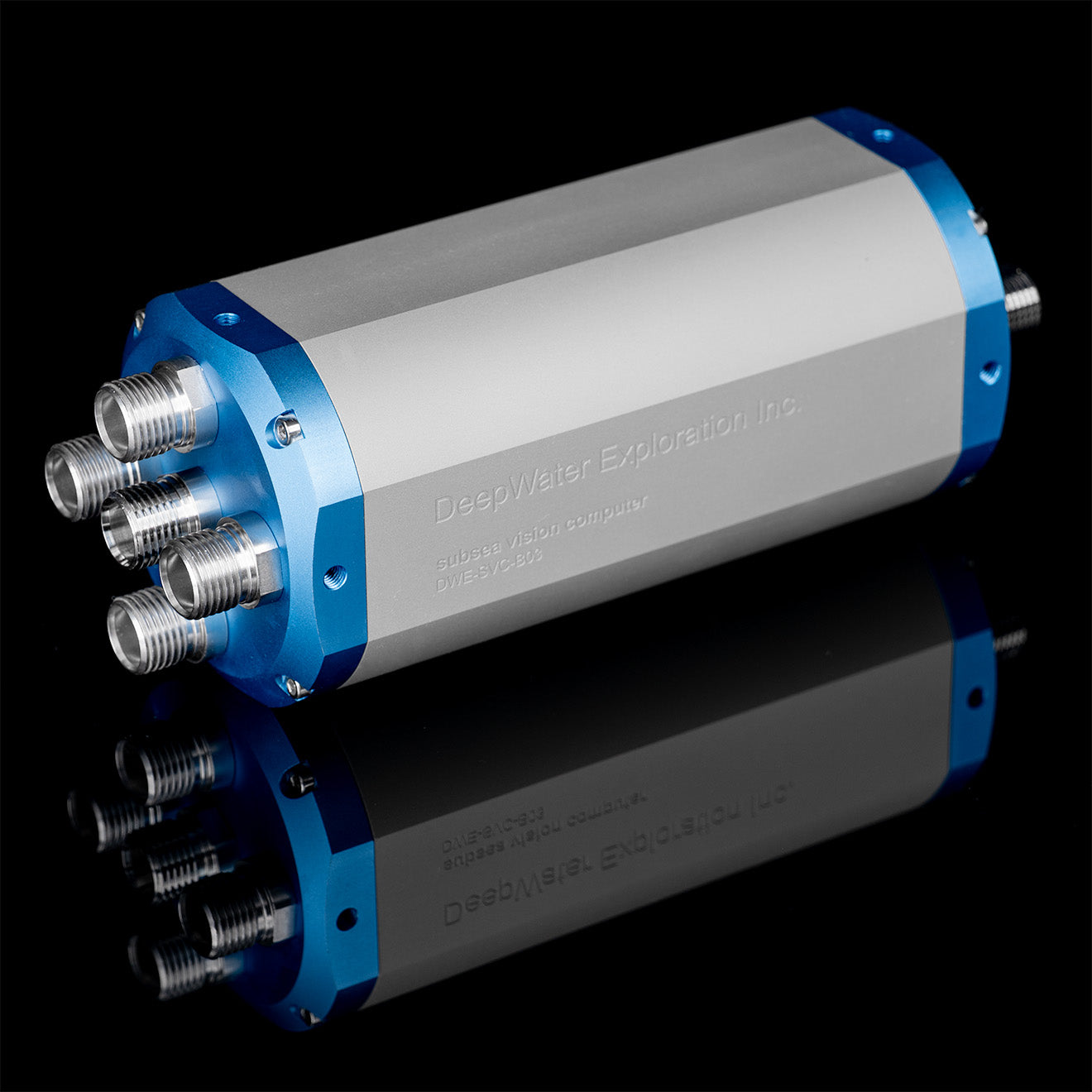 Technical Information for the SVC Pro.
The **Subsea Vision Computer Pro (SVC Pro)** is an intelligent hub for subsea stereo vision. Powered by the **NVIDIA Jetson Orin NX (16GB)**, it provides edge AI performance for complex machine vision models, real-time 3D reconstruction, and autonomous navigation tasks.
## Key Features
* Edge AI Performance: Integrated NVIDIA Jetson Orin NX (16GB RAM) for high-performance computing and machine learning. Live Stereo Compute and VSLAM capable\*.
* Large Internal Storage: Includes 1TB SSD for extensive data recording and OS management.
* Plug-and-Play Management: Automatically configures cameras to "Follower" mode and manages all clock signals to ensure precise frame synchronization without external hardware.
* Multi-Camera Support: Capable of streaming up to 4x stellarHD cameras or 2x explore3D stereo pairs simultaneously.
* Intelligent Strobe Lighting Integration: Synchronizes strobe pulses directly with the camera's exposure window for motion-blur-free imagery.
For information on VSLAM, contact [sales@dwe.ai](mailto:sales@dwe.ai)
## Software Setup
**Get Started with the SVC Pro**: 5-minute setup guide to get your SVC Pro configured.
## Power Specifications
| Property | Value |
| ----------------- | ---------------------- |
| Operating Voltage | 9-50V |
| Operating Current | Depends on voltage |
| Operating Wattage | 20W (Under Heavy Load) |
| Minimum Wattage | 10W (Idle) |
| Maximum Wattage | 25W (With MAXN mode) |
## I/O Connectors
Download the I/O information for your Cobalt variant SVC Pro.
Download the I/O information for your SubConn variant SVC Pro.
## Physical & Environmental
| Property | Value |
| ------------------- | ----------------------------------------- |
| **Weight in Air** | 1.3 Kg |
| **Weight in Water** | 450 g |
| **Depth Rating** | 600M / 2000M / 6000M |
| **Data Outputs** | Raw Images, JPEGs, Depth Map, Point Cloud |
## Camera Input Pinout
Technical Information for the SVC Pro.
The **Subsea Vision Computer Pro (SVC Pro)** is an intelligent hub for subsea stereo vision. Powered by the **NVIDIA Jetson Orin NX (16GB)**, it provides edge AI performance for complex machine vision models, real-time 3D reconstruction, and autonomous navigation tasks.
## Key Features
* Edge AI Performance: Integrated NVIDIA Jetson Orin NX (16GB RAM) for high-performance computing and machine learning. Live Stereo Compute and VSLAM capable\*.
* Large Internal Storage: Includes 1TB SSD for extensive data recording and OS management.
* Plug-and-Play Management: Automatically configures cameras to "Follower" mode and manages all clock signals to ensure precise frame synchronization without external hardware.
* Multi-Camera Support: Capable of streaming up to 4x stellarHD cameras or 2x explore3D stereo pairs simultaneously.
* Intelligent Strobe Lighting Integration: Synchronizes strobe pulses directly with the camera's exposure window for motion-blur-free imagery.
For information on VSLAM, contact [sales@dwe.ai](mailto:sales@dwe.ai)
## Software Setup
**Get Started with the SVC Pro**: 5-minute setup guide to get your SVC Pro configured.
## Power Specifications
| Property | Value |
| ----------------- | ---------------------- |
| Operating Voltage | 9-50V |
| Operating Current | Depends on voltage |
| Operating Wattage | 20W (Under Heavy Load) |
| Minimum Wattage | 10W (Idle) |
| Maximum Wattage | 25W (With MAXN mode) |
## I/O Connectors
Download the I/O information for your Cobalt variant SVC Pro.
Download the I/O information for your SubConn variant SVC Pro.
## Physical & Environmental
| Property | Value |
| ------------------- | ----------------------------------------- |
| **Weight in Air** | 1.3 Kg |
| **Weight in Water** | 450 g |
| **Depth Rating** | 600M / 2000M / 6000M |
| **Data Outputs** | Raw Images, JPEGs, Depth Map, Point Cloud |
## Camera Input Pinout
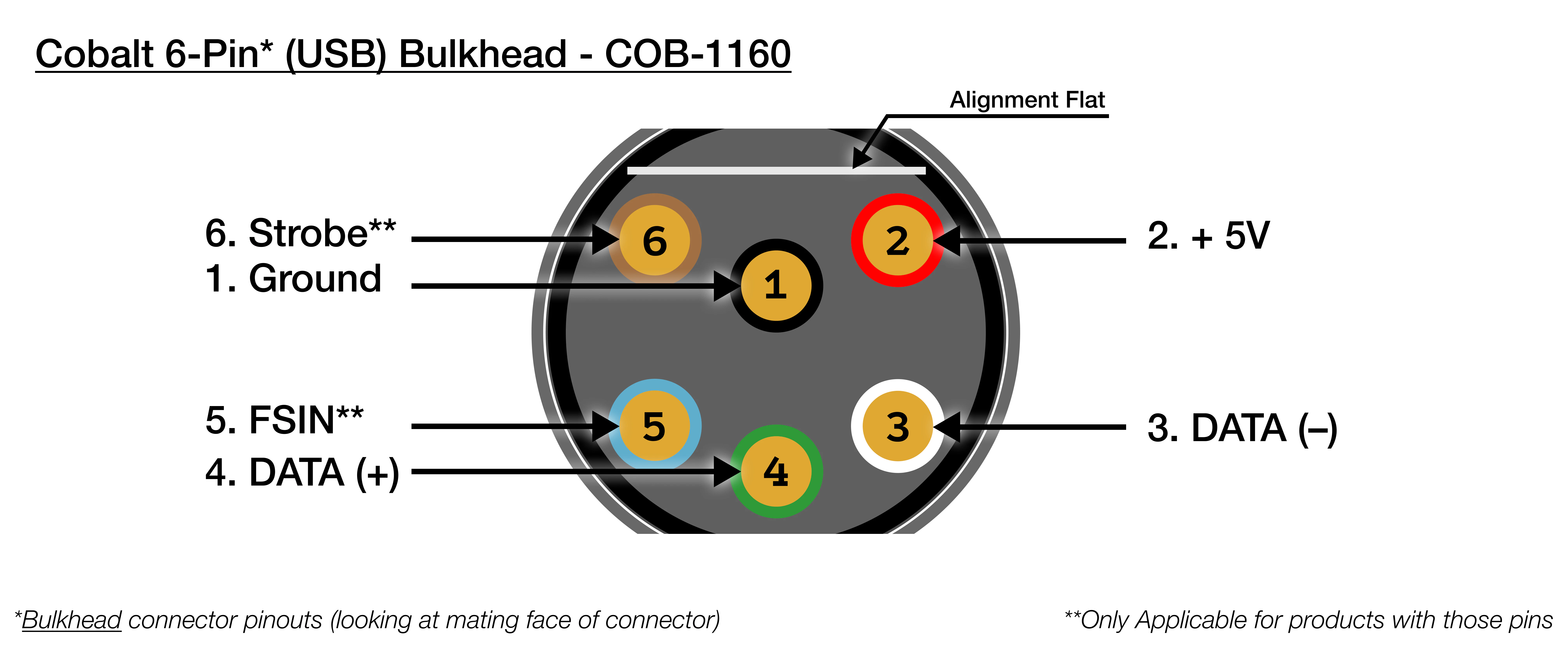 | Cobalt (6 Pin) USB Bulkhead | COB-1160 |
| --------------------------- | ------------------------ |
| 1 | Black : Ground |
| 2 | Red : +5V |
| 3 | White : DATA - |
| 4 | Green : DATA + |
| 5 | Blue : FSIN (Frame-Sync) |
| 6 | Brown : Strobe |
| Cobalt (6 Pin) USB Bulkhead | COB-1160 |
| --------------------------- | ------------------------ |
| 1 | Black : Ground |
| 2 | Red : +5V |
| 3 | White : DATA - |
| 4 | Green : DATA + |
| 5 | Blue : FSIN (Frame-Sync) |
| 6 | Brown : Strobe |
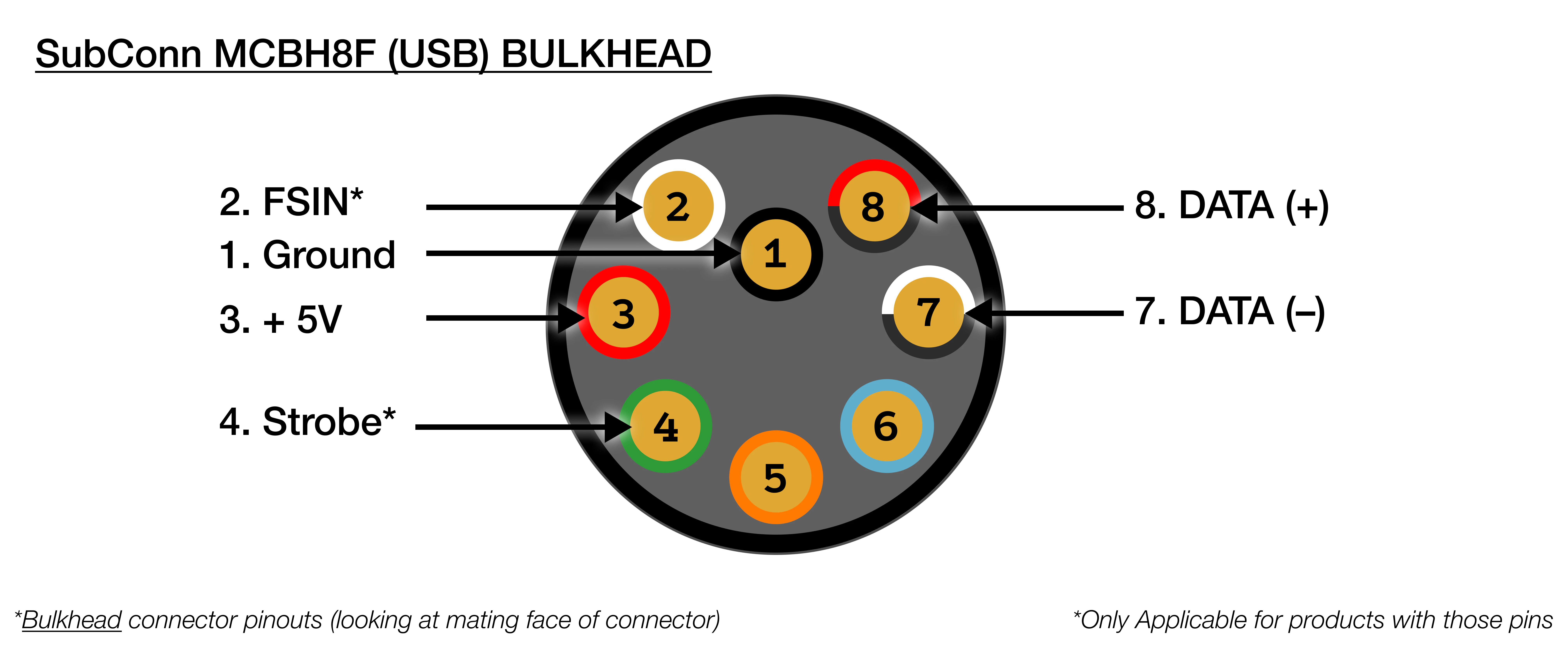 | SubConn MCBH8M (USB) Bulkhead | |
| ----------------------------- | ----------------------------- |
| 1 | **Black : Ground** |
| 2 | **White : FSIN (Frame-Sync)** |
| 3 | **Red : +5V** |
| 4 | **Green : Strobe** |
| 5 | Orange : NC |
| 6 | Blue : NC |
| 7 | **White/black : DATA -** |
| 8 | **Red/black : DATA +** |
## Light Input Pinout
| SubConn MCBH8M (USB) Bulkhead | |
| ----------------------------- | ----------------------------- |
| 1 | **Black : Ground** |
| 2 | **White : FSIN (Frame-Sync)** |
| 3 | **Red : +5V** |
| 4 | **Green : Strobe** |
| 5 | Orange : NC |
| 6 | Blue : NC |
| 7 | **White/black : DATA -** |
| 8 | **Red/black : DATA +** |
## Light Input Pinout
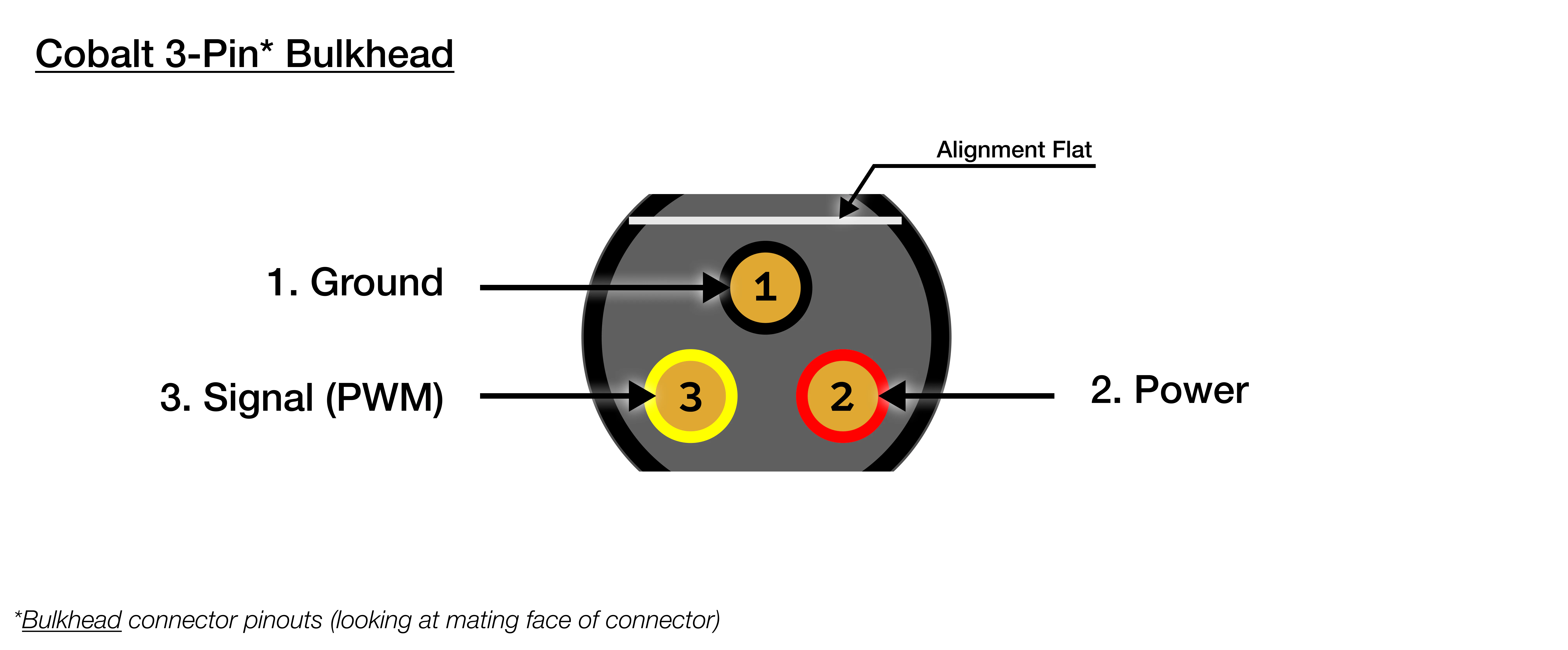 | Cobalt (3 Pin) Bulkhead | |
| ----------------------- | --------------------- |
| 1 | Black : Ground |
| 2 | Red : 12V - 48V |
| 3 | Yellow : Signal (PWM) |
| Cobalt (3 Pin) Bulkhead | |
| ----------------------- | --------------------- |
| 1 | Black : Ground |
| 2 | Red : 12V - 48V |
| 3 | Yellow : Signal (PWM) |
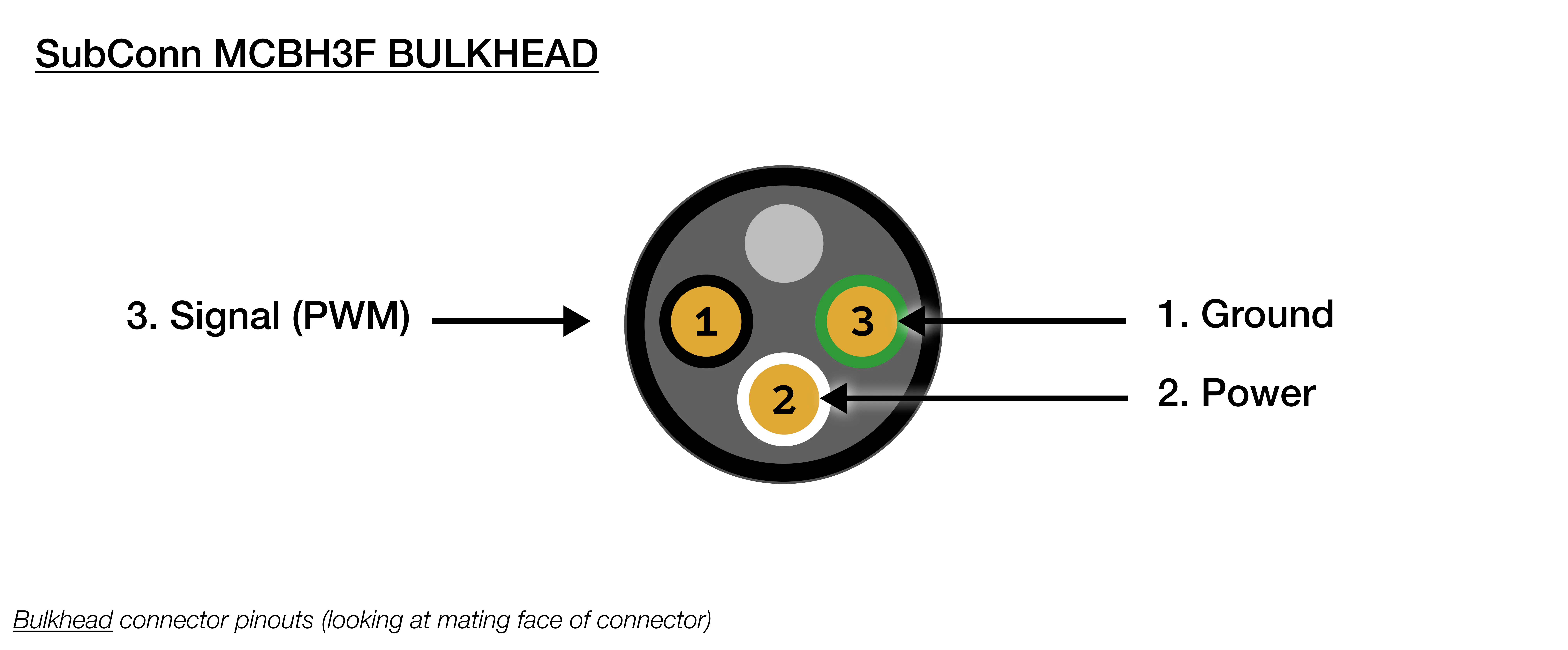 | SubConn MCBH3F Bulkhead | |
| ----------------------- | ------------------ |
| 1 | Black : Ground |
| 2 | White : 12V - 48V |
| 3 | Red : Signal (PWM) |
## Ethernet Output Pinout
| SubConn MCBH3F Bulkhead | |
| ----------------------- | ------------------ |
| 1 | Black : Ground |
| 2 | White : 12V - 48V |
| 3 | Red : Signal (PWM) |
## Ethernet Output Pinout
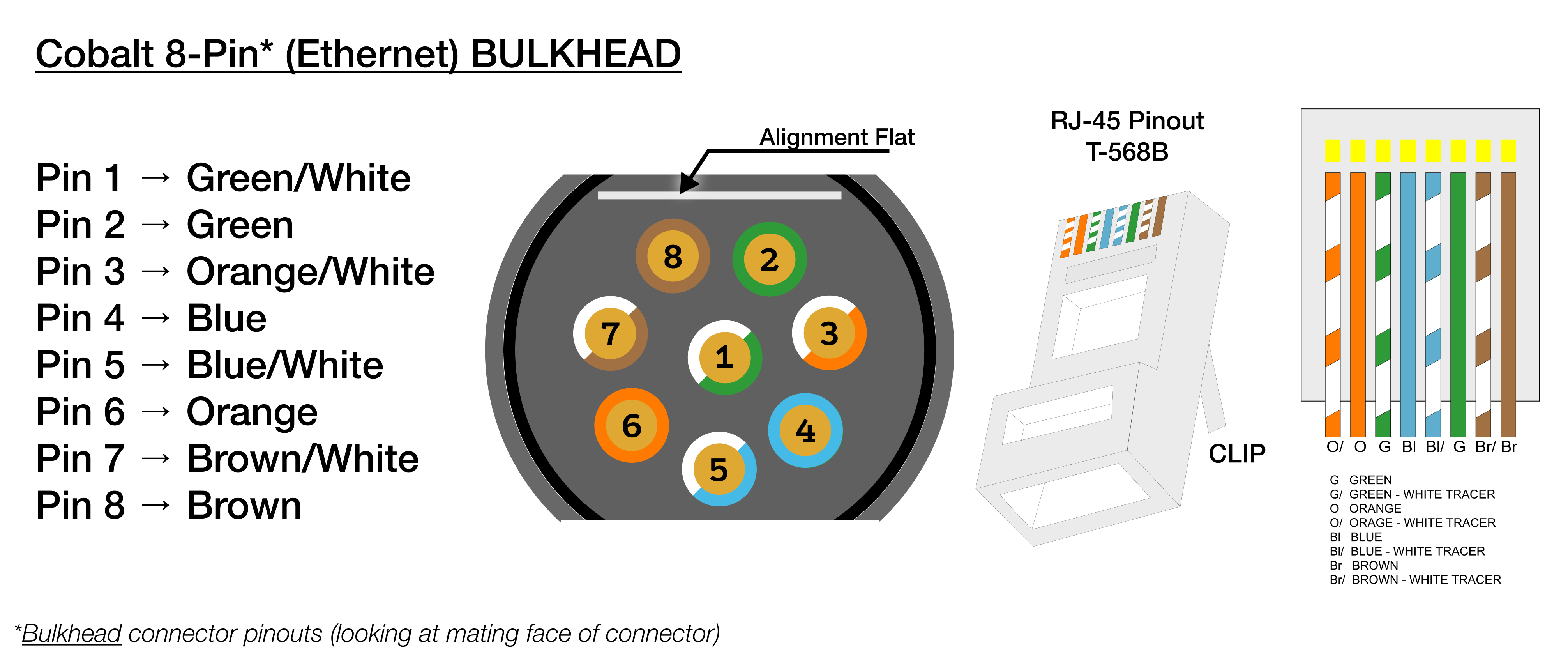 | Cobalt 8-Pin Ethernet Bulkhead | |
| ------------------------------ | ------------ |
| 1 | Green/White |
| 2 | Green |
| 3 | Orange/White |
| 4 | Blue |
| 5 | Blue/White |
| 6 | Orange |
| 7 | Brown/White |
| 8 | Brown |
| Cobalt 8-Pin Ethernet Bulkhead | |
| ------------------------------ | ------------ |
| 1 | Green/White |
| 2 | Green |
| 3 | Orange/White |
| 4 | Blue |
| 5 | Blue/White |
| 6 | Orange |
| 7 | Brown/White |
| 8 | Brown |
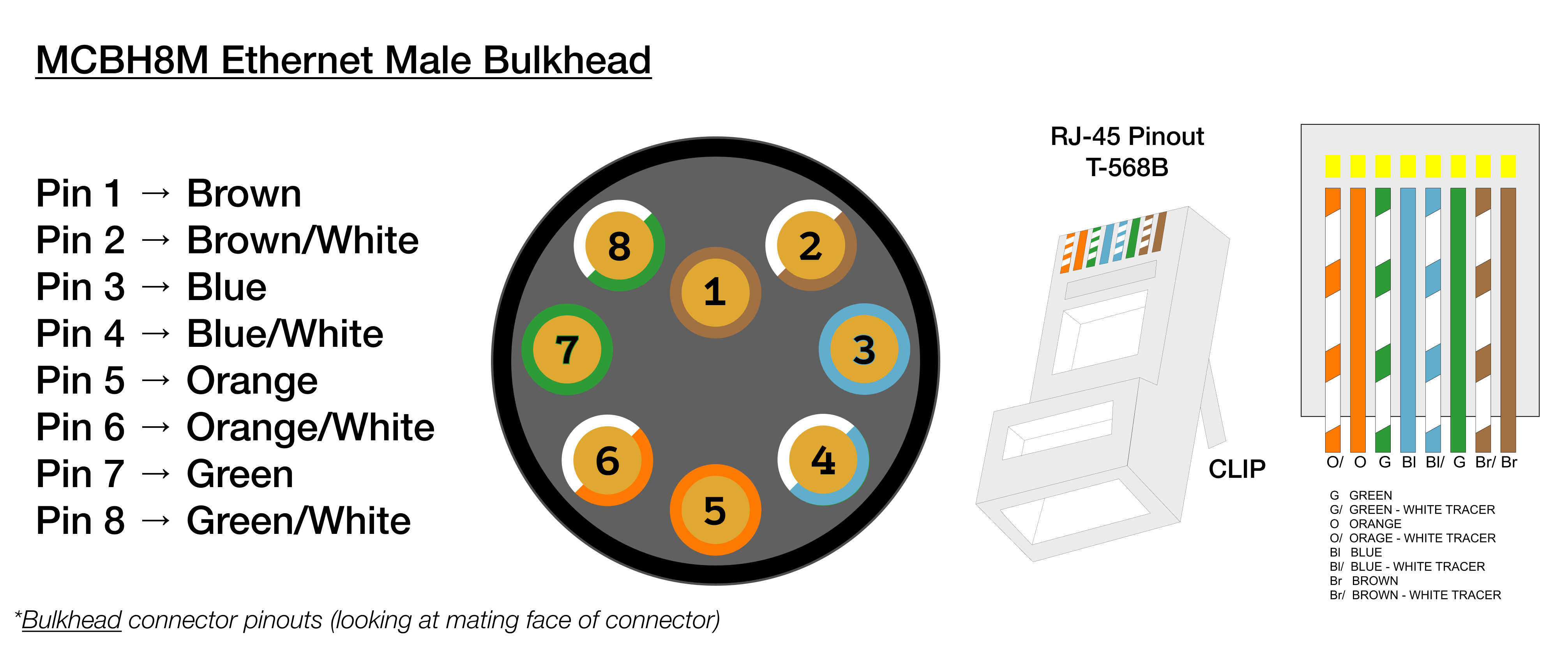 | SubConn MCBH8M (Ethernet) | |
| ------------------------- | ------------ |
| 1 | Brown |
| 2 | Green/White |
| 3 | Green |
| 4 | Orange/White |
| 5 | Orange |
| 6 | Blue/White |
| 7 | Blue |
| 8 | Brown/White |
## Power Input Pinout
| SubConn MCBH8M (Ethernet) | |
| ------------------------- | ------------ |
| 1 | Brown |
| 2 | Green/White |
| 3 | Green |
| 4 | Orange/White |
| 5 | Orange |
| 6 | Blue/White |
| 7 | Blue |
| 8 | Brown/White |
## Power Input Pinout
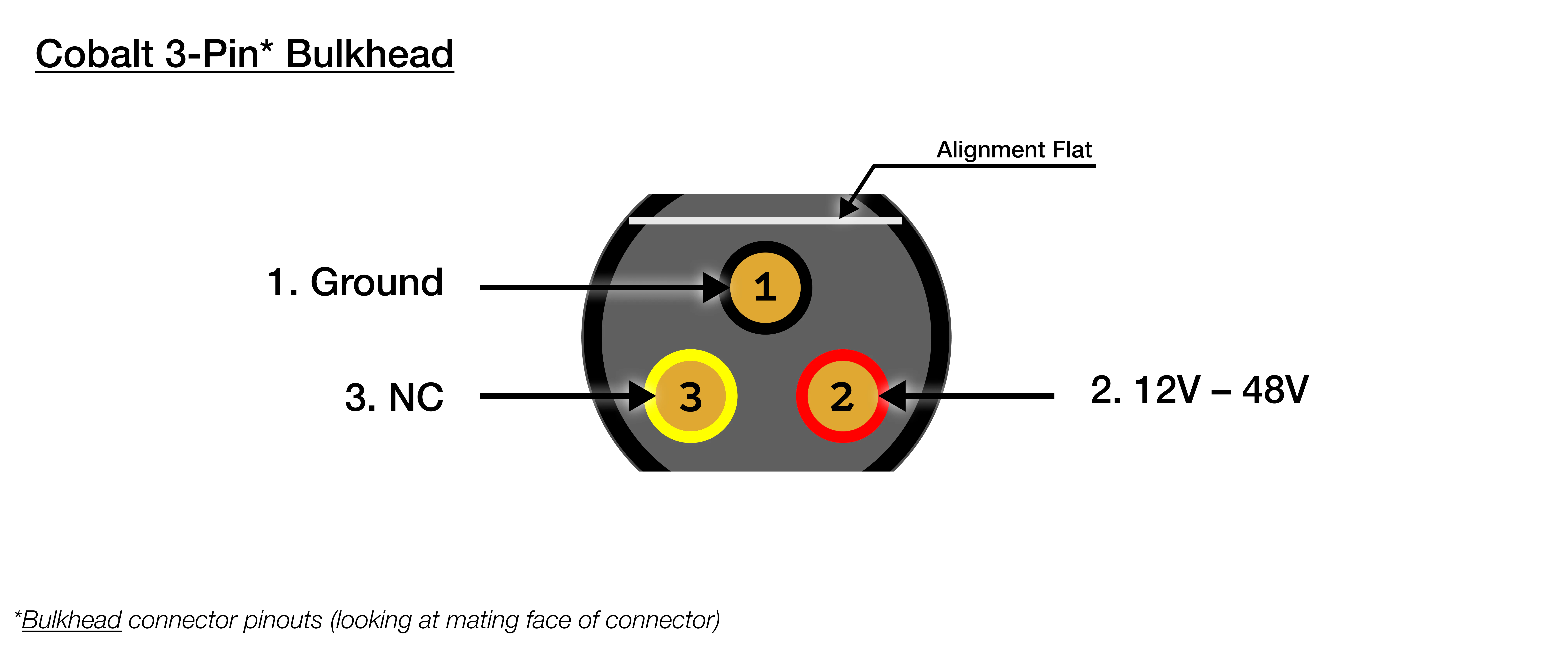 | Cobalt (3 Pin) Bulkhead | |
| ----------------------- | ------------------- |
| 1 | **Black : Ground** |
| 2 | **Red : 12V - 48V** |
| 3 | Yellow : NC |
| Cobalt (3 Pin) Bulkhead | |
| ----------------------- | ------------------- |
| 1 | **Black : Ground** |
| 2 | **Red : 12V - 48V** |
| 3 | Yellow : NC |
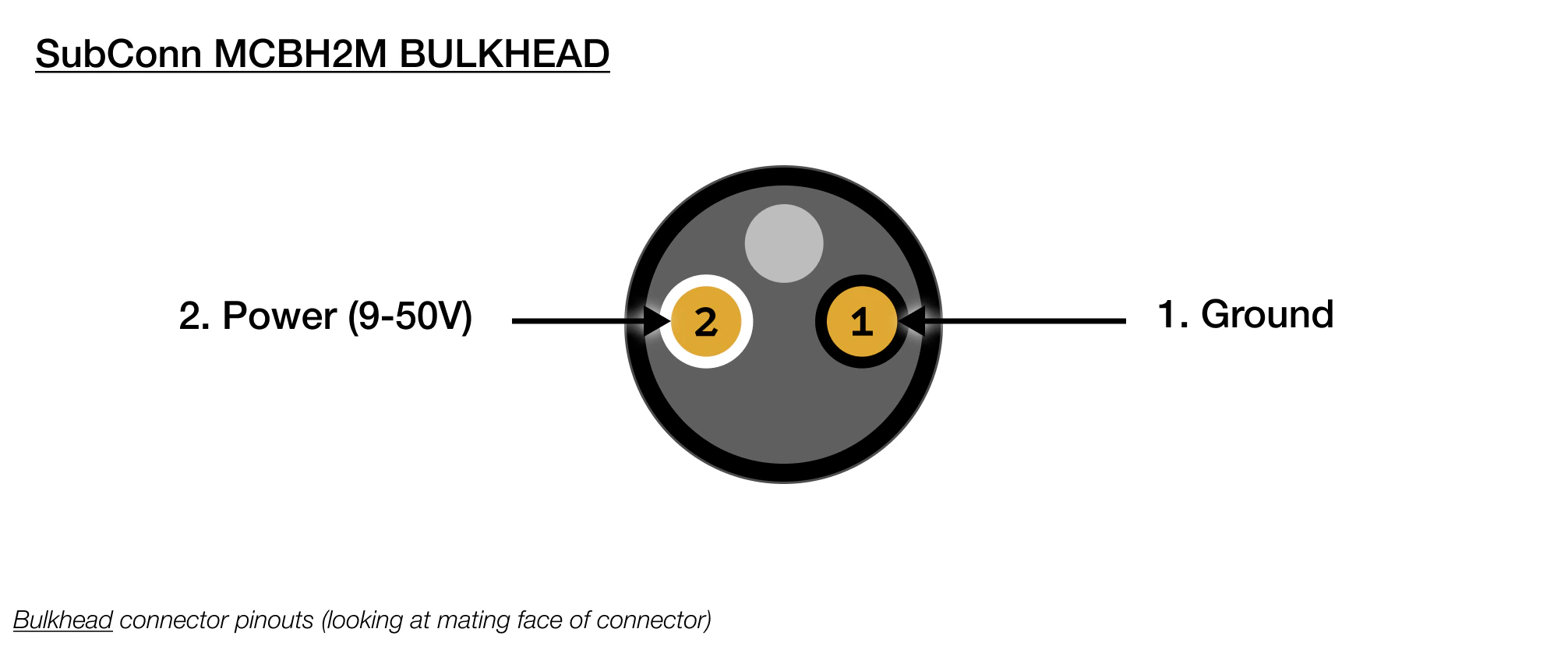 | SubConn MCBH2M Bulkhead | |
| ----------------------- | ---------------- |
| 1 | Black : Ground |
| 2 | White : 9V - 50V |
## CAD Files
SVC Pro (Cobalt) STEP File
SVC Pro (Cobalt) Drawing (PDF)
SVC Pro (SubConn) STEP File
SVC Pro (SubConn) Drawing (PDF)
## NDAA Section 889 Compliance
> This product is fully compliant with Section 889 of the National Defense Authorization Act (NDAA).
> We do not utilize any covered telecommunications equipment, video surveillance equipment, or services
> from prohibited entities (including Huawei, ZTE, Hytera, Hikvision, Dahua, or their affiliates).
> This product contains compliant core processing components and zero proprietary firmware, ensuring
> a secure hardware profile free of restricted data pathways.
## CE (Conformité Européenne)
> This product is CE certified, indicating conformance with relevant European Union directives
> and regulations regarding health, safety, and environmental protection. This certification
> validates that the product meets the high standards required for sale within the European Economic Area.
| SubConn MCBH2M Bulkhead | |
| ----------------------- | ---------------- |
| 1 | Black : Ground |
| 2 | White : 9V - 50V |
## CAD Files
SVC Pro (Cobalt) STEP File
SVC Pro (Cobalt) Drawing (PDF)
SVC Pro (SubConn) STEP File
SVC Pro (SubConn) Drawing (PDF)
## NDAA Section 889 Compliance
> This product is fully compliant with Section 889 of the National Defense Authorization Act (NDAA).
> We do not utilize any covered telecommunications equipment, video surveillance equipment, or services
> from prohibited entities (including Huawei, ZTE, Hytera, Hikvision, Dahua, or their affiliates).
> This product contains compliant core processing components and zero proprietary firmware, ensuring
> a secure hardware profile free of restricted data pathways.
## CE (Conformité Européenne)
> This product is CE certified, indicating conformance with relevant European Union directives
> and regulations regarding health, safety, and environmental protection. This certification
> validates that the product meets the high standards required for sale within the European Economic Area.