> ## Documentation Index
> Fetch the complete documentation index at: https://docs.dwe.ai/llms.txt
> Use this file to discover all available pages before exploring further.
# micro SVC (Subsea Vision Computer)
{/* datasheet-ignore */}
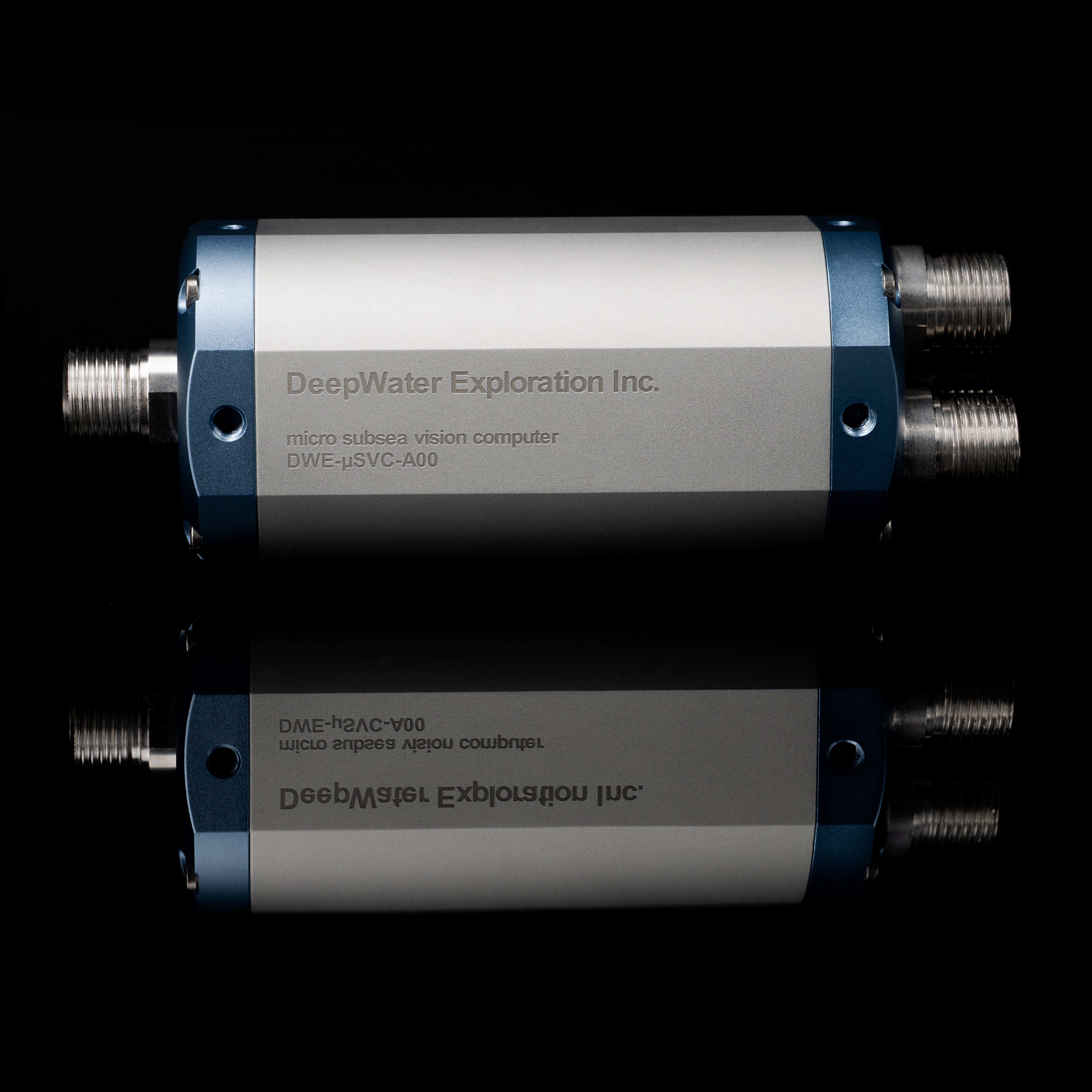 Technical Information for the micro SVC.
## Physical Specifications
| Property | Value |
| ------------------------- | -------------------------------------- |
| Depth Rating | 600 |
| Ingress Protection Rating | IP69K+ equivalent |
| Mass in Air | 1.350 kilograms |
| Mass in Water | 450 grams |
| Material | Aerospace-grade 6061-T6 alloy aluminum |
## Computing Specifications
| Raspberry Pi Zero 2W | |
| --------------------- | -------------------------------- |
| SDRAM | 512MB |
| On Board Storage | 64 GB |
| CPU | 64-bit ARM SoC Quad-Core |
| Wireless | 2.4GHz 802.11 b/g/n wireless LAN |
| Operating Temperature | 0-60 C |
| Ethernet Speeds | 100 BaseT Ethernet |
| Bootup Time | 30 Seconds |
## PoE Specifications
| Waveshare PoE/ETH/USB HAT | |
| ------------------------- | ------------------------------------ |
| Input Voltage | 40-57 V DC |
| Standard | IEEE 802.3af-compliant PoE |
| Ethernet Speeds | 10M / 100M auto-negotiation Ethernet |
| Max Cable Length | 100m (Cat5e) |
## Power Specifications
| Property | Value |
| ----------------- | ---------------------------- |
| Input Voltage | 40-57 V DC |
| Operating Current | -42mA @ 48V (no cameras) |
| Minimum Wattage | -2.1W |
| Operating Wattage | Depends on cameras connected |
| Maximum Wattage | Depends on cameras connected |
## Input Connectors: USB Cameras
Technical Information for the micro SVC.
## Physical Specifications
| Property | Value |
| ------------------------- | -------------------------------------- |
| Depth Rating | 600 |
| Ingress Protection Rating | IP69K+ equivalent |
| Mass in Air | 1.350 kilograms |
| Mass in Water | 450 grams |
| Material | Aerospace-grade 6061-T6 alloy aluminum |
## Computing Specifications
| Raspberry Pi Zero 2W | |
| --------------------- | -------------------------------- |
| SDRAM | 512MB |
| On Board Storage | 64 GB |
| CPU | 64-bit ARM SoC Quad-Core |
| Wireless | 2.4GHz 802.11 b/g/n wireless LAN |
| Operating Temperature | 0-60 C |
| Ethernet Speeds | 100 BaseT Ethernet |
| Bootup Time | 30 Seconds |
## PoE Specifications
| Waveshare PoE/ETH/USB HAT | |
| ------------------------- | ------------------------------------ |
| Input Voltage | 40-57 V DC |
| Standard | IEEE 802.3af-compliant PoE |
| Ethernet Speeds | 10M / 100M auto-negotiation Ethernet |
| Max Cable Length | 100m (Cat5e) |
## Power Specifications
| Property | Value |
| ----------------- | ---------------------------- |
| Input Voltage | 40-57 V DC |
| Operating Current | -42mA @ 48V (no cameras) |
| Minimum Wattage | -2.1W |
| Operating Wattage | Depends on cameras connected |
| Maximum Wattage | Depends on cameras connected |
## Input Connectors: USB Cameras
 | Cobalt (6 Pin) USB Bulkhead | COB-1160 |
| --------------------------- | ------------------ |
| 1 | **Black : Ground** |
| 2 | **Red : +5V** |
| 3 | **White : DATA -** |
| 4 | **Green : DATA +** |
| 5 | Blue : NC |
| 6 | Brown : NC |
| Cobalt (6 Pin) USB Bulkhead | COB-1160 |
| --------------------------- | ------------------ |
| 1 | **Black : Ground** |
| 2 | **Red : +5V** |
| 3 | **White : DATA -** |
| 4 | **Green : DATA +** |
| 5 | Blue : NC |
| 6 | Brown : NC |
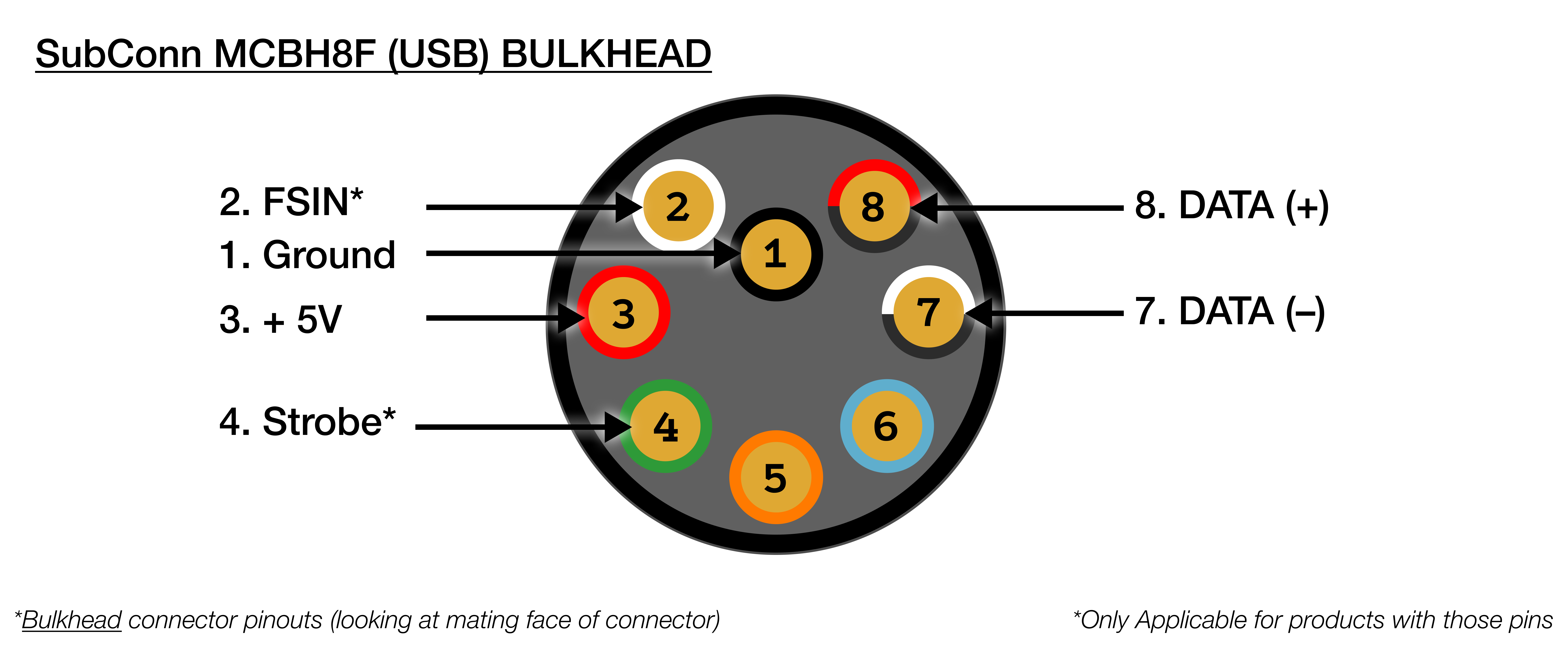 | SubConn MCBH8F (USB) Bulkhead | |
| ----------------------------- | ------------------------ |
| 1 | **Black : Ground** |
| 2 | **Red/Black : DATA +** |
| 3 | **White/Black : DATA -** |
| 4 | Blue : NC |
| 5 | Orange : NC |
| 6 | Green : NC |
| 7 | **Red : +5V** |
| 8 | White : NC |
## Output Connector: PoE/Ethernet
| SubConn MCBH8F (USB) Bulkhead | |
| ----------------------------- | ------------------------ |
| 1 | **Black : Ground** |
| 2 | **Red/Black : DATA +** |
| 3 | **White/Black : DATA -** |
| 4 | Blue : NC |
| 5 | Orange : NC |
| 6 | Green : NC |
| 7 | **Red : +5V** |
| 8 | White : NC |
## Output Connector: PoE/Ethernet
 | Cobalt 8-Pin Ethernet Bulkhead | |
| ------------------------------ | ------------ |
| 1 | Green/White |
| 2 | Green |
| 3 | Orange/White |
| 4 | Blue |
| 5 | Blue/White |
| 6 | Orange |
| 7 | Brown/White |
| 8 | Brown |
| Cobalt 8-Pin Ethernet Bulkhead | |
| ------------------------------ | ------------ |
| 1 | Green/White |
| 2 | Green |
| 3 | Orange/White |
| 4 | Blue |
| 5 | Blue/White |
| 6 | Orange |
| 7 | Brown/White |
| 8 | Brown |
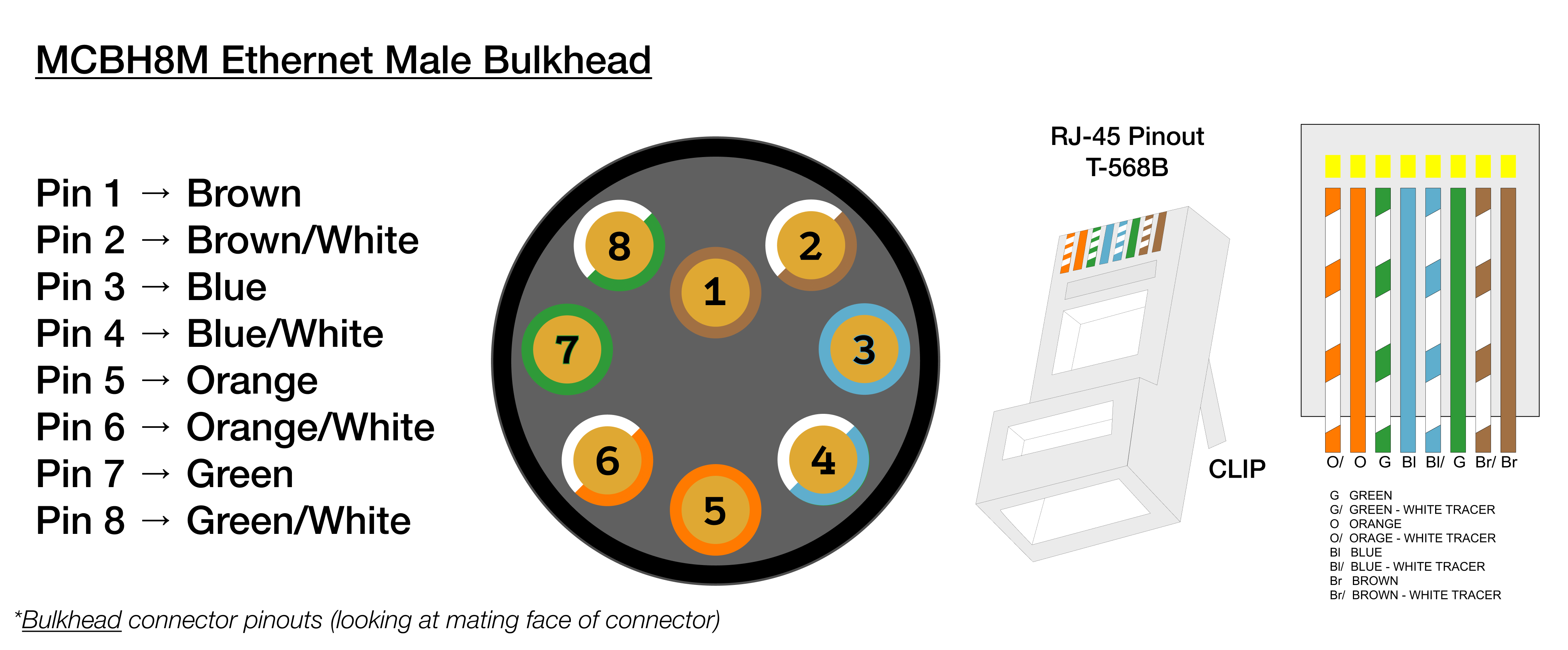 | SubConn MCBH8M (Ethernet) | |
| ------------------------- | ------------ |
| 1 | Brown |
| 2 | Green/White |
| 3 | Green |
| 4 | Orange/White |
| 5 | Orange |
| 6 | Blue/White |
| 7 | Blue |
| 8 | Brown/White |
## CAD Files
microSVC (Cobalt) STEP File
microSVC (Cobalt) Drawing (PDF)
microSVC (SubConn) STEP File
microSVC (SubConn) Drawing (PDF)
## Troubleshooting
This fix only applies to orders placed prior to June 2026.
**What's wrong?** Your microSVC works for a while, then suddenly drops the connection. This one-time fix is know to solve it. It takes about 5 minutes.
Just follow each step in order. Copy each command exactly as shown.
Connect to the microSVC over SSH. When asked, enter:
* **Username:** `dwe`
* **Password:** `deepwater`
Not sure how? Follow [this guide](https://docs.dwe.ai/dwe-os/pages/terminal#accessing-the-terminal) first, then come back here.
This applies the fix. Nothing will look like it happened — that's normal.
```bash theme={null}
cmdline_path=""
for candidate in /boot/firmware/cmdline.txt /boot/cmdline.txt; do
if [ -f "$candidate" ]; then
cmdline_path="$candidate"
break
fi
done
if [ -z "$cmdline_path" ]; then
echo "Warning: cmdline.txt not found in /boot/firmware or /boot, skipping USB quirks configuration."
else
# Idempotent: only append if the quirk isn't already there
if ! grep -q 'usbcore.quirks=0bda:8152:k' "$cmdline_path"; then
sudo sed -i -e 's/$/ usbcore.autosuspend=-1 usbcore.quirks=0bda:8152:k/' "$cmdline_path"
echo "USB quirks added to $cmdline_path"
else
echo "USB quirks already present in $cmdline_path, skipping."
fi
fi
```
What does this command do?
If you see `Warning: ... not found`, stop here and contact support — the fix was not applied.
Type this command and press Enter. The device will reboot, which takes a minute or two.
```bash theme={null}
sudo reboot
```
Once the device has restarted, open the terminal again (Step 1) and paste this command:
```bash theme={null}
for d in /sys/bus/usb/devices/*/; do
vid=$(cat "$d/idVendor" 2>/dev/null)
pid=$(cat "$d/idProduct" 2>/dev/null)
[ "$vid:$pid" = "0bda:8152" ] && echo "$d" && cat "$d/quirks"
done
```
What does this command do?
If you see `0x400` in the output, the fix worked. You're done! If you don't see it, repeat the steps or contact support.
## CE (Conformité Européenne)
> This product is CE certified, indicating conformance with relevant European Union directives
> and regulations regarding health, safety, and environmental protection. This certification
> validates that the product meets the high standards required for sale within the European Economic Area.
| SubConn MCBH8M (Ethernet) | |
| ------------------------- | ------------ |
| 1 | Brown |
| 2 | Green/White |
| 3 | Green |
| 4 | Orange/White |
| 5 | Orange |
| 6 | Blue/White |
| 7 | Blue |
| 8 | Brown/White |
## CAD Files
microSVC (Cobalt) STEP File
microSVC (Cobalt) Drawing (PDF)
microSVC (SubConn) STEP File
microSVC (SubConn) Drawing (PDF)
## Troubleshooting
This fix only applies to orders placed prior to June 2026.
**What's wrong?** Your microSVC works for a while, then suddenly drops the connection. This one-time fix is know to solve it. It takes about 5 minutes.
Just follow each step in order. Copy each command exactly as shown.
Connect to the microSVC over SSH. When asked, enter:
* **Username:** `dwe`
* **Password:** `deepwater`
Not sure how? Follow [this guide](https://docs.dwe.ai/dwe-os/pages/terminal#accessing-the-terminal) first, then come back here.
This applies the fix. Nothing will look like it happened — that's normal.
```bash theme={null}
cmdline_path=""
for candidate in /boot/firmware/cmdline.txt /boot/cmdline.txt; do
if [ -f "$candidate" ]; then
cmdline_path="$candidate"
break
fi
done
if [ -z "$cmdline_path" ]; then
echo "Warning: cmdline.txt not found in /boot/firmware or /boot, skipping USB quirks configuration."
else
# Idempotent: only append if the quirk isn't already there
if ! grep -q 'usbcore.quirks=0bda:8152:k' "$cmdline_path"; then
sudo sed -i -e 's/$/ usbcore.autosuspend=-1 usbcore.quirks=0bda:8152:k/' "$cmdline_path"
echo "USB quirks added to $cmdline_path"
else
echo "USB quirks already present in $cmdline_path, skipping."
fi
fi
```
What does this command do?
If you see `Warning: ... not found`, stop here and contact support — the fix was not applied.
Type this command and press Enter. The device will reboot, which takes a minute or two.
```bash theme={null}
sudo reboot
```
Once the device has restarted, open the terminal again (Step 1) and paste this command:
```bash theme={null}
for d in /sys/bus/usb/devices/*/; do
vid=$(cat "$d/idVendor" 2>/dev/null)
pid=$(cat "$d/idProduct" 2>/dev/null)
[ "$vid:$pid" = "0bda:8152" ] && echo "$d" && cat "$d/quirks"
done
```
What does this command do?
If you see `0x400` in the output, the fix worked. You're done! If you don't see it, repeat the steps or contact support.
## CE (Conformité Européenne)
> This product is CE certified, indicating conformance with relevant European Union directives
> and regulations regarding health, safety, and environmental protection. This certification
> validates that the product meets the high standards required for sale within the European Economic Area.