> ## Documentation Index
> Fetch the complete documentation index at: https://docs.dwe.ai/llms.txt
> Use this file to discover all available pages before exploring further.

# Strømming/opptak

> Kontroller strømme- og opptakstilstander.

## Strømmeknapper <Icon icon="play" iconType="solid" color="green" /> <Icon icon="stop" iconType="solid" color="orange" />

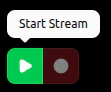
Når kortet **ikke** strømmer, kan du starte strømmen med <Icon icon="play" iconType="solid" color="green" /> **Start strøm**.

<Note>
  <Icon icon="circle" iconType="solid" color="red" /> **Start opptak** er
  deaktivert siden det ikke er noen strøm.
</Note>

<Frame>
  <img src="https://mintcdn.com/deepwaterexplorationinc/PpwtoMTlxduUAF0D/discovery/video-card-buttons/images/startStreamButton.png?fit=max&auto=format&n=PpwtoMTlxduUAF0D&q=85&s=8d61b02d8950e553b0e48f7620b858de" width="111" height="92" data-path="discovery/video-card-buttons/images/startStreamButton.png" />
</Frame>

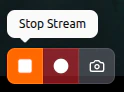
Når kortet **strømmer**, har du tilgang til <Icon icon="stop" iconType="solid" color="orange" /> **Stopp strøm** og <Icon icon="circle" iconType="solid" color="red" /> **Start opptak**.
Hvis strømmen er **MJPEG**, har du tilgang til <Icon icon="camera" color="#46bae7" /> [**Øyeblikksbilde**](/no/discovery/video-card-buttons/snapshotting).
<Frame>
  <img src="https://mintcdn.com/deepwaterexplorationinc/PpwtoMTlxduUAF0D/discovery/video-card-buttons/images/stopStreamButton.png?fit=max&auto=format&n=PpwtoMTlxduUAF0D&q=85&s=2520d840aebd5b3f1433d1b385922e9e" width="124" height="92" data-path="discovery/video-card-buttons/images/stopStreamButton.png" />
</Frame>

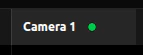
Det vil **ikke** være noe aktivitetslys når kortet **ikke** strømmer.
<Frame>
  <img src="https://mintcdn.com/deepwaterexplorationinc/PpwtoMTlxduUAF0D/discovery/video-card-buttons/images/noStreamLight.png?fit=max&auto=format&n=PpwtoMTlxduUAF0D&q=85&s=62253693a4dd6d36c2fab7a69b35c003" width="143" height="55" data-path="discovery/video-card-buttons/images/noStreamLight.png" />
</Frame>

Aktivitetslyset vil være **konstant** <Icon icon="circle" iconType="solid" color="green" size={8} /> når kortet **strømmer**.

<Frame>
  <img src="https://mintcdn.com/deepwaterexplorationinc/PpwtoMTlxduUAF0D/discovery/video-card-buttons/images/activeStreamLight.png?fit=max&auto=format&n=PpwtoMTlxduUAF0D&q=85&s=a774521e18c5188c4fc686bb7180220e" width="143" height="55" data-path="discovery/video-card-buttons/images/activeStreamLight.png" />
</Frame>

***

## Opptaksknapper <Icon icon="circle" iconType="solid" color="red" /> <Icon icon="record-vinyl" iconType="regular" color="red" />

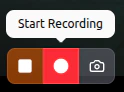
Når kortet strømmer **og** videoen ikke allerede tas opp, kan du **starte** et opptak ved å trykke på <Icon icon="circle" iconType="solid" color="red" /> **Start opptak**.

<Frame>
  <img src="https://mintcdn.com/deepwaterexplorationinc/PpwtoMTlxduUAF0D/discovery/video-card-buttons/images/recordButton.png?fit=max&auto=format&n=PpwtoMTlxduUAF0D&q=85&s=af0e168f7e41fdd31585e259b9e26086" width="124" height="92" data-path="discovery/video-card-buttons/images/recordButton.png" />
</Frame>

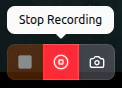
Mens kortet **tar opp**, kan du avslutte opptaket med <Icon icon="record-vinyl" iconType="regular" color="red" /> **Stopp opptak**.

<Frame>
  <img src="https://mintcdn.com/deepwaterexplorationinc/PpwtoMTlxduUAF0D/discovery/video-card-buttons/images/stopRecordButton.png?fit=max&auto=format&n=PpwtoMTlxduUAF0D&q=85&s=47a6a008782d2165aaeac112447b964b" width="122" height="88" data-path="discovery/video-card-buttons/images/stopRecordButton.png" />
</Frame>

Aktivitetslyset vil **blinke sakte** <Icon icon="circle" iconType="solid" color="red" size={8} /> mens kortet aktivt tar opp.

<Frame>
  <video controls={false} autoPlay loop className="h-full aspect-video" src="https://mintcdn.com/deepwaterexplorationinc/e0wVLTi_h45Y5fkF/discovery/video-card-buttons/images/animations/activeRecordingLight.webm?fit=max&auto=format&n=e0wVLTi_h45Y5fkF&q=85&s=f13eeb5759ee4ef292d1b1e4f303e981" data-path="discovery/video-card-buttons/images/animations/activeRecordingLight.webm" />
</Frame>

> De resulterende videoene finnes via filstien under "Lagringsstier" i [Innstillinger for opptaksstier](/no/discovery/global-settings/capture-paths)-kortet.