> ## Documentation Index
> Fetch the complete documentation index at: https://docs.dwe.ai/llms.txt
> Use this file to discover all available pages before exploring further.

# Nettverksinnstillinger

> Nettverksdetaljer og avansert nettverkskonfigurasjon.

Nettverksinnstillingene viser skannede nettverks-IP-er du kan kopiere hvis du trenger dem.
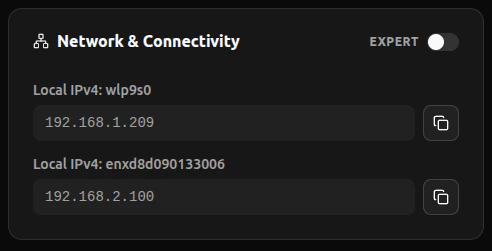
<Frame>
  <img width="400px" src="https://mintcdn.com/deepwaterexplorationinc/dfjvCdz1MNiiPVwN/discovery/global-settings/images/networkingSettings.png?fit=max&auto=format&n=dfjvCdz1MNiiPVwN&q=85&s=e80631adf98fe01a47de014ecb7f0047" data-path="discovery/global-settings/images/networkingSettings.png" />
</Frame>

## Avansert nettverk

For strenge brannmurer er det mulig å begrense WebRTC UDP-trafikken til et bestemt portintervall.

<Frame>
  <video controls={false} autoPlay loop className="w-full aspect-video" src="https://mintcdn.com/deepwaterexplorationinc/e0wVLTi_h45Y5fkF/discovery/global-settings/images/animations/porttechnicalities.webm?fit=max&auto=format&n=e0wVLTi_h45Y5fkF&q=85&s=c52a34bbe6f15e10d9b0836380e2a0a3" data-path="discovery/global-settings/images/animations/porttechnicalities.webm" />
</Frame>

For å tilbakestille WebRTC UDP-trafikkbegrensningene, slå av **Ekspertmodus**.

<Frame>
  <video controls={false} autoPlay loop className="w-full aspect-video" src="https://mintcdn.com/deepwaterexplorationinc/e0wVLTi_h45Y5fkF/discovery/global-settings/images/animations/resetports.webm?fit=max&auto=format&n=e0wVLTi_h45Y5fkF&q=85&s=54f79d1fe6efbf2276fd0f4f6d259329" data-path="discovery/global-settings/images/animations/resetports.webm" />
</Frame>
