> ## Documentation Index
> Fetch the complete documentation index at: https://docs.dwe.ai/llms.txt
> Use this file to discover all available pages before exploring further.

# 스트리밍/녹화

> 스트리밍 및 녹화 상태를 제어합니다.

## 스트리밍 버튼 <Icon icon="play" iconType="solid" color="green" /> <Icon icon="stop" iconType="solid" color="orange" />

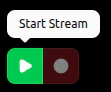
카드가 스트리밍 중이 **아닐** 때 <Icon icon="play" iconType="solid" color="green" /> **Start Stream**으로 스트림을 시작할 수 있습니다.

<Note>
  <Icon icon="circle" iconType="solid" color="red" /> **Start Recording**은 스트림이 없기 때문에
  비활성화되어 있습니다.
</Note>

<Frame>
  <img src="https://mintcdn.com/deepwaterexplorationinc/PpwtoMTlxduUAF0D/discovery/video-card-buttons/images/startStreamButton.png?fit=max&auto=format&n=PpwtoMTlxduUAF0D&q=85&s=8d61b02d8950e553b0e48f7620b858de" width="111" height="92" data-path="discovery/video-card-buttons/images/startStreamButton.png" />
</Frame>

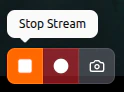
카드가 스트리밍 **중일** 때는 <Icon icon="stop" iconType="solid" color="orange" /> **Stop Stream**과 <Icon icon="circle" iconType="solid" color="red" /> **Start Recording**을 사용할 수 있습니다.
스트림이 **MJPEG**라면 <Icon icon="camera" color="#46bae7" /> [**Snapshot**](/ko/discovery/video-card-buttons/snapshotting)도 사용할 수 있습니다.
<Frame>
  <img src="https://mintcdn.com/deepwaterexplorationinc/PpwtoMTlxduUAF0D/discovery/video-card-buttons/images/stopStreamButton.png?fit=max&auto=format&n=PpwtoMTlxduUAF0D&q=85&s=2520d840aebd5b3f1433d1b385922e9e" width="124" height="92" data-path="discovery/video-card-buttons/images/stopStreamButton.png" />
</Frame>

카드가 스트리밍 중이 **아닐** 때는 활동 표시등이 **없습니다**.
<Frame>
  <img src="https://mintcdn.com/deepwaterexplorationinc/PpwtoMTlxduUAF0D/discovery/video-card-buttons/images/noStreamLight.png?fit=max&auto=format&n=PpwtoMTlxduUAF0D&q=85&s=62253693a4dd6d36c2fab7a69b35c003" width="143" height="55" data-path="discovery/video-card-buttons/images/noStreamLight.png" />
</Frame>

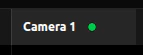
카드가 스트리밍 **중일** 때는 활동 표시등이 **상시 점등** <Icon icon="circle" iconType="solid" color="green" size={8} /> 상태가 됩니다.

<Frame>
  <img src="https://mintcdn.com/deepwaterexplorationinc/PpwtoMTlxduUAF0D/discovery/video-card-buttons/images/activeStreamLight.png?fit=max&auto=format&n=PpwtoMTlxduUAF0D&q=85&s=a774521e18c5188c4fc686bb7180220e" width="143" height="55" data-path="discovery/video-card-buttons/images/activeStreamLight.png" />
</Frame>

***

## 녹화 버튼 <Icon icon="circle" iconType="solid" color="red" /> <Icon icon="record-vinyl" iconType="regular" color="red" />

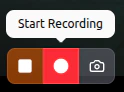
카드가 스트리밍 중**이고** 아직 녹화 중이 아닐 때, <Icon icon="circle" iconType="solid" color="red" /> **Start Recording**을 눌러 녹화를 **시작**할 수 있습니다.
<Frame>
  <img src="https://mintcdn.com/deepwaterexplorationinc/PpwtoMTlxduUAF0D/discovery/video-card-buttons/images/recordButton.png?fit=max&auto=format&n=PpwtoMTlxduUAF0D&q=85&s=af0e168f7e41fdd31585e259b9e26086" width="124" height="92" data-path="discovery/video-card-buttons/images/recordButton.png" />
</Frame>

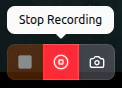
카드가 **녹화 중**일 때는 <Icon icon="record-vinyl" iconType="regular" color="red" /> **Stop Recording**으로 녹화를 종료할 수 있습니다.

<Frame>
  <img src="https://mintcdn.com/deepwaterexplorationinc/PpwtoMTlxduUAF0D/discovery/video-card-buttons/images/stopRecordButton.png?fit=max&auto=format&n=PpwtoMTlxduUAF0D&q=85&s=47a6a008782d2165aaeac112447b964b" width="122" height="88" data-path="discovery/video-card-buttons/images/stopRecordButton.png" />
</Frame>

카드가 녹화 중일 때 활동 표시등은 **느리게 깜박이는** <Icon icon="circle" iconType="solid" color="red" size={8} /> 상태가 됩니다.

<Frame>
  <video controls={false} autoPlay loop className="h-full aspect-video" src="https://mintcdn.com/deepwaterexplorationinc/e0wVLTi_h45Y5fkF/discovery/video-card-buttons/images/animations/activeRecordingLight.webm?fit=max&auto=format&n=e0wVLTi_h45Y5fkF&q=85&s=f13eeb5759ee4ef292d1b1e4f303e981" data-path="discovery/video-card-buttons/images/animations/activeRecordingLight.webm" />
</Frame>

> 결과 동영상은 [Capture Path Settings](/ko/discovery/global-settings/capture-paths) 카드의 "Save Paths" 아래에 있는 파일 경로를 통해 찾을 수 있습니다.