> ## Documentation Index
> Fetch the complete documentation index at: https://docs.dwe.ai/llms.txt
> Use this file to discover all available pages before exploring further.

# 네트워킹 설정

> 네트워크 세부 정보 및 고급 네트워킹 구성.

네트워크 설정은 필요할 경우 복사할 수 있는 스캔된 네트워크 IP를 보여줍니다.
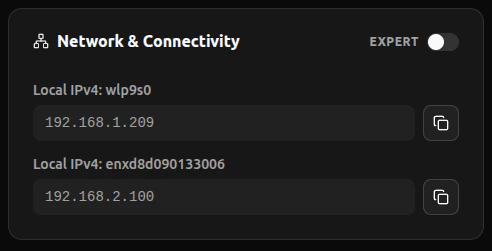
<Frame>
  <img width="400px" src="https://mintcdn.com/deepwaterexplorationinc/dfjvCdz1MNiiPVwN/discovery/global-settings/images/networkingSettings.png?fit=max&auto=format&n=dfjvCdz1MNiiPVwN&q=85&s=e80631adf98fe01a47de014ecb7f0047" data-path="discovery/global-settings/images/networkingSettings.png" />
</Frame>

## 고급 네트워킹

엄격한 방화벽이 있는 경우, WebRTC UDP 트래픽을 특정 포트 범위로 제한하는 옵션이 제공됩니다.

<Frame>
  <video controls={false} autoPlay loop className="w-full aspect-video" src="https://mintcdn.com/deepwaterexplorationinc/e0wVLTi_h45Y5fkF/discovery/global-settings/images/animations/porttechnicalities.webm?fit=max&auto=format&n=e0wVLTi_h45Y5fkF&q=85&s=c52a34bbe6f15e10d9b0836380e2a0a3" data-path="discovery/global-settings/images/animations/porttechnicalities.webm" />
</Frame>

WebRTC UDP 트래픽 제한을 재설정하려면 **Expert Mode**를 끄세요.

<Frame>
  <video controls={false} autoPlay loop className="w-full aspect-video" src="https://mintcdn.com/deepwaterexplorationinc/e0wVLTi_h45Y5fkF/discovery/global-settings/images/animations/resetports.webm?fit=max&auto=format&n=e0wVLTi_h45Y5fkF&q=85&s=54f79d1fe6efbf2276fd0f4f6d259329" data-path="discovery/global-settings/images/animations/resetports.webm" />
</Frame>
