> ## Documentation Index
> Fetch the complete documentation index at: https://docs.dwe.ai/llms.txt
> Use this file to discover all available pages before exploring further.
# 기본 카드 옵션
> 새 비디오 카드의 기본 매개변수를 설정합니다.
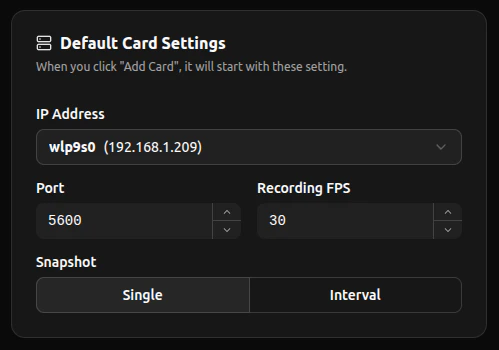
이 설정은 기본 **IP 주소 선택**, **포트 번호**, **FPS**, **스냅샷 모드**를 설정하는 데 사용됩니다. 각 **새** 카드는 이 기본값을 자동으로 상속받습니다.
 ## 네트워크 및 녹화
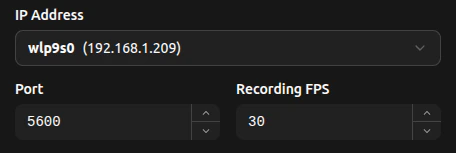 새로 추가되는 카드의 네트워크 기본값을 제어하려면 **IP Address** 박스를 누를 때 표시되는 감지된 IP 주소 드롭다운에서 선택하세요.
설정된 포트 값은 사용되지 않는 포트로 자동으로 증가합니다 (오름차순).
포트는 **1025-65535** 범위로 제한됩니다.
녹화 FPS는 dweOS에서 설정한 값이나 기본값 등 카메라에 설정된 값과 동일하게 설정하는 것이 좋습니다.
## 스냅샷
여기에서 새로 추가되는 각 카드의 스냅샷 모드를 설정할 수 있습니다. 아이콘은 비디오 카드 기능의 [스냅샷](/ko/discovery/video-card-buttons/snapshotting#단일-스냅샷) 섹션에 표시된 것처럼 모드에 따라 다릅니다.
새로 추가되는 카드의 네트워크 기본값을 제어하려면 **IP Address** 박스를 누를 때 표시되는 감지된 IP 주소 드롭다운에서 선택하세요.
설정된 포트 값은 사용되지 않는 포트로 자동으로 증가합니다 (오름차순).
포트는 **1025-65535** 범위로 제한됩니다.
녹화 FPS는 dweOS에서 설정한 값이나 기본값 등 카메라에 설정된 값과 동일하게 설정하는 것이 좋습니다.
## 스냅샷
여기에서 새로 추가되는 각 카드의 스냅샷 모드를 설정할 수 있습니다. 아이콘은 비디오 카드 기능의 [스냅샷](/ko/discovery/video-card-buttons/snapshotting#단일-스냅샷) 섹션에 표시된 것처럼 모드에 따라 다릅니다.
 **Single** 스냅샷은 버튼을 누른 순간에 한 장의 사진을 찍습니다.
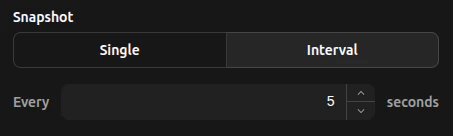 **Interval** 스냅샷은 숫자 입력란에 지정된 간격으로 사진을 찍습니다.