> ## Documentation Index
> Fetch the complete documentation index at: https://docs.dwe.ai/llms.txt
> Use this file to discover all available pages before exploring further.
# 캡처 경로
> 녹화 및 스냅샷이 저장되는 위치를 구성합니다.
여기서 모든 동영상이나 스냅샷이 저장될 출력 폴더를 지정할 수 있습니다. 기본적으로 디렉터리는 녹화의 경우 시스템의 **Videos** 폴더, 스냅샷의 경우 **Documents** 폴더로 설정됩니다. 두 폴더 안에는 새로운 Discovery 폴더가 생성됩니다.
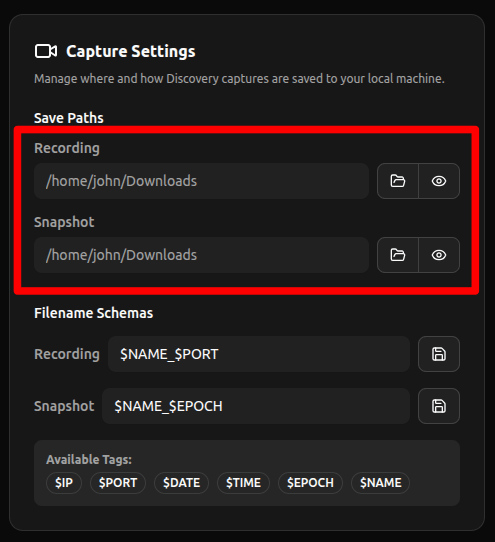 * **열기:** 파일 탐색기를 열어 폴더를 선택합니다.
* **보기:** 파일 탐색기를 열어 폴더 내의 파일을 확인합니다.
* **열기:** 파일 탐색기를 열어 폴더를 선택합니다.
* **보기:** 파일 탐색기를 열어 폴더 내의 파일을 확인합니다.