> ## Documentation Index
> Fetch the complete documentation index at: https://docs.dwe.ai/llms.txt
> Use this file to discover all available pages before exploring further.

# ビデオカードの概要

> 各ビデオカードで利用できる操作の概要です。

各ビデオカードには、ストリーム、録画状態、ビューを管理するためのいくつかのコントロールが用意されています。
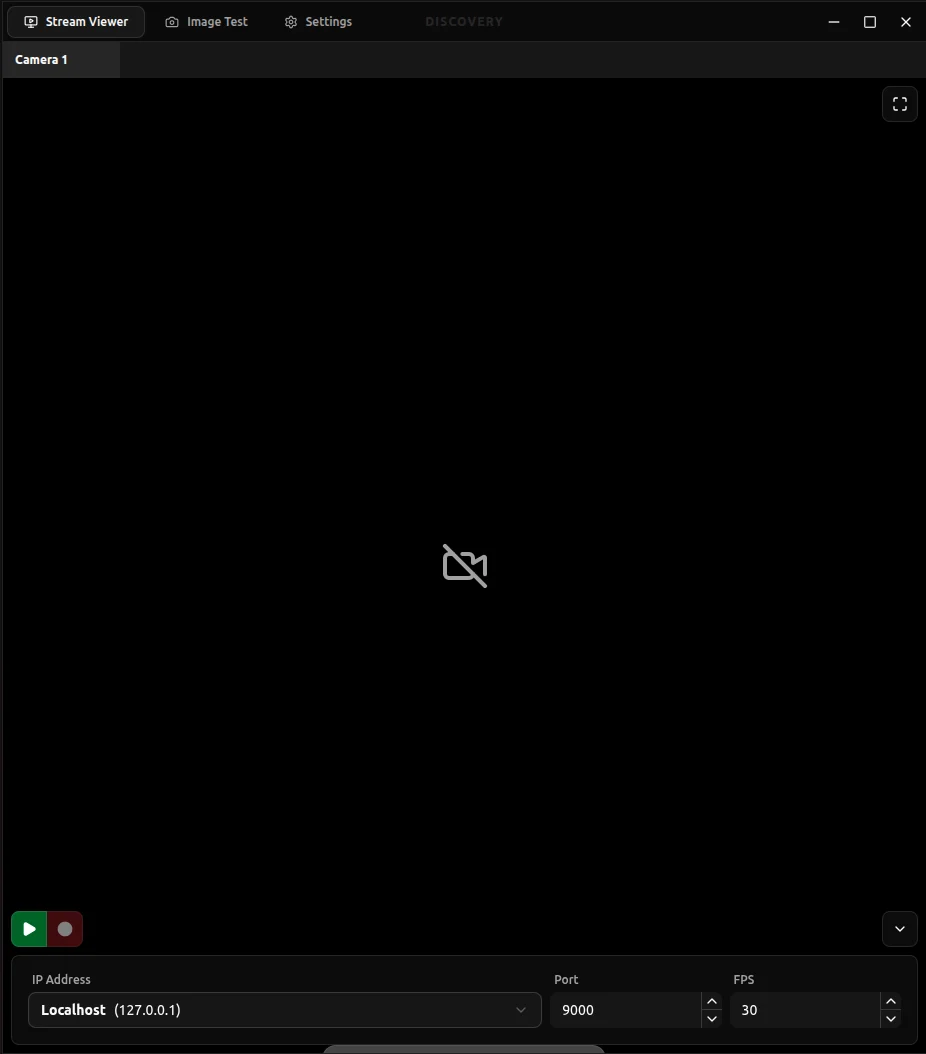
<Frame>
  <img width="400px" src="https://mintcdn.com/deepwaterexplorationinc/dDpT5_8Eip43UIec/discovery/video-card-buttons/images/videoCard.png?fit=max&auto=format&n=dDpT5_8Eip43UIec&q=85&s=bfcadb344199b2ee1d216dc72fea4223" data-path="discovery/video-card-buttons/images/videoCard.png" />
</Frame>

特定のカードボタンについて詳しく学ぶには、以下のセクションを選択してください:

<CardGroup cols={2}>
  <Card title="IP、ポート、FPS" icon="network-wired" href="/ja/discovery/video-card-buttons/ip-port-fps" horizontal>
    ビデオカードのストリーミングエンドポイントを設定します。
  </Card>

  <Card title="ストリーミング/録画" icon="video" href="/ja/discovery/video-card-buttons/video-feed-buttons" horizontal>
    ストリーミングと録画の状態を制御します。
  </Card>

  <Card title="スナップショット" icon="camera" href="/ja/discovery/video-card-buttons/snapshotting" horizontal>
    現在のストリームのスナップショットを撮影します。
  </Card>

  <Card title="設定ボタン" icon="sliders" href="/ja/discovery/video-card-buttons/config-button" horizontal>
    設定フィールドの表示/非表示を切り替えます。
  </Card>

  <Card title="フィットビュー" icon="expand" href="/ja/discovery/video-card-buttons/view-button" horizontal>
    映像フィードのカード内での表示方法を調整します。
  </Card>

  <Card title="ビットレート" icon="chart-line" href="/ja/discovery/video-card-buttons/bitrate" horizontal>
    ストリームのビットレートを表示し、時間経過で追跡します。
  </Card>
</CardGroup>
