> ## Documentation Index
> Fetch the complete documentation index at: https://docs.dwe.ai/llms.txt
> Use this file to discover all available pages before exploring further.
# micro SVC (Subsea Vision Computer)
{/* datasheet-ignore */}
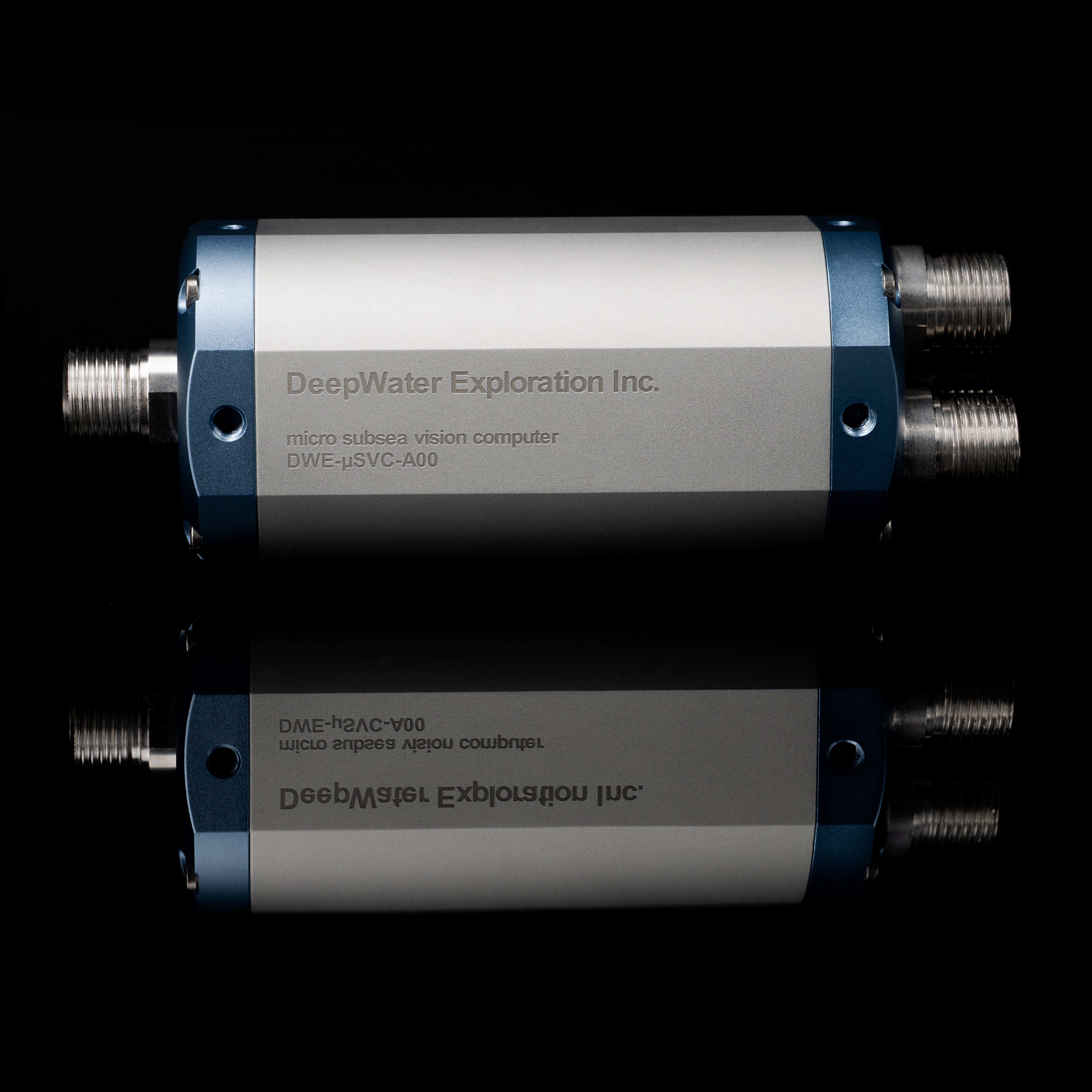 Informations techniques pour le micro SVC.
## Spécifications physiques
| Propriété | Valeur |
| -------------------- | ----------------------------------------- |
| Profondeur nominale | 600 |
| Indice de protection | équivalent IP69K+ |
| Masse dans l'air | 1,350 kilogramme |
| Masse dans l'eau | 450 grammes |
| Matériau | Aluminium 6061-T6 de qualité aérospatiale |
## Spécifications informatiques
| Raspberry Pi Zero 2W | |
| ----------------------------- | --------------------------------- |
| SDRAM | 512 Mo |
| Stockage embarqué | 64 Go |
| CPU | ARM SoC Quad-Core 64 bits |
| Sans fil | LAN sans fil 2,4 GHz 802.11 b/g/n |
| Température de fonctionnement | 0-60 °C |
| Vitesses Ethernet | Ethernet 100 BaseT |
| Temps de démarrage | 30 secondes |
## Spécifications PoE
| Waveshare PoE/ETH/USB HAT | |
| ------------------------- | ------------------------------------ |
| Tension d'entrée | 40-57 V CC |
| Standard | PoE conforme IEEE 802.3af |
| Vitesses Ethernet | Ethernet auto-négociation 10M / 100M |
| Longueur max du câble | 100m (Cat5e) |
## Spécifications d'alimentation
| Propriété | Valeur |
| --------------------------- | ----------------------------- |
| Tension d'entrée | 40-57 V CC |
| Courant de fonctionnement | -42mA @ 48V (sans caméra) |
| Puissance minimale | -2,1W |
| Puissance en fonctionnement | Dépend des caméras connectées |
| Puissance maximale | Dépend des caméras connectées |
## Connecteurs d'entrée : caméras USB
Informations techniques pour le micro SVC.
## Spécifications physiques
| Propriété | Valeur |
| -------------------- | ----------------------------------------- |
| Profondeur nominale | 600 |
| Indice de protection | équivalent IP69K+ |
| Masse dans l'air | 1,350 kilogramme |
| Masse dans l'eau | 450 grammes |
| Matériau | Aluminium 6061-T6 de qualité aérospatiale |
## Spécifications informatiques
| Raspberry Pi Zero 2W | |
| ----------------------------- | --------------------------------- |
| SDRAM | 512 Mo |
| Stockage embarqué | 64 Go |
| CPU | ARM SoC Quad-Core 64 bits |
| Sans fil | LAN sans fil 2,4 GHz 802.11 b/g/n |
| Température de fonctionnement | 0-60 °C |
| Vitesses Ethernet | Ethernet 100 BaseT |
| Temps de démarrage | 30 secondes |
## Spécifications PoE
| Waveshare PoE/ETH/USB HAT | |
| ------------------------- | ------------------------------------ |
| Tension d'entrée | 40-57 V CC |
| Standard | PoE conforme IEEE 802.3af |
| Vitesses Ethernet | Ethernet auto-négociation 10M / 100M |
| Longueur max du câble | 100m (Cat5e) |
## Spécifications d'alimentation
| Propriété | Valeur |
| --------------------------- | ----------------------------- |
| Tension d'entrée | 40-57 V CC |
| Courant de fonctionnement | -42mA @ 48V (sans caméra) |
| Puissance minimale | -2,1W |
| Puissance en fonctionnement | Dépend des caméras connectées |
| Puissance maximale | Dépend des caméras connectées |
## Connecteurs d'entrée : caméras USB
 | Cobalt (6 Pin) USB Bulkhead | COB-1160 |
| --------------------------- | ------------------ |
| 1 | **Noir : Masse** |
| 2 | **Rouge : +5V** |
| 3 | **Blanc : DATA -** |
| 4 | **Vert : DATA +** |
| 5 | Bleu : NC |
| 6 | Marron : NC |
| Cobalt (6 Pin) USB Bulkhead | COB-1160 |
| --------------------------- | ------------------ |
| 1 | **Noir : Masse** |
| 2 | **Rouge : +5V** |
| 3 | **Blanc : DATA -** |
| 4 | **Vert : DATA +** |
| 5 | Bleu : NC |
| 6 | Marron : NC |
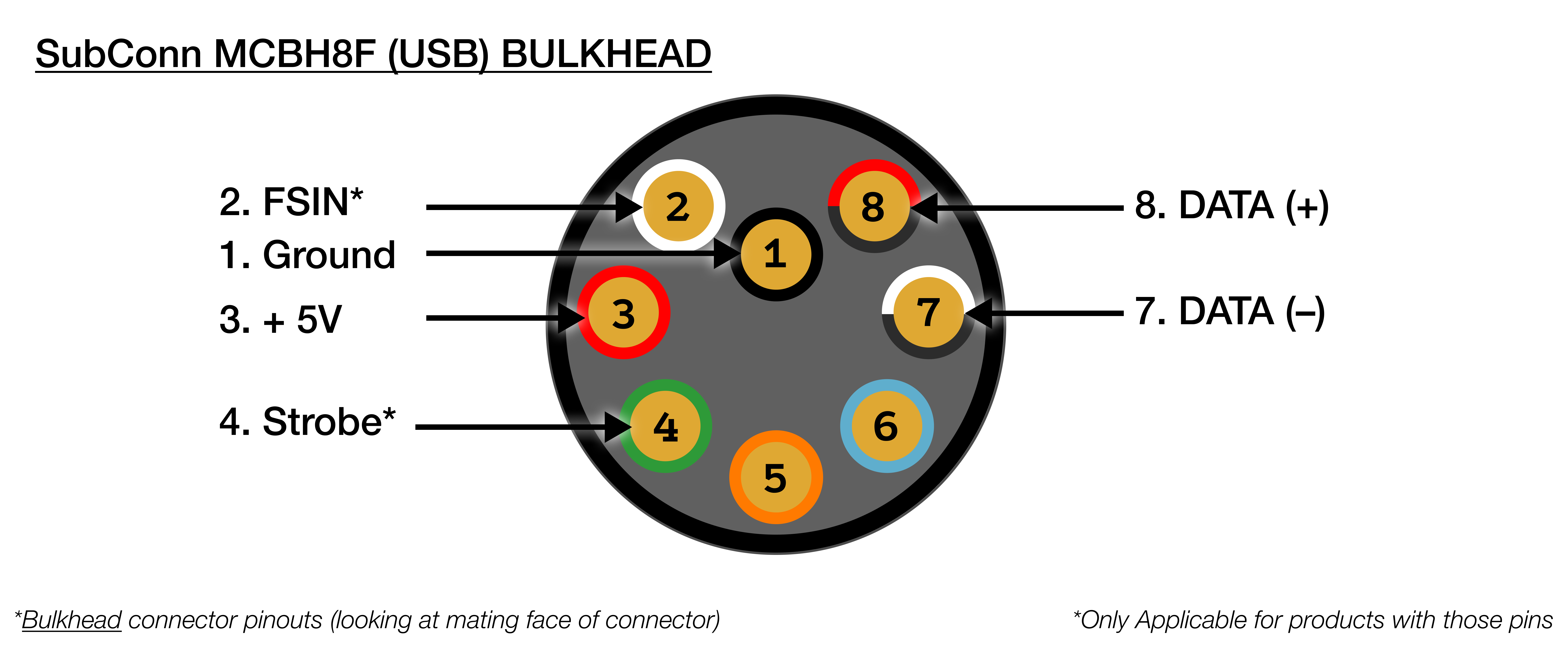 | SubConn MCBH8F (USB) Bulkhead | |
| ----------------------------- | ----------------------- |
| 1 | **Noir : Masse** |
| 2 | **Rouge/Noir : DATA +** |
| 3 | **Blanc/Noir : DATA -** |
| 4 | Bleu : NC |
| 5 | Orange : NC |
| 6 | Vert : NC |
| 7 | **Rouge : +5V** |
| 8 | Blanc : NC |
## Connecteur de sortie : PoE/Ethernet
| SubConn MCBH8F (USB) Bulkhead | |
| ----------------------------- | ----------------------- |
| 1 | **Noir : Masse** |
| 2 | **Rouge/Noir : DATA +** |
| 3 | **Blanc/Noir : DATA -** |
| 4 | Bleu : NC |
| 5 | Orange : NC |
| 6 | Vert : NC |
| 7 | **Rouge : +5V** |
| 8 | Blanc : NC |
## Connecteur de sortie : PoE/Ethernet
 | Cobalt 8-Pin Ethernet Bulkhead | |
| ------------------------------ | ------------ |
| 1 | Vert/Blanc |
| 2 | Vert |
| 3 | Orange/Blanc |
| 4 | Bleu |
| 5 | Bleu/Blanc |
| 6 | Orange |
| 7 | Marron/Blanc |
| 8 | Marron |
| Cobalt 8-Pin Ethernet Bulkhead | |
| ------------------------------ | ------------ |
| 1 | Vert/Blanc |
| 2 | Vert |
| 3 | Orange/Blanc |
| 4 | Bleu |
| 5 | Bleu/Blanc |
| 6 | Orange |
| 7 | Marron/Blanc |
| 8 | Marron |
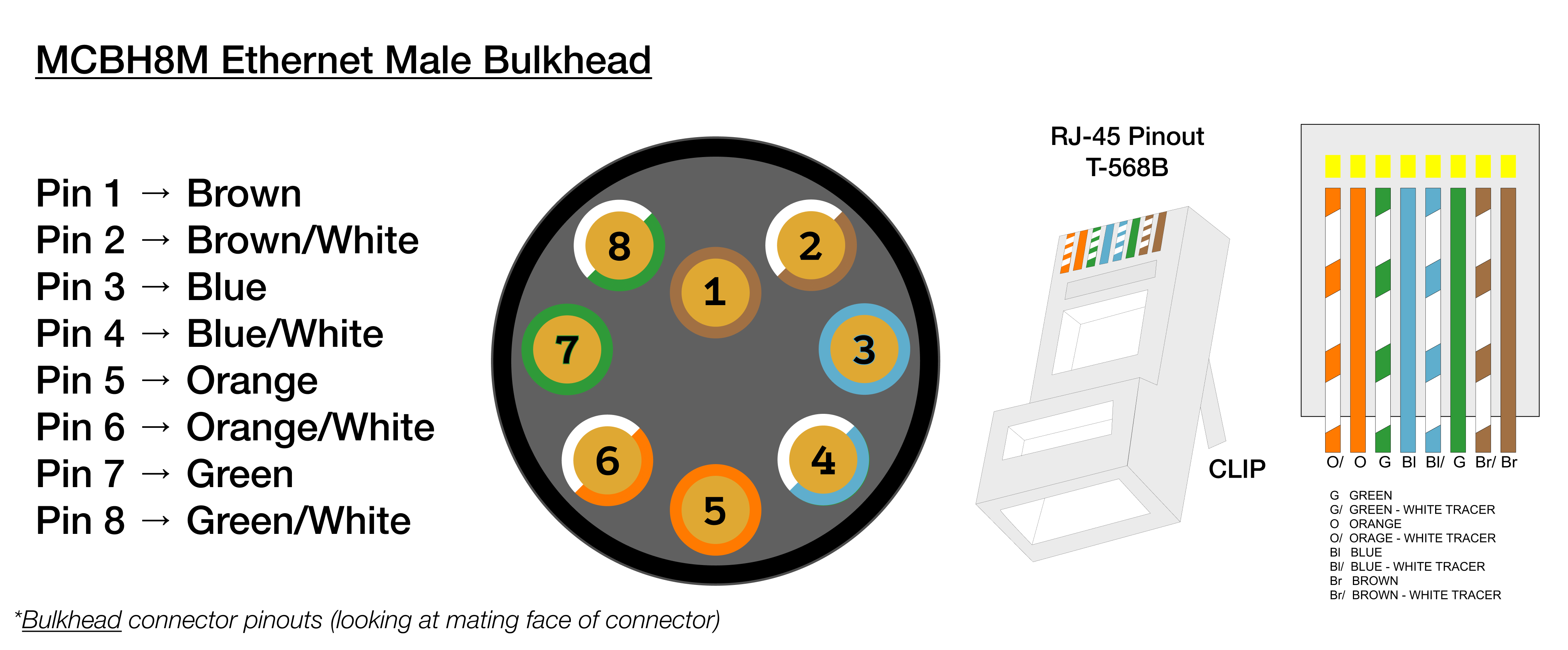 | SubConn MCBH8M (Ethernet) | |
| ------------------------- | ------------ |
| 1 | Marron |
| 2 | Vert/Blanc |
| 3 | Vert |
| 4 | Orange/Blanc |
| 5 | Orange |
| 6 | Bleu/Blanc |
| 7 | Bleu |
| 8 | Marron/Blanc |
## Fichiers CAO
Fichier STEP microSVC (Cobalt)
Plan microSVC (Cobalt) (PDF)
Fichier STEP microSVC (SubConn)
Plan microSVC (SubConn) (PDF)
## Dépannage
Ce correctif s'applique uniquement aux commandes passées avant juin 2026.
**Quel est le problème ?** Votre microSVC fonctionne pendant un certain temps, puis la connexion est soudainement interrompue. Ce correctif ponctuel est connu pour résoudre ce problème. Il prend environ 5 minutes.
Suivez simplement chaque étape dans l'ordre. Copiez chaque commande exactement comme elle est indiquée.
Connectez-vous au microSVC via SSH. Lorsqu'on vous le demande, saisissez :
* **Nom d'utilisateur :** `dwe`
* **Mot de passe :** `deepwater`
Vous ne savez pas comment faire ? Suivez d'abord [ce guide](/fr/dwe-os/pages/terminal), puis revenez ici.
Cela applique le correctif. Rien ne semblera se produire — c'est normal.
```bash theme={null}
cmdline_path=""
for candidate in /boot/firmware/cmdline.txt /boot/cmdline.txt; do
if [ -f "$candidate" ]; then
cmdline_path="$candidate"
break
fi
done
if [ -z "$cmdline_path" ]; then
echo "Warning: cmdline.txt not found in /boot/firmware or /boot, skipping USB quirks configuration."
else
# Idempotent: only append if the quirk isn't already there
if ! grep -q 'usbcore.quirks=0bda:8152:k' "$cmdline_path"; then
sudo sed -i -e 's/$/ usbcore.autosuspend=-1 usbcore.quirks=0bda:8152:k/' "$cmdline_path"
echo "USB quirks added to $cmdline_path"
else
echo "USB quirks already present in $cmdline_path, skipping."
fi
fi
```
Que fait cette commande ?
Si vous voyez `Warning: ... not found`, arrêtez-vous ici et contactez le support — le correctif n'a pas été appliqué.
Tapez cette commande et appuyez sur Entrée. L'appareil va redémarrer, ce qui prend une minute ou deux.
```bash theme={null}
sudo reboot
```
Une fois l'appareil redémarré, ouvrez à nouveau le terminal (étape 1) et collez cette commande :
```bash theme={null}
for d in /sys/bus/usb/devices/*/; do
vid=$(cat "$d/idVendor" 2>/dev/null)
pid=$(cat "$d/idProduct" 2>/dev/null)
[ "$vid:$pid" = "0bda:8152" ] && echo "$d" && cat "$d/quirks"
done
```
Que fait cette commande ?
Si vous voyez `0x400` dans la sortie, le correctif a fonctionné. C'est terminé ! Si vous ne le voyez pas, recommencez les étapes ou contactez le support.
## CE (Conformité Européenne)
> Ce produit est certifié CE, ce qui atteste de sa conformité aux directives et réglementations
> pertinentes de l'Union européenne en matière de santé, de sécurité et de protection de l'environnement.
> Cette certification confirme que le produit respecte les normes élevées requises pour la commercialisation
> au sein de l'Espace économique européen.
| SubConn MCBH8M (Ethernet) | |
| ------------------------- | ------------ |
| 1 | Marron |
| 2 | Vert/Blanc |
| 3 | Vert |
| 4 | Orange/Blanc |
| 5 | Orange |
| 6 | Bleu/Blanc |
| 7 | Bleu |
| 8 | Marron/Blanc |
## Fichiers CAO
Fichier STEP microSVC (Cobalt)
Plan microSVC (Cobalt) (PDF)
Fichier STEP microSVC (SubConn)
Plan microSVC (SubConn) (PDF)
## Dépannage
Ce correctif s'applique uniquement aux commandes passées avant juin 2026.
**Quel est le problème ?** Votre microSVC fonctionne pendant un certain temps, puis la connexion est soudainement interrompue. Ce correctif ponctuel est connu pour résoudre ce problème. Il prend environ 5 minutes.
Suivez simplement chaque étape dans l'ordre. Copiez chaque commande exactement comme elle est indiquée.
Connectez-vous au microSVC via SSH. Lorsqu'on vous le demande, saisissez :
* **Nom d'utilisateur :** `dwe`
* **Mot de passe :** `deepwater`
Vous ne savez pas comment faire ? Suivez d'abord [ce guide](/fr/dwe-os/pages/terminal), puis revenez ici.
Cela applique le correctif. Rien ne semblera se produire — c'est normal.
```bash theme={null}
cmdline_path=""
for candidate in /boot/firmware/cmdline.txt /boot/cmdline.txt; do
if [ -f "$candidate" ]; then
cmdline_path="$candidate"
break
fi
done
if [ -z "$cmdline_path" ]; then
echo "Warning: cmdline.txt not found in /boot/firmware or /boot, skipping USB quirks configuration."
else
# Idempotent: only append if the quirk isn't already there
if ! grep -q 'usbcore.quirks=0bda:8152:k' "$cmdline_path"; then
sudo sed -i -e 's/$/ usbcore.autosuspend=-1 usbcore.quirks=0bda:8152:k/' "$cmdline_path"
echo "USB quirks added to $cmdline_path"
else
echo "USB quirks already present in $cmdline_path, skipping."
fi
fi
```
Que fait cette commande ?
Si vous voyez `Warning: ... not found`, arrêtez-vous ici et contactez le support — le correctif n'a pas été appliqué.
Tapez cette commande et appuyez sur Entrée. L'appareil va redémarrer, ce qui prend une minute ou deux.
```bash theme={null}
sudo reboot
```
Une fois l'appareil redémarré, ouvrez à nouveau le terminal (étape 1) et collez cette commande :
```bash theme={null}
for d in /sys/bus/usb/devices/*/; do
vid=$(cat "$d/idVendor" 2>/dev/null)
pid=$(cat "$d/idProduct" 2>/dev/null)
[ "$vid:$pid" = "0bda:8152" ] && echo "$d" && cat "$d/quirks"
done
```
Que fait cette commande ?
Si vous voyez `0x400` dans la sortie, le correctif a fonctionné. C'est terminé ! Si vous ne le voyez pas, recommencez les étapes ou contactez le support.
## CE (Conformité Européenne)
> Ce produit est certifié CE, ce qui atteste de sa conformité aux directives et réglementations
> pertinentes de l'Union européenne en matière de santé, de sécurité et de protection de l'environnement.
> Cette certification confirme que le produit respecte les normes élevées requises pour la commercialisation
> au sein de l'Espace économique européen.