> ## Documentation Index
> Fetch the complete documentation index at: https://docs.dwe.ai/llms.txt
> Use this file to discover all available pages before exploring further.
# exploreHD Heavy Technical Specifications
{/* datasheet-ignore */}
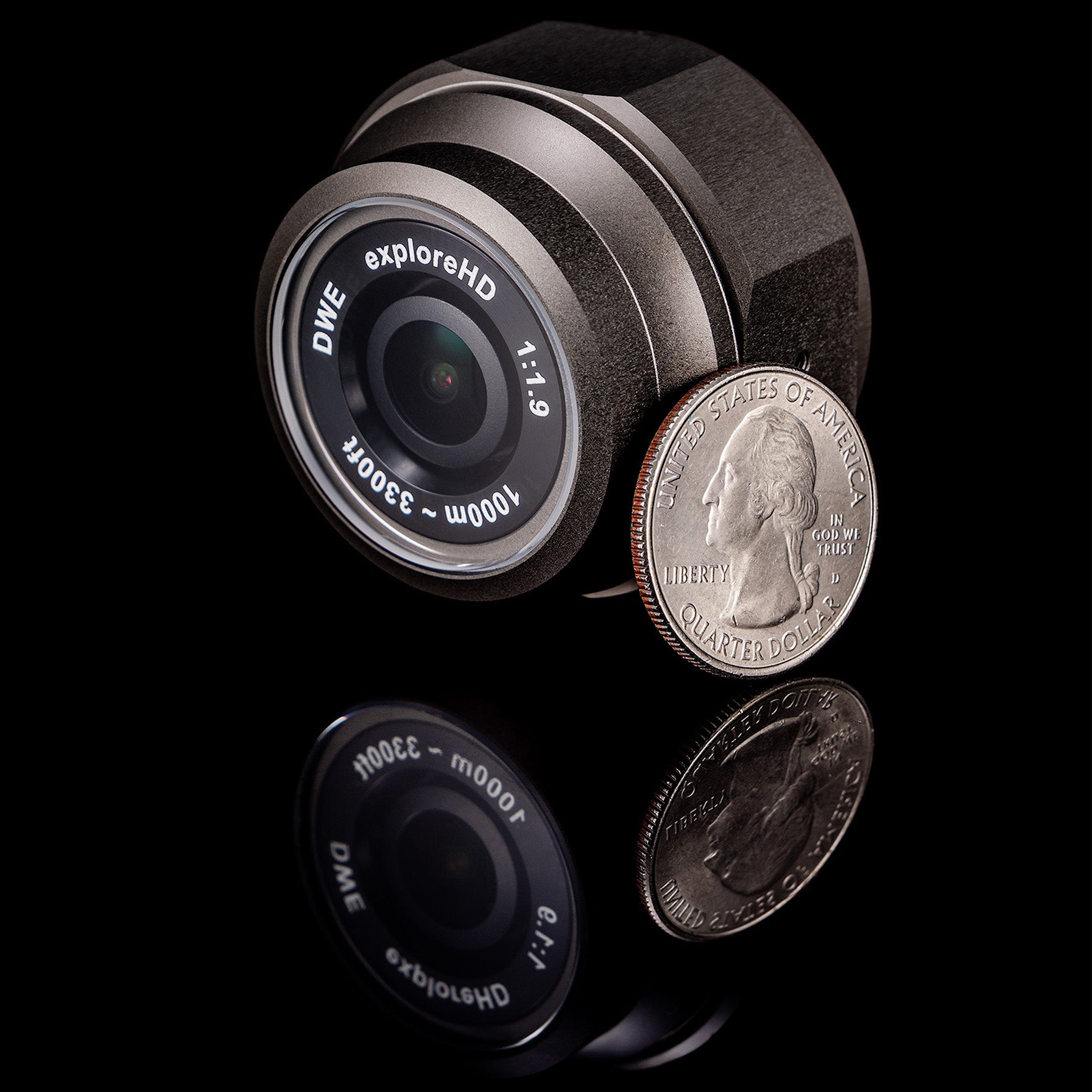 Technical Information for the exploreHD Heavy.
## Physical Specifications
| Property | Value |
| ----------------------------- | -------------------------------------------------------------------------------------------- |
| Depth Rating | 1000 meters |
| Safety Margin | 50% |
| Ingress Protection Rating | IP69K+ equivalent |
| Mass in Air | 120 grams |
| Mass in Water | 50 grams |
| Material | Naval-grade, Corrosion Resistant Aluminum - Black, Abrasion-Resistant, Hard-Anodized Coating |
| Front Port | Scratch-Resistant Sapphire with internal AR Coating |
| Operating Temperature | -20°C to 85°C |
| Max Cable Length\* | 5m (USB 2.0) |
*\*Cameras ship with a \~1m cable by default. For longer cables, contact [sales@dwe.ai](mailto:sales@dwe.ai).*
## Lens Specifications
| Specification | Fisheye | Aquagon |
| ------------------------- | ----------- | ------------------------------------------- |
| Type | Fisheye | Low-Distortion |
| Focus Type | Fixed Focus | Fixed Focus |
| Focal Length | 2.65mm | 3.0mm |
| Lens Aperture | f/1.9 | f/1.6 |
| Minimum Focus Distance | 20-30cm | 25cm |
| Lens Element Count | - | 7 with 2 aspherical, 2 extra-low dispersion |
| Lens Coatings | - | DGS™ MULTI-COATING |
| Distortion | - | \<-1.5% |
| Back Focal Length | - | 2.05mm |
| IR Filter | 650nm | 650nm |
| Horizontal FOV (In Air) | 138° | - |
| Vertical FOV (In Air) | 70° | - |
| Diagonal FOV (In Air) | 168° | - |
| Horizontal FOV (In Water) | \~82° | 87° |
| Vertical FOV (In Water) | - | 56° |
| Diagonal FOV (In Water) | - | 95° |
## Image Sensor Specifications
| Property | Value |
| ----------------------- | ---------------------------------------------------- |
| Image Sensor | 1/2.8" Sony Exmor™ **STARVIS** CMOS |
| Sensor Color | RGB |
| Sensor Type | Back-Side Illuminated |
| Pixel Size | 2.9 µm (H) × 2.9 µm (V) |
| Electronic Shutter Type | Rolling Shutter |
| Max Resolution | 1920x1080 |
| Max Framerate | 30fps with H.264/MJPEG |
| Color Channels | 3 |
| Bits Per Channel | 8 bits |
| Compression Formats | H.264 (Baseline), MJPEG, YUY2 |
| Connection | USB 2.0 High Speed / UVC Compliant / V4L2 Compatible |
| Spectral Sensitivity | See Graph Below |
Technical Information for the exploreHD Heavy.
## Physical Specifications
| Property | Value |
| ----------------------------- | -------------------------------------------------------------------------------------------- |
| Depth Rating | 1000 meters |
| Safety Margin | 50% |
| Ingress Protection Rating | IP69K+ equivalent |
| Mass in Air | 120 grams |
| Mass in Water | 50 grams |
| Material | Naval-grade, Corrosion Resistant Aluminum - Black, Abrasion-Resistant, Hard-Anodized Coating |
| Front Port | Scratch-Resistant Sapphire with internal AR Coating |
| Operating Temperature | -20°C to 85°C |
| Max Cable Length\* | 5m (USB 2.0) |
*\*Cameras ship with a \~1m cable by default. For longer cables, contact [sales@dwe.ai](mailto:sales@dwe.ai).*
## Lens Specifications
| Specification | Fisheye | Aquagon |
| ------------------------- | ----------- | ------------------------------------------- |
| Type | Fisheye | Low-Distortion |
| Focus Type | Fixed Focus | Fixed Focus |
| Focal Length | 2.65mm | 3.0mm |
| Lens Aperture | f/1.9 | f/1.6 |
| Minimum Focus Distance | 20-30cm | 25cm |
| Lens Element Count | - | 7 with 2 aspherical, 2 extra-low dispersion |
| Lens Coatings | - | DGS™ MULTI-COATING |
| Distortion | - | \<-1.5% |
| Back Focal Length | - | 2.05mm |
| IR Filter | 650nm | 650nm |
| Horizontal FOV (In Air) | 138° | - |
| Vertical FOV (In Air) | 70° | - |
| Diagonal FOV (In Air) | 168° | - |
| Horizontal FOV (In Water) | \~82° | 87° |
| Vertical FOV (In Water) | - | 56° |
| Diagonal FOV (In Water) | - | 95° |
## Image Sensor Specifications
| Property | Value |
| ----------------------- | ---------------------------------------------------- |
| Image Sensor | 1/2.8" Sony Exmor™ **STARVIS** CMOS |
| Sensor Color | RGB |
| Sensor Type | Back-Side Illuminated |
| Pixel Size | 2.9 µm (H) × 2.9 µm (V) |
| Electronic Shutter Type | Rolling Shutter |
| Max Resolution | 1920x1080 |
| Max Framerate | 30fps with H.264/MJPEG |
| Color Channels | 3 |
| Bits Per Channel | 8 bits |
| Compression Formats | H.264 (Baseline), MJPEG, YUY2 |
| Connection | USB 2.0 High Speed / UVC Compliant / V4L2 Compatible |
| Spectral Sensitivity | See Graph Below |

 ## Image Compression Specifications
| | H.264 | MJPEG | YUY2 |
| ------------------ | -------- | ----- | ----- |
| Type | Baseline | -- | -- |
| Chroma Subsampling | 4:2:0 | 4:2:2 | 4:2:2 |
## Supported Resolutions and Framerates
| Resolution | MJPEG & H.264 | YUY2 |
| :------------ | :--------------------- | :------------------------ |
| **1920x1080** | 10, 15, 20, 25, 30 fps | 5 fps |
| **1280x720** | 10, 15, 20, 25, 30 fps | 5, 10 fps |
| **800x600** | 10, 15, 20, 25, 30 fps | 5, 10, 15 fps |
| **640x480** | 10, 15, 20, 25, 30 fps | 5, 10, 15, 20, 25, 30 fps |
| **640x360** | 10, 15, 20, 25, 30 fps | 5, 10, 15, 20, 25, 30 fps |
| **352x288** | 10, 15, 20, 25, 30 fps | 5, 10, 15, 20, 25, 30 fps |
| **320x240** | 10, 15, 20, 25, 30 fps | 5, 10, 15, 20, 25, 30 fps |
## Software Requirements
| Property | Value |
| --------------------- | ---------------------------------- |
| **External Software** | None Required (Plug-and-Play) |
| **Protocol** | UVC (USB Video Class) Compliant |
| **Windows Support** | Native Support - No drivers needed |
| **macOS Support** | Native Support - No drivers needed |
| **Linux Support** | Native Support - V4L2 compatible |
**Zero Software Required**
Because it is fully UVC compliant, it requires absolutely **no proprietary drivers, external software, or libraries** for retrieving images.
While we provide helpful optional utilities like our Camera Tester and dweOS, **these are strictly optional**. You can plug the camera into your system and immediately view the feed using standard built-in camera applications (like Windows Camera, OBS, etc).
## Bitrate Control Library
For specific advanced application using H.264 mode, you can manage the camera's bitrate via our open-sourced bitrate control code.
Bitrate Control README document.
## Electrical Specifications
| Property | MJPEG Mode | H.264 Mode |
| ----------------- | ---------- | ---------- |
| Voltage | 5V | 5V |
| Current | 250mA | 300mA |
| Current (Max) | 260mA | 320mA |
| Operating Wattage | 1.25W | 1.5W |
| Wattage (Min) | 0.004W | 0.004W |
| Wattage (Max) | 1.3W | 1.6W |
## Connector Pinout
## Image Compression Specifications
| | H.264 | MJPEG | YUY2 |
| ------------------ | -------- | ----- | ----- |
| Type | Baseline | -- | -- |
| Chroma Subsampling | 4:2:0 | 4:2:2 | 4:2:2 |
## Supported Resolutions and Framerates
| Resolution | MJPEG & H.264 | YUY2 |
| :------------ | :--------------------- | :------------------------ |
| **1920x1080** | 10, 15, 20, 25, 30 fps | 5 fps |
| **1280x720** | 10, 15, 20, 25, 30 fps | 5, 10 fps |
| **800x600** | 10, 15, 20, 25, 30 fps | 5, 10, 15 fps |
| **640x480** | 10, 15, 20, 25, 30 fps | 5, 10, 15, 20, 25, 30 fps |
| **640x360** | 10, 15, 20, 25, 30 fps | 5, 10, 15, 20, 25, 30 fps |
| **352x288** | 10, 15, 20, 25, 30 fps | 5, 10, 15, 20, 25, 30 fps |
| **320x240** | 10, 15, 20, 25, 30 fps | 5, 10, 15, 20, 25, 30 fps |
## Software Requirements
| Property | Value |
| --------------------- | ---------------------------------- |
| **External Software** | None Required (Plug-and-Play) |
| **Protocol** | UVC (USB Video Class) Compliant |
| **Windows Support** | Native Support - No drivers needed |
| **macOS Support** | Native Support - No drivers needed |
| **Linux Support** | Native Support - V4L2 compatible |
**Zero Software Required**
Because it is fully UVC compliant, it requires absolutely **no proprietary drivers, external software, or libraries** for retrieving images.
While we provide helpful optional utilities like our Camera Tester and dweOS, **these are strictly optional**. You can plug the camera into your system and immediately view the feed using standard built-in camera applications (like Windows Camera, OBS, etc).
## Bitrate Control Library
For specific advanced application using H.264 mode, you can manage the camera's bitrate via our open-sourced bitrate control code.
Bitrate Control README document.
## Electrical Specifications
| Property | MJPEG Mode | H.264 Mode |
| ----------------- | ---------- | ---------- |
| Voltage | 5V | 5V |
| Current | 250mA | 300mA |
| Current (Max) | 260mA | 320mA |
| Operating Wattage | 1.25W | 1.5W |
| Wattage (Min) | 0.004W | 0.004W |
| Wattage (Max) | 1.3W | 1.6W |
## Connector Pinout
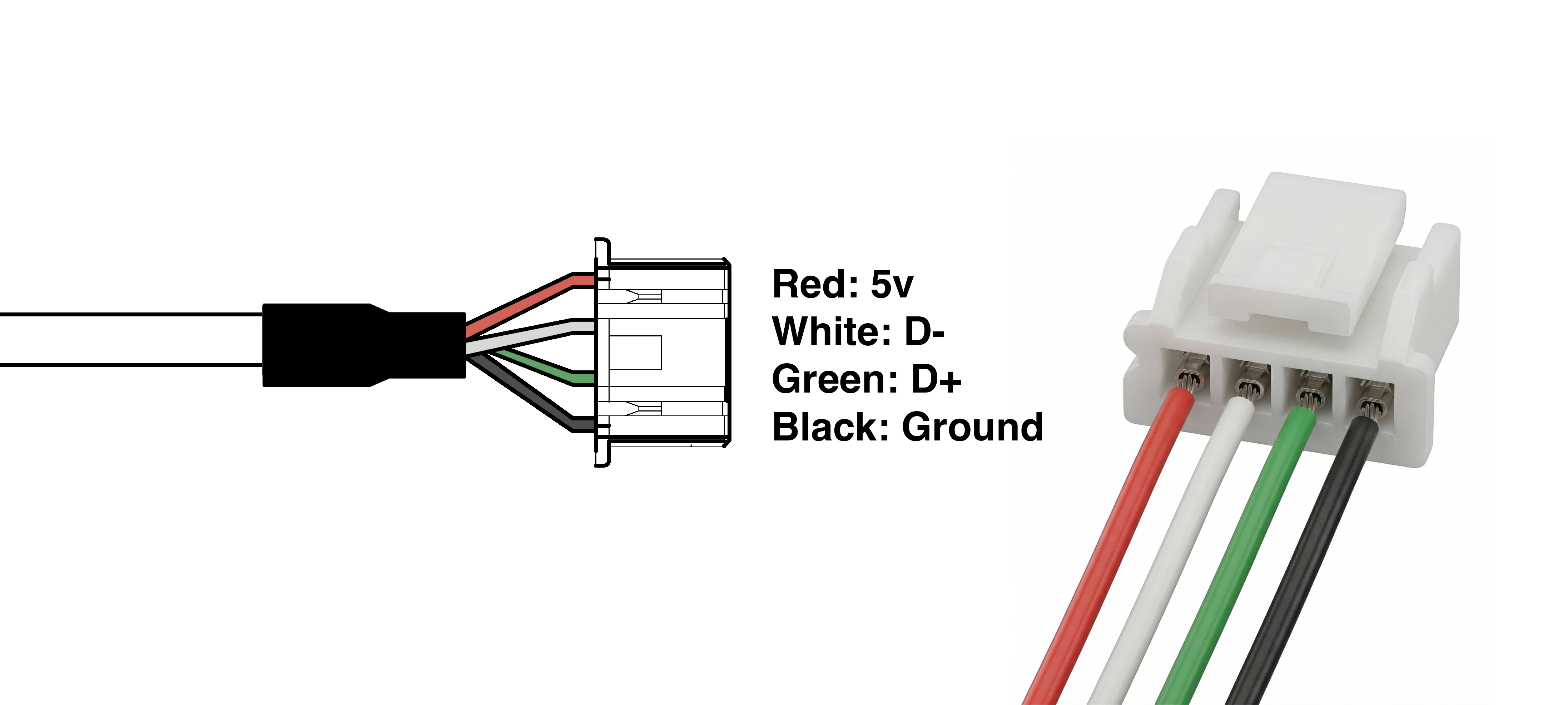 | Color | Function | Wire Gauge (AWG) |
| ----- | ------------------ | ---------------- |
| Red | 5V | 24 |
| White | D- (Data Negative) | 28 |
| Green | D+ (Data Positive) | 28 |
| Black | Ground | 24 |
| Color | Function | Wire Gauge (AWG) |
| ----- | ------------------ | ---------------- |
| Red | 5V | 24 |
| White | D- (Data Negative) | 28 |
| Green | D+ (Data Positive) | 28 |
| Black | Ground | 24 |
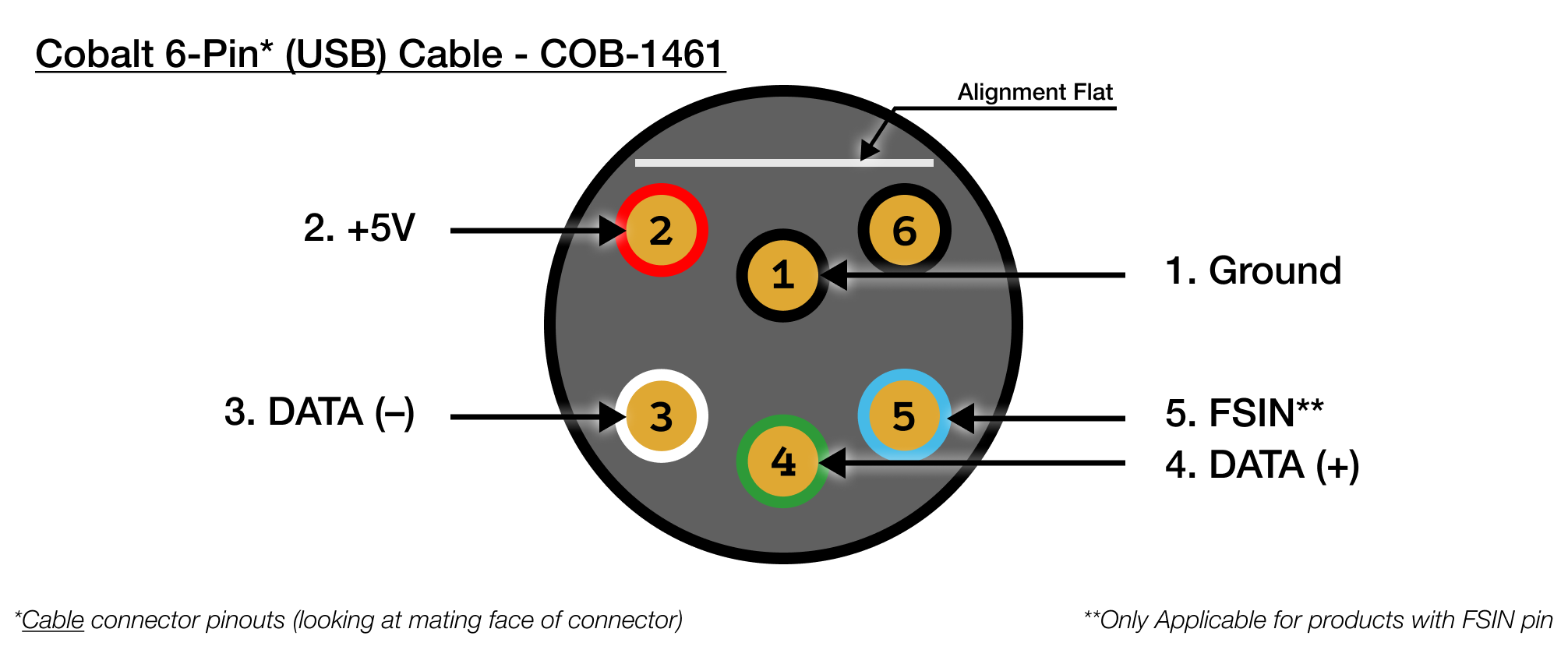 | Cobalt (6 Pin) USB Cable | COB-1461 |
| ------------------------ | ------------------ |
| 1 | **Black : Ground** |
| 2 | **Red : +5V** |
| 3 | **White : DATA -** |
| 4 | **Green : DATA +** |
| 5 | Blue : NC |
| 6 | Brown : NC |
## CAD Files
### Standard Lens
exploreHD Heavy (WetLink) STEP File
exploreHD Heavy (WetLink) Technical Drawing (PDF)
### Aquagon Lens
exploreHD Heavy with Aquagon Lens (WetLink) STEP File
exploreHD Heavy with Aquagon Lens (WetLink) Technical Drawing (PDF)
### Standard Lens
exploreHD Heavy (Cobalt) STEP File
exploreHD Heavy (Cobalt) Technical Drawing (PDF)
### Aquagon Lens
exploreHD Heavy with Aquagon Lens (Cobalt) STEP File
exploreHD Heavy with Aquagon Lens (Cobalt) Technical Drawing (PDF)
### Standard Lens
exploreHD Heavy (SubConn) STEP File
exploreHD Heavy (SubConn) Technical Drawing (PDF)
### Aquagon Lens
exploreHD Heavy with Aquagon Lens (SubConn) STEP File
exploreHD Heavy with Aquagon Lens (SubConn) Technical Drawing (PDF)
exploreHD Heavy Mounting Bracket STEP File
exploreHD Heavy Mounting Bracket Technical Drawing (PDF)
## Updating Firmware
Please check the [product changelog](/product-update-log), before updating firmware.
Firmware Updating Utility
Simple guide to updating firmware.
## NDAA Section 889 Compliance
> This product is fully compliant with Section 889 of the National Defense Authorization Act (NDAA).
> We do not utilize any covered telecommunications equipment, video surveillance equipment, or services
> from prohibited entities (including Huawei, ZTE, Hytera, Hikvision, Dahua, or their affiliates).
> This product contains compliant core processing components and zero proprietary firmware, ensuring
> a secure hardware profile free of restricted data pathways.
## CE (Conformité Européenne)
> This product is CE certified, indicating conformance with relevant European Union directives
> and regulations regarding health, safety, and environmental protection. This certification
> validates that the product meets the high standards required for sale within the European Economic Area.
| Cobalt (6 Pin) USB Cable | COB-1461 |
| ------------------------ | ------------------ |
| 1 | **Black : Ground** |
| 2 | **Red : +5V** |
| 3 | **White : DATA -** |
| 4 | **Green : DATA +** |
| 5 | Blue : NC |
| 6 | Brown : NC |
## CAD Files
### Standard Lens
exploreHD Heavy (WetLink) STEP File
exploreHD Heavy (WetLink) Technical Drawing (PDF)
### Aquagon Lens
exploreHD Heavy with Aquagon Lens (WetLink) STEP File
exploreHD Heavy with Aquagon Lens (WetLink) Technical Drawing (PDF)
### Standard Lens
exploreHD Heavy (Cobalt) STEP File
exploreHD Heavy (Cobalt) Technical Drawing (PDF)
### Aquagon Lens
exploreHD Heavy with Aquagon Lens (Cobalt) STEP File
exploreHD Heavy with Aquagon Lens (Cobalt) Technical Drawing (PDF)
### Standard Lens
exploreHD Heavy (SubConn) STEP File
exploreHD Heavy (SubConn) Technical Drawing (PDF)
### Aquagon Lens
exploreHD Heavy with Aquagon Lens (SubConn) STEP File
exploreHD Heavy with Aquagon Lens (SubConn) Technical Drawing (PDF)
exploreHD Heavy Mounting Bracket STEP File
exploreHD Heavy Mounting Bracket Technical Drawing (PDF)
## Updating Firmware
Please check the [product changelog](/product-update-log), before updating firmware.
Firmware Updating Utility
Simple guide to updating firmware.
## NDAA Section 889 Compliance
> This product is fully compliant with Section 889 of the National Defense Authorization Act (NDAA).
> We do not utilize any covered telecommunications equipment, video surveillance equipment, or services
> from prohibited entities (including Huawei, ZTE, Hytera, Hikvision, Dahua, or their affiliates).
> This product contains compliant core processing components and zero proprietary firmware, ensuring
> a secure hardware profile free of restricted data pathways.
## CE (Conformité Européenne)
> This product is CE certified, indicating conformance with relevant European Union directives
> and regulations regarding health, safety, and environmental protection. This certification
> validates that the product meets the high standards required for sale within the European Economic Area.