> ## Documentation Index
> Fetch the complete documentation index at: https://docs.dwe.ai/llms.txt
> Use this file to discover all available pages before exploring further.
# Tracking & Filter Parameters
Stick to the default parameters for the best out-of-the-box experience. Manual
tuning is entirely optional and reserved for advanced performance
optimization.
## Tracking Parameters
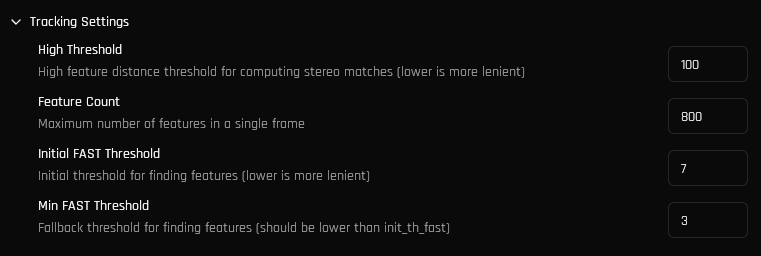
VSLAM tracking performance can be optimized for your environment by adjusting the following parameters.
 | Parameter | What it does |
| ---------------------- | -------------------------------------------------------------------------------------------------------------------------------------------------------------------- |
| High Threshold | Controls how lenient the stereo-matching algorithm is. Lower is more lenient, higher is more accurate. |
| Feature Count | Maximum allowed number of features in a single frame. Higher feature count increases the chance of loop closures/map merges happening at the cost of performance. |
| Initial FAST Threshold | Initial FAST threshold used for feature detection. Lower threshold increases detected features, but increases likelihood of incorrect feature matches across frames. |
| Min FAST Threshold | Fallback FAST threshold used if the initial threshold did not find enough features. |
## Filter Parameters
A voxel filter is used to ensure uniform point distribution in the resulting point cloud. The following filter settings can be configured.
| Parameter | What it does |
| ---------------------- | -------------------------------------------------------------------------------------------------------------------------------------------------------------------- |
| High Threshold | Controls how lenient the stereo-matching algorithm is. Lower is more lenient, higher is more accurate. |
| Feature Count | Maximum allowed number of features in a single frame. Higher feature count increases the chance of loop closures/map merges happening at the cost of performance. |
| Initial FAST Threshold | Initial FAST threshold used for feature detection. Lower threshold increases detected features, but increases likelihood of incorrect feature matches across frames. |
| Min FAST Threshold | Fallback FAST threshold used if the initial threshold did not find enough features. |
## Filter Parameters
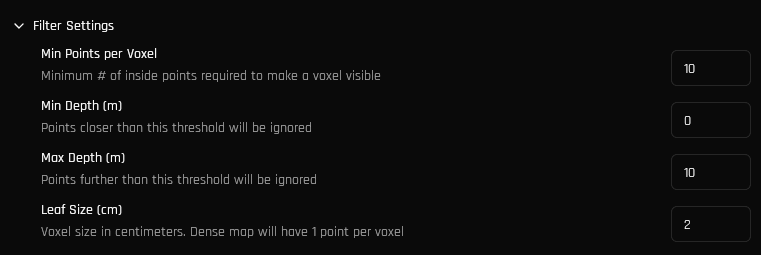
A voxel filter is used to ensure uniform point distribution in the resulting point cloud. The following filter settings can be configured.
 | Parameter | What it does |
| -------------------- | ------------------------------------------------------------------------------------------------------------------------------------------------------------------ |
| Min Points per Voxel | Minimum number of points required within a single voxel to produce a visible point in the output cloud |
| Min Depth (m) | Points closer than this threshold will be ignored. |
| Max Depth (m) | Points further than this threshold will be ignored. |
| Leaf Size (cm) | Size in centimeters of a voxel. Lowering this value will increase detail at the cost of memory consumption. Sizes less than 2cm should only be used on small maps. |
| Parameter | What it does |
| -------------------- | ------------------------------------------------------------------------------------------------------------------------------------------------------------------ |
| Min Points per Voxel | Minimum number of points required within a single voxel to produce a visible point in the output cloud |
| Min Depth (m) | Points closer than this threshold will be ignored. |
| Max Depth (m) | Points further than this threshold will be ignored. |
| Leaf Size (cm) | Size in centimeters of a voxel. Lowering this value will increase detail at the cost of memory consumption. Sizes less than 2cm should only be used on small maps. |