> ## Documentation Index
> Fetch the complete documentation index at: https://docs.dwe.ai/llms.txt
> Use this file to discover all available pages before exploring further.

# Bitrate

> View the stream's bitrate and measure bitrate change over time.

<Frame>
  <video controls={false} autoPlay loop muted playsInline className="h-full aspect-video" src="https://mintcdn.com/deepwaterexplorationinc/e0wVLTi_h45Y5fkF/discovery/video-card-buttons/images/animations/bitrate.webm?fit=max&auto=format&n=e0wVLTi_h45Y5fkF&q=85&s=1b0304599839eab824ac984c012c3103" data-path="discovery/video-card-buttons/images/animations/bitrate.webm" />
</Frame>

## Showing the widget

<Columns cols={2}>
  <Card title="Expand" icon="chart-line">
    <img src="https://mintcdn.com/deepwaterexplorationinc/dDpT5_8Eip43UIec/discovery/video-card-buttons/images/bitrateIcon.png?fit=max&auto=format&n=dDpT5_8Eip43UIec&q=85&s=162ebce4aecaf9df923e404ad1e8507c" noZoom width="44" height="43" data-path="discovery/video-card-buttons/images/bitrateIcon.png" />

    Click this icon to expand the widget.
  </Card>

  <Card title="Hide" icon="eye-slash">
    <img src="https://mintcdn.com/deepwaterexplorationinc/dDpT5_8Eip43UIec/discovery/video-card-buttons/images/bitrateWidget.png?fit=max&auto=format&n=dDpT5_8Eip43UIec&q=85&s=34c1436d8c0edfcf484a1bac792e17a0" noZoom width="128" height="43" data-path="discovery/video-card-buttons/images/bitrateWidget.png" />

    Click on the number (around the **Mb/s**) to hide the widget completely.
  </Card>
</Columns>

## Graph view

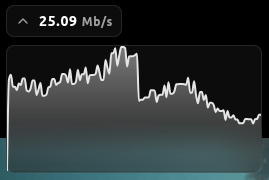
Click the <Icon icon="chevron-down" /> **Arrow** to the left of the widget to open and close the **Graph View**, which shows the trend across the last 30 seconds.

<Frame caption="Hovering over the graph shows the exact Mb/s at that moment.">
  <img src="https://mintcdn.com/deepwaterexplorationinc/dDpT5_8Eip43UIec/discovery/video-card-buttons/images/bitrateGraph.png?fit=max&auto=format&n=dDpT5_8Eip43UIec&q=85&s=ccec4e574a6894bf4377f64ff467a02b" noZoom width="269" height="180" data-path="discovery/video-card-buttons/images/bitrateGraph.png" />
</Frame>