> ## Documentation Index
> Fetch the complete documentation index at: https://docs.dwe.ai/llms.txt
> Use this file to discover all available pages before exploring further.
# Filename Scheme
> Customize the naming conventions for your saved recordings.
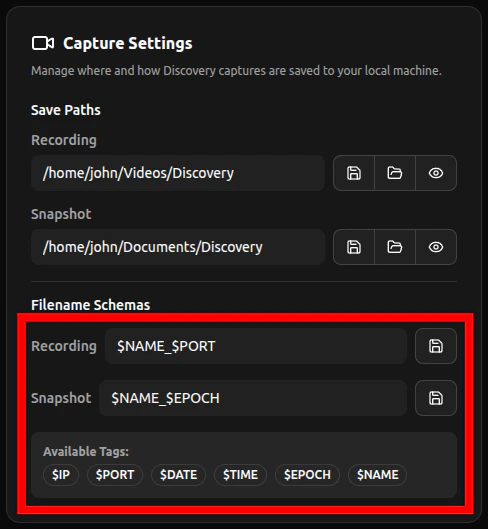 The following are parameters you can use in your filenames:
The IP address of the video card during recording.
*example: `192.168.2.1`*
The port number of the camera you are using during recording.
*example: `5600`*
The current system date, formatted as `MM-DD-YYYY`.
*example: `09-07-2023`*
The current system time in 24-hour format, formatted as `HHhMMmSSs`.
*example: `14h13m25s`*
The UNIX epoch timestamp.
*example: `1695341103`*
The name of the video card, shown on the tab.
*example: `Camera1`*
The following are parameters you can use in your filenames:
The IP address of the video card during recording.
*example: `192.168.2.1`*
The port number of the camera you are using during recording.
*example: `5600`*
The current system date, formatted as `MM-DD-YYYY`.
*example: `09-07-2023`*
The current system time in 24-hour format, formatted as `HHhMMmSSs`.
*example: `14h13m25s`*
The UNIX epoch timestamp.
*example: `1695341103`*
The name of the video card, shown on the tab.
*example: `Camera1`*