> ## Documentation Index
> Fetch the complete documentation index at: https://docs.dwe.ai/llms.txt
> Use this file to discover all available pages before exploring further.
# SVC Pro
{/* datasheet-ignore */}
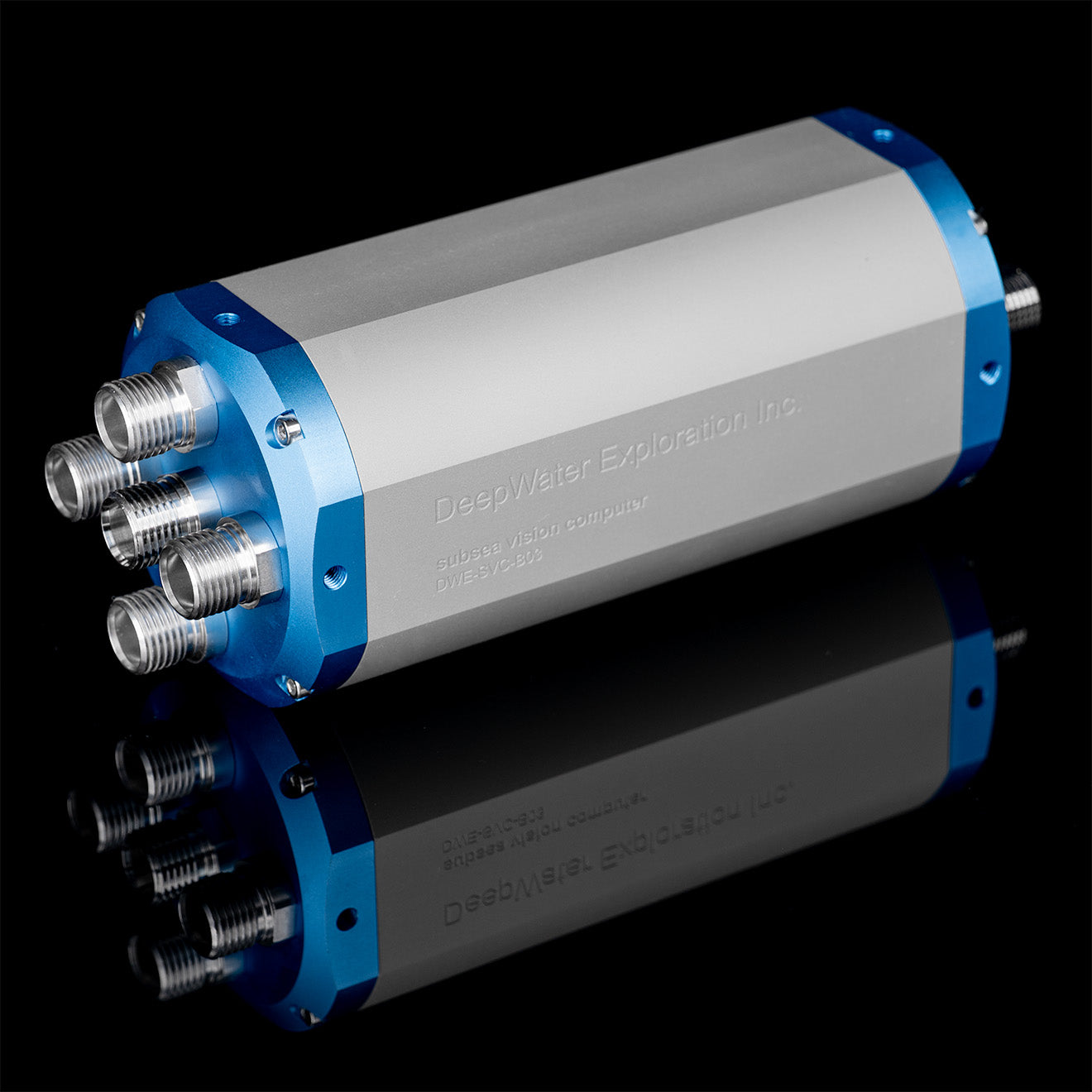 Technische Informationen zum SVC Pro.
Der **Subsea Vision Computer Pro (SVC Pro)** ist ein intelligenter Hub für Unterwasser-Stereo-Vision. Angetrieben vom **NVIDIA Jetson Orin NX (16 GB)** bietet er Edge-KI-Leistung für komplexe Machine-Vision-Modelle, 3D-Rekonstruktion in Echtzeit und autonome Navigationsaufgaben.
## Hauptmerkmale
* Edge-KI-Leistung: Integrierter NVIDIA Jetson Orin NX (16 GB RAM) für hochperformantes Rechnen und maschinelles Lernen. In der Lage zur Live-Stereo-Berechnung und VSLAM\*.
* Großer interner Speicher: Enthält 1-TB-SSD für umfangreiche Datenaufzeichnung und Betriebssystemverwaltung.
* Plug-and-Play-Verwaltung: Konfiguriert Kameras automatisch in den „Follower"-Modus und verwaltet alle Taktsignale, um eine präzise Bildsynchronisation ohne externe Hardware sicherzustellen.
* Mehrkameraunterstützung: Kann bis zu 4 stellarHD-Kameras oder 2 explore3D-Stereopaare gleichzeitig streamen.
* Intelligente Strobe-Lichtintegration: Synchronisiert Strobe-Impulse direkt mit dem Belichtungsfenster der Kamera für bewegungsunschärfefreie Bilder.
Für Informationen zu VSLAM wenden Sie sich an [sales@dwe.ai](mailto:sales@dwe.ai).
## Software-Einrichtung
**Erste Schritte mit dem SVC Pro**: 5-minütige Einrichtungsanleitung, um Ihren SVC Pro zu konfigurieren.
## Leistungsspezifikationen
| Eigenschaft | Wert |
| ----------------- | ------------------------- |
| Betriebsspannung | 9–50 V |
| Betriebsstrom | Abhängig von der Spannung |
| Betriebsleistung | 20 W (unter hoher Last) |
| Minimale Leistung | 10 W (im Leerlauf) |
| Maximale Leistung | 25 W (im MAXN-Modus) |
## E/A-Steckverbinder
Laden Sie die E/A-Informationen für Ihre Cobalt-Variante des SVC Pro herunter.
Laden Sie die E/A-Informationen für Ihre SubConn-Variante des SVC Pro herunter.
## Physisch & Umwelt
| Eigenschaft | Wert |
| --------------------- | ----------------------------------------- |
| **Gewicht an Luft** | 1,3 kg |
| **Gewicht im Wasser** | 450 g |
| **Tiefenbewertung** | 600 m / 2000 m / 6000 m |
| **Datenausgaben** | Rohbilder, JPEGs, Tiefenkarte, Punktwolke |
## Pinbelegung Kameraeingang
Technische Informationen zum SVC Pro.
Der **Subsea Vision Computer Pro (SVC Pro)** ist ein intelligenter Hub für Unterwasser-Stereo-Vision. Angetrieben vom **NVIDIA Jetson Orin NX (16 GB)** bietet er Edge-KI-Leistung für komplexe Machine-Vision-Modelle, 3D-Rekonstruktion in Echtzeit und autonome Navigationsaufgaben.
## Hauptmerkmale
* Edge-KI-Leistung: Integrierter NVIDIA Jetson Orin NX (16 GB RAM) für hochperformantes Rechnen und maschinelles Lernen. In der Lage zur Live-Stereo-Berechnung und VSLAM\*.
* Großer interner Speicher: Enthält 1-TB-SSD für umfangreiche Datenaufzeichnung und Betriebssystemverwaltung.
* Plug-and-Play-Verwaltung: Konfiguriert Kameras automatisch in den „Follower"-Modus und verwaltet alle Taktsignale, um eine präzise Bildsynchronisation ohne externe Hardware sicherzustellen.
* Mehrkameraunterstützung: Kann bis zu 4 stellarHD-Kameras oder 2 explore3D-Stereopaare gleichzeitig streamen.
* Intelligente Strobe-Lichtintegration: Synchronisiert Strobe-Impulse direkt mit dem Belichtungsfenster der Kamera für bewegungsunschärfefreie Bilder.
Für Informationen zu VSLAM wenden Sie sich an [sales@dwe.ai](mailto:sales@dwe.ai).
## Software-Einrichtung
**Erste Schritte mit dem SVC Pro**: 5-minütige Einrichtungsanleitung, um Ihren SVC Pro zu konfigurieren.
## Leistungsspezifikationen
| Eigenschaft | Wert |
| ----------------- | ------------------------- |
| Betriebsspannung | 9–50 V |
| Betriebsstrom | Abhängig von der Spannung |
| Betriebsleistung | 20 W (unter hoher Last) |
| Minimale Leistung | 10 W (im Leerlauf) |
| Maximale Leistung | 25 W (im MAXN-Modus) |
## E/A-Steckverbinder
Laden Sie die E/A-Informationen für Ihre Cobalt-Variante des SVC Pro herunter.
Laden Sie die E/A-Informationen für Ihre SubConn-Variante des SVC Pro herunter.
## Physisch & Umwelt
| Eigenschaft | Wert |
| --------------------- | ----------------------------------------- |
| **Gewicht an Luft** | 1,3 kg |
| **Gewicht im Wasser** | 450 g |
| **Tiefenbewertung** | 600 m / 2000 m / 6000 m |
| **Datenausgaben** | Rohbilder, JPEGs, Tiefenkarte, Punktwolke |
## Pinbelegung Kameraeingang
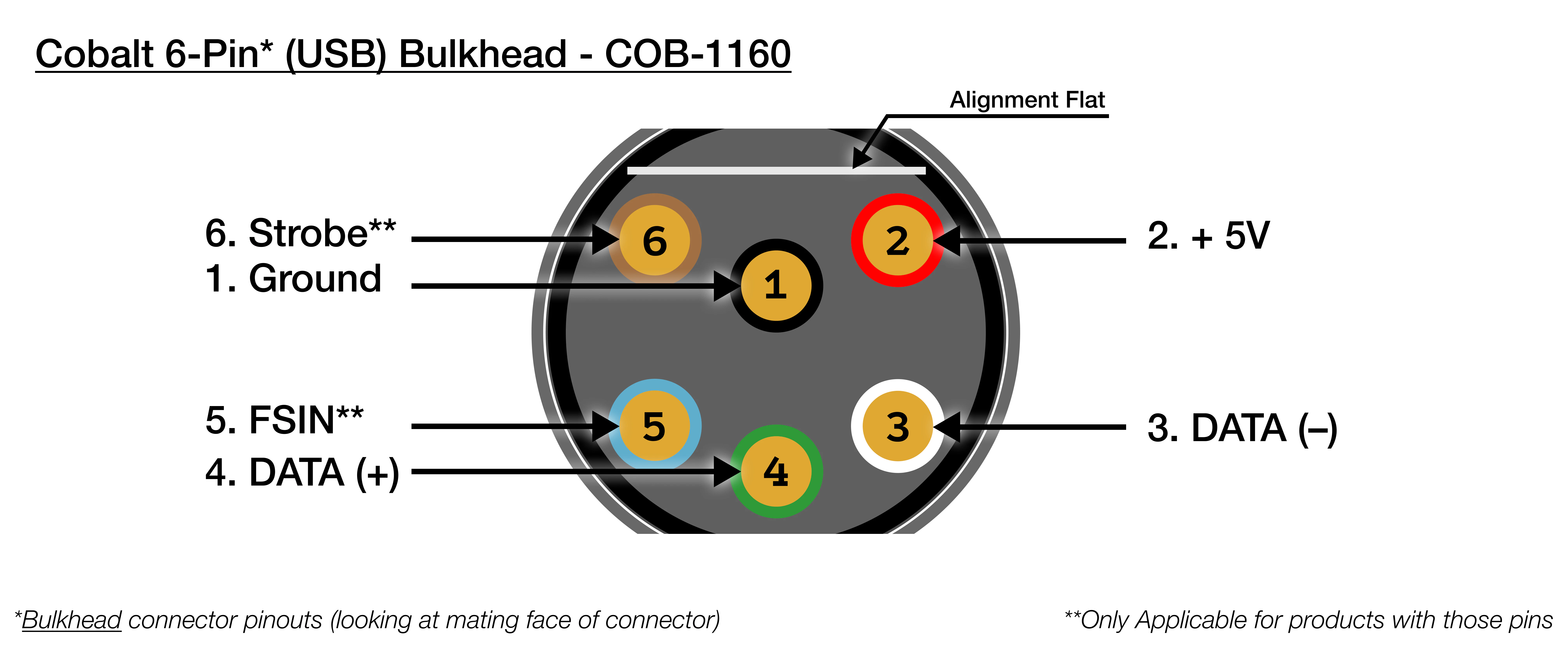 | Cobalt (6 Pin) USB Bulkhead | COB-1160 |
| --------------------------- | ----------------------- |
| 1 | Schwarz: Masse |
| 2 | Rot: +5V |
| 3 | Weiß: DATA - |
| 4 | Grün: DATA + |
| 5 | Blau: FSIN (Frame-Sync) |
| 6 | Braun: Strobe |
| Cobalt (6 Pin) USB Bulkhead | COB-1160 |
| --------------------------- | ----------------------- |
| 1 | Schwarz: Masse |
| 2 | Rot: +5V |
| 3 | Weiß: DATA - |
| 4 | Grün: DATA + |
| 5 | Blau: FSIN (Frame-Sync) |
| 6 | Braun: Strobe |
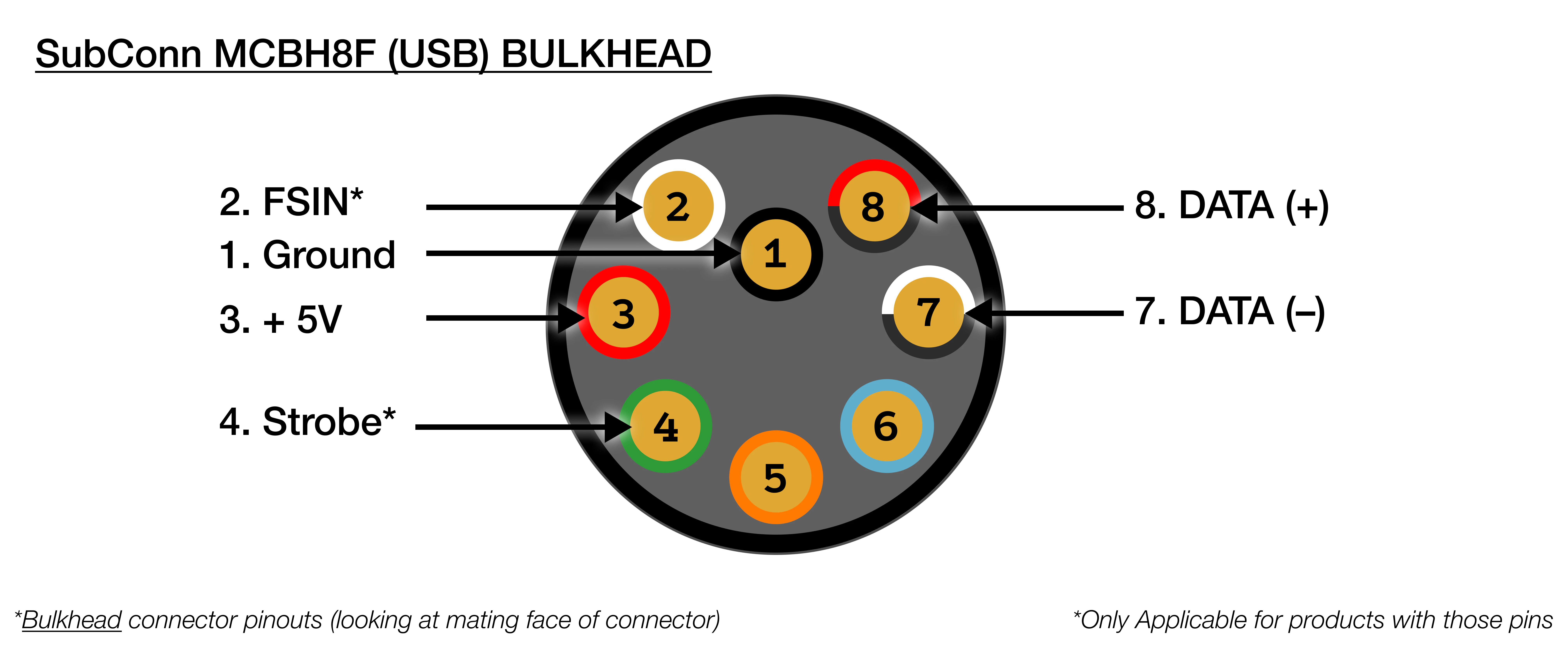 | SubConn MCBH8M (USB) Bulkhead | |
| ----------------------------- | --------------------------- |
| 1 | **Schwarz: Masse** |
| 2 | **Weiß: FSIN (Frame-Sync)** |
| 3 | **Rot: +5V** |
| 4 | **Grün: Strobe** |
| 5 | Orange: NC |
| 6 | Blau: NC |
| 7 | **Weiß/Schwarz: DATA -** |
| 8 | **Rot/Schwarz: DATA +** |
## Pinbelegung Lichteingang
| SubConn MCBH8M (USB) Bulkhead | |
| ----------------------------- | --------------------------- |
| 1 | **Schwarz: Masse** |
| 2 | **Weiß: FSIN (Frame-Sync)** |
| 3 | **Rot: +5V** |
| 4 | **Grün: Strobe** |
| 5 | Orange: NC |
| 6 | Blau: NC |
| 7 | **Weiß/Schwarz: DATA -** |
| 8 | **Rot/Schwarz: DATA +** |
## Pinbelegung Lichteingang
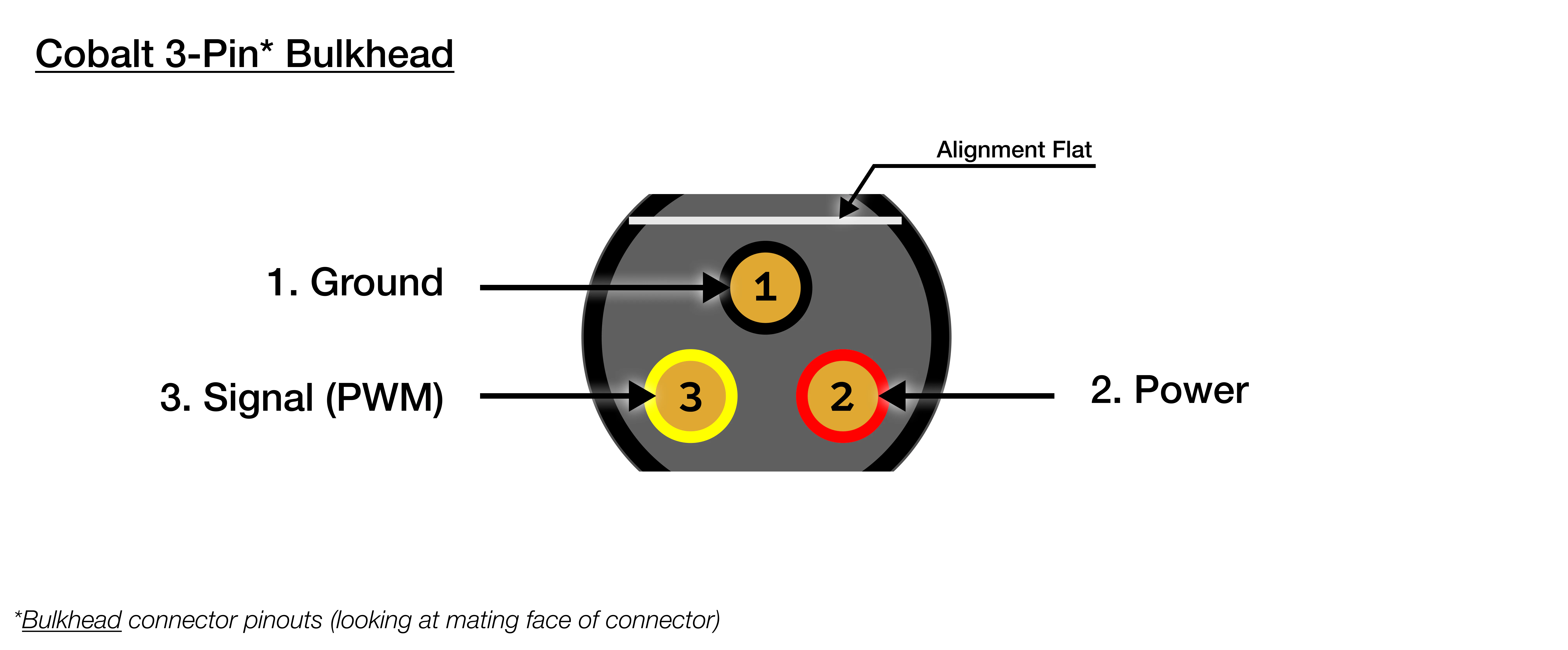 | Cobalt (3 Pin) Bulkhead | |
| ----------------------- | ------------------ |
| 1 | Schwarz: Masse |
| 2 | Rot: 12V - 48V |
| 3 | Gelb: Signal (PWM) |
| Cobalt (3 Pin) Bulkhead | |
| ----------------------- | ------------------ |
| 1 | Schwarz: Masse |
| 2 | Rot: 12V - 48V |
| 3 | Gelb: Signal (PWM) |
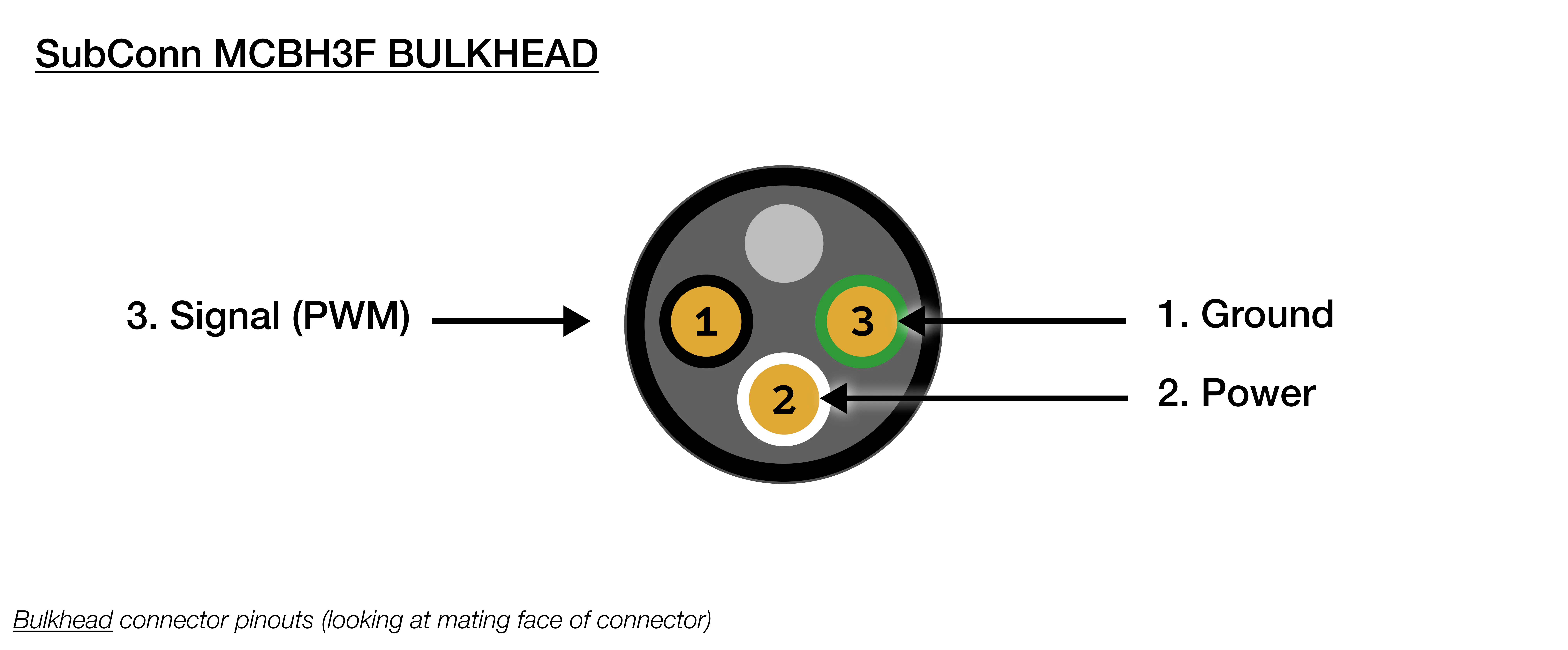 | SubConn MCBH3F Bulkhead | |
| ----------------------- | ----------------- |
| 1 | Schwarz: Masse |
| 2 | Weiß: 12V - 48V |
| 3 | Rot: Signal (PWM) |
## Pinbelegung Ethernet-Ausgang
| SubConn MCBH3F Bulkhead | |
| ----------------------- | ----------------- |
| 1 | Schwarz: Masse |
| 2 | Weiß: 12V - 48V |
| 3 | Rot: Signal (PWM) |
## Pinbelegung Ethernet-Ausgang
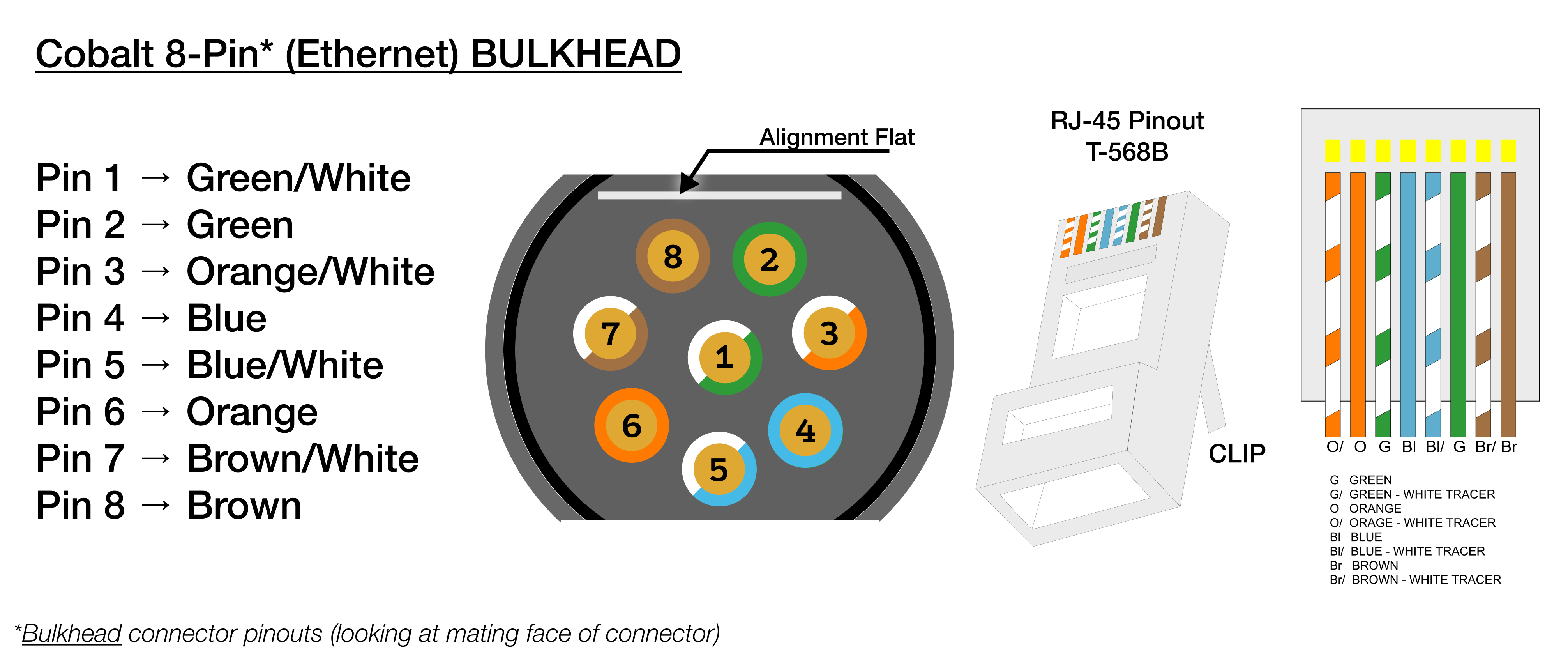 | Cobalt 8-Pin Ethernet Bulkhead | |
| ------------------------------ | ----------- |
| 1 | Grün/Weiß |
| 2 | Grün |
| 3 | Orange/Weiß |
| 4 | Blau |
| 5 | Blau/Weiß |
| 6 | Orange |
| 7 | Braun/Weiß |
| 8 | Braun |
| Cobalt 8-Pin Ethernet Bulkhead | |
| ------------------------------ | ----------- |
| 1 | Grün/Weiß |
| 2 | Grün |
| 3 | Orange/Weiß |
| 4 | Blau |
| 5 | Blau/Weiß |
| 6 | Orange |
| 7 | Braun/Weiß |
| 8 | Braun |
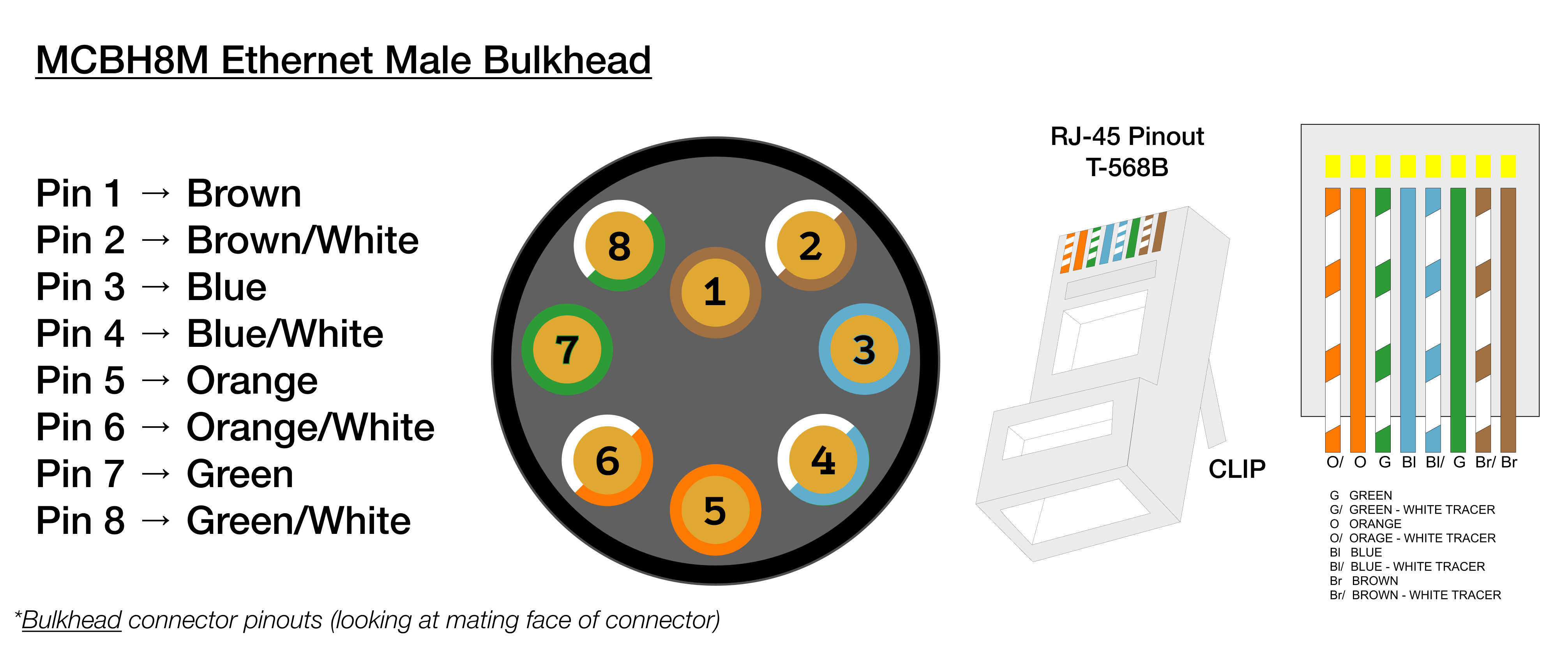 | SubConn MCBH8M (Ethernet) | |
| ------------------------- | ----------- |
| 1 | Braun |
| 2 | Grün/Weiß |
| 3 | Grün |
| 4 | Orange/Weiß |
| 5 | Orange |
| 6 | Blau/Weiß |
| 7 | Blau |
| 8 | Braun/Weiß |
## Pinbelegung Stromeingang
| SubConn MCBH8M (Ethernet) | |
| ------------------------- | ----------- |
| 1 | Braun |
| 2 | Grün/Weiß |
| 3 | Grün |
| 4 | Orange/Weiß |
| 5 | Orange |
| 6 | Blau/Weiß |
| 7 | Blau |
| 8 | Braun/Weiß |
## Pinbelegung Stromeingang
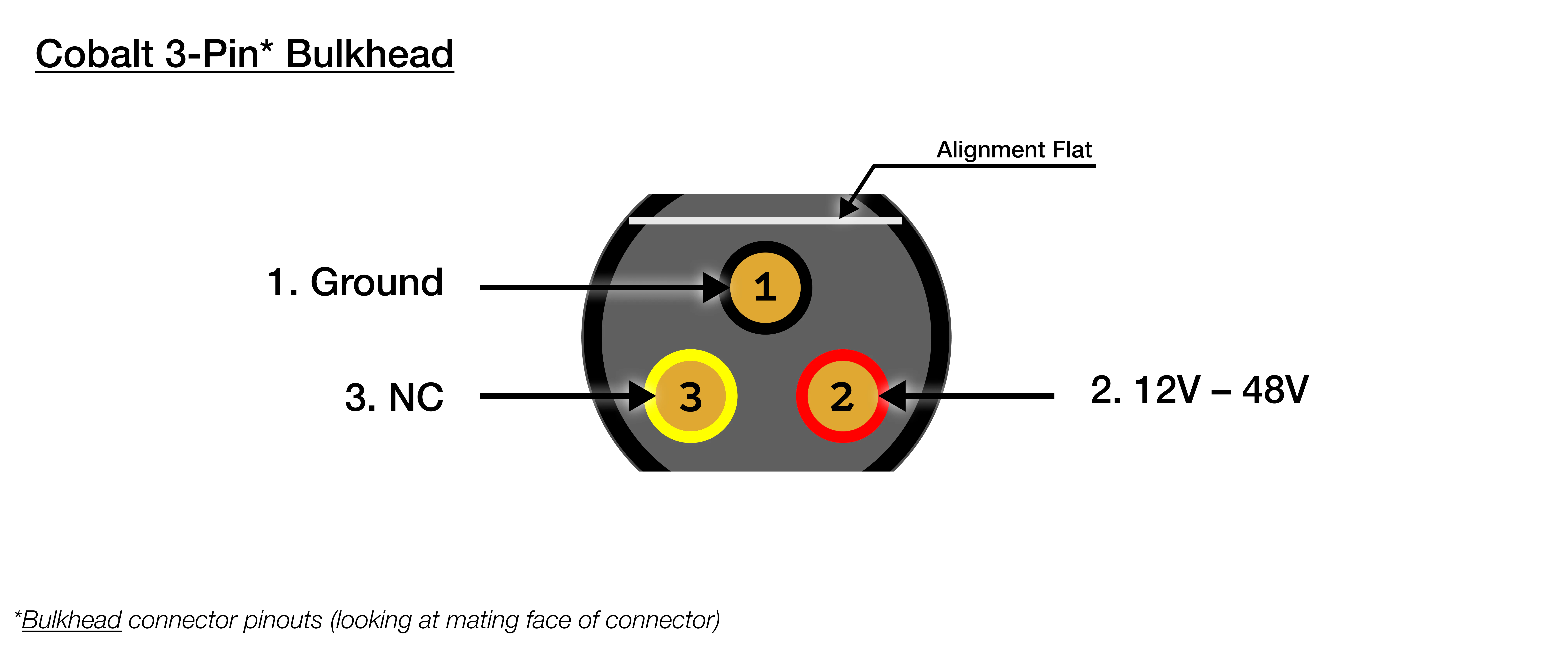 | Cobalt-Durchführung (3-Pin) | |
| --------------------------- | -------------------- |
| 1 | **Schwarz: Masse** |
| 2 | **Rot: 12 V – 48 V** |
| 3 | Gelb: NC |
| Cobalt-Durchführung (3-Pin) | |
| --------------------------- | -------------------- |
| 1 | **Schwarz: Masse** |
| 2 | **Rot: 12 V – 48 V** |
| 3 | Gelb: NC |
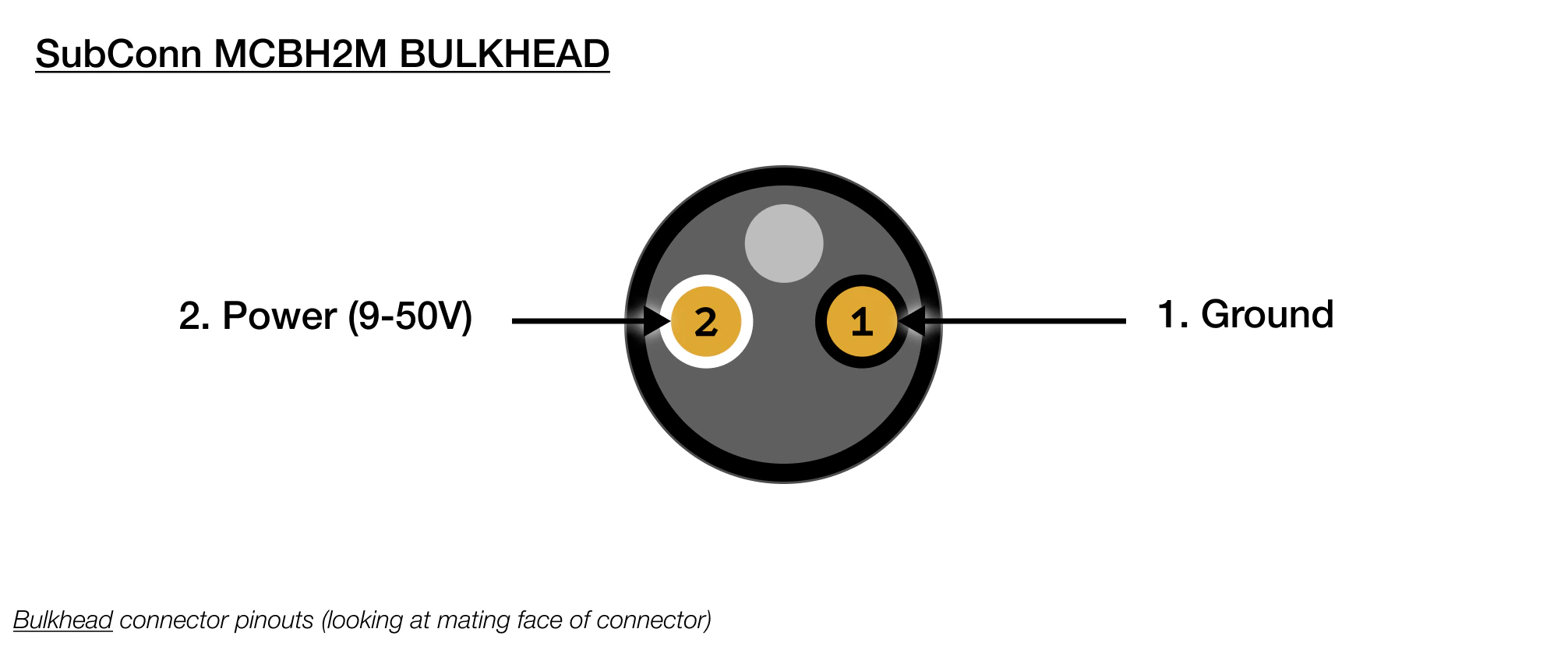 | SubConn MCBH2M Bulkhead | |
| ----------------------- | -------------- |
| 1 | Schwarz: Masse |
| 2 | Weiß: 9V - 50V |
## CAD-Dateien
SVC Pro (Cobalt) STEP-Datei
SVC Pro (Cobalt) Zeichnung (PDF)
SVC Pro (SubConn) STEP-Datei
SVC Pro (SubConn) Zeichnung (PDF)
## Konformität mit Abschnitt 889 des NDAA
> Dieses Produkt ist vollständig konform mit Abschnitt 889 des National Defense Authorization Act (NDAA).
> Wir verwenden keinerlei erfasste Telekommunikationsausrüstung, Videoüberwachungsausrüstung oder Dienste
> verbotener Unternehmen (einschließlich Huawei, ZTE, Hytera, Hikvision, Dahua oder deren Tochtergesellschaften).
> Dieses Produkt enthält konforme Kern-Verarbeitungskomponenten und keinerlei proprietäre Firmware, wodurch
> ein sicheres Hardware-Profil ohne eingeschränkte Datenpfade gewährleistet wird.
## CE (Conformité Européenne)
> Dieses Produkt ist CE-zertifiziert und bestätigt damit die Konformität mit den einschlägigen Richtlinien
> und Verordnungen der Europäischen Union in den Bereichen Gesundheit, Sicherheit und Umweltschutz. Diese
> Zertifizierung bestätigt, dass das Produkt die hohen Anforderungen für den Vertrieb im Europäischen
> Wirtschaftsraum erfüllt.
| SubConn MCBH2M Bulkhead | |
| ----------------------- | -------------- |
| 1 | Schwarz: Masse |
| 2 | Weiß: 9V - 50V |
## CAD-Dateien
SVC Pro (Cobalt) STEP-Datei
SVC Pro (Cobalt) Zeichnung (PDF)
SVC Pro (SubConn) STEP-Datei
SVC Pro (SubConn) Zeichnung (PDF)
## Konformität mit Abschnitt 889 des NDAA
> Dieses Produkt ist vollständig konform mit Abschnitt 889 des National Defense Authorization Act (NDAA).
> Wir verwenden keinerlei erfasste Telekommunikationsausrüstung, Videoüberwachungsausrüstung oder Dienste
> verbotener Unternehmen (einschließlich Huawei, ZTE, Hytera, Hikvision, Dahua oder deren Tochtergesellschaften).
> Dieses Produkt enthält konforme Kern-Verarbeitungskomponenten und keinerlei proprietäre Firmware, wodurch
> ein sicheres Hardware-Profil ohne eingeschränkte Datenpfade gewährleistet wird.
## CE (Conformité Européenne)
> Dieses Produkt ist CE-zertifiziert und bestätigt damit die Konformität mit den einschlägigen Richtlinien
> und Verordnungen der Europäischen Union in den Bereichen Gesundheit, Sicherheit und Umweltschutz. Diese
> Zertifizierung bestätigt, dass das Produkt die hohen Anforderungen für den Vertrieb im Europäischen
> Wirtschaftsraum erfüllt.