> ## Documentation Index
> Fetch the complete documentation index at: https://docs.dwe.ai/llms.txt
> Use this file to discover all available pages before exploring further.
# Streaming/Aufzeichnung
> Steuern Sie Streaming- und Aufzeichnungszustände.
## Streaming-Schaltflächen
Wenn die Karte **nicht** streamt, können Sie den Stream mit **Start Stream** starten.
**Start Recording** ist
deaktiviert, da kein Stream vorhanden ist.
 Wenn die Karte **streamt**, haben Sie Zugriff auf **Stop Stream** und **Start Recording**.
Wenn der Stream **MJPEG** ist, haben Sie Zugriff auf [**Snapshot**](/de/discovery/video-card-buttons/snapshotting).
Wenn die Karte **streamt**, haben Sie Zugriff auf **Stop Stream** und **Start Recording**.
Wenn der Stream **MJPEG** ist, haben Sie Zugriff auf [**Snapshot**](/de/discovery/video-card-buttons/snapshotting).
 Es wird **keine** Aktivitätsanzeige geben, wenn die Karte **nicht** streamt.
 Die Aktivitätsanzeige leuchtet **dauerhaft** , wenn die Karte **streamt**.
 ***
## Aufzeichnungs-Schaltflächen
Wenn die Karte streamt **und** das Video nicht bereits aufgezeichnet wird, können Sie eine Aufzeichnung mit **Start Recording** **starten**.
***
## Aufzeichnungs-Schaltflächen
Wenn die Karte streamt **und** das Video nicht bereits aufgezeichnet wird, können Sie eine Aufzeichnung mit **Start Recording** **starten**.
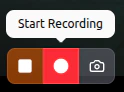 Während die Karte **aufzeichnet**, können Sie die Aufzeichnung mit **Stop Recording** beenden.
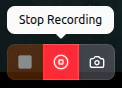 Die Aktivitätsanzeige wird **langsam blinken** , während die Karte aktiv aufzeichnet.
> Die resultierenden Videos finden Sie über den Dateipfad unter „Save Paths“ in der Karte [Einstellungen für Aufnahmepfade](/de/discovery/global-settings/capture-paths).
Die Aktivitätsanzeige wird **langsam blinken** , während die Karte aktiv aufzeichnet.
> Die resultierenden Videos finden Sie über den Dateipfad unter „Save Paths“ in der Karte [Einstellungen für Aufnahmepfade](/de/discovery/global-settings/capture-paths).